Category: Productivity

  • Seconds to Minutes: Exact Formula, Table & Calculator

    Seconds to Minutes: Exact Formula, Table & Calculator

    Header: Exact seconds to minutes conversion

    To convert seconds to minutes, divide the number of seconds by 60. For example, 450 ÷ 60 = 7.5 minutes, or 7 minutes 30 seconds. The factor is exact: the SI system defines one minute as exactly 60 seconds, so there is no rounding or approximation.

    How Do You Convert Seconds to Minutes? The ÷60 Formula

    The seconds to minutes conversion comes down to one operation: minutes = seconds ÷ 60. It is the same as multiplying the seconds by 1/60. Everything else on this page — the table, the calculator, the spreadsheet formula — is just another way to express that one division.

    This conversion is unusual because there is no uncertainty. According to the BIPM SI Brochure, one minute is exactly 60 seconds, with no uncertainty attached to the factor. There is nothing to round, no precision setting to choose, and no version of the answer that changes when a source updates or a page refreshes. A search for “seconds to minutes” returns the same exact number today as it will in any future year.

    The input unit is defined just as tightly. The second is the SI base unit of time, defined as the duration of 9,192,631,770 periods of the caesium-133 transition — a standard unchanged since 1967. Because both units are fixed by definition, the ÷60 relationship is one of the few everyday conversions where the input is exactly as precise as the output.

    Put the inverse beside the rule, and any answer becomes easy to check: minutes × 60 = seconds. If 450 ÷ 60 = 7.5, then 7.5 × 60 must return 450. If it does not, the arithmetic slipped somewhere.

    The one decision the formula does not make for you is the output format. There are two valid ways to express the same result — decimal minutes (7.5 min) and minutes and seconds (7 min 30 s) — and they are separated in the next section because mixing them is the most common error in this conversion.

    This basic operation is common enough that the scale is worth noting: the wikiHow conversion guide reviewed by Grace Imson, MA, a math teacher with over 40 years of experience, has been viewed 426,399 times. That gives a light sense of how routine this calculation is.

    The formula in one line

    Minutes = Seconds ÷ 60. The reverse is Seconds = Minutes × 60. Applied to 450 seconds: 450 ÷ 60 = 7.5. Applied back: 7.5 × 60 = 450.
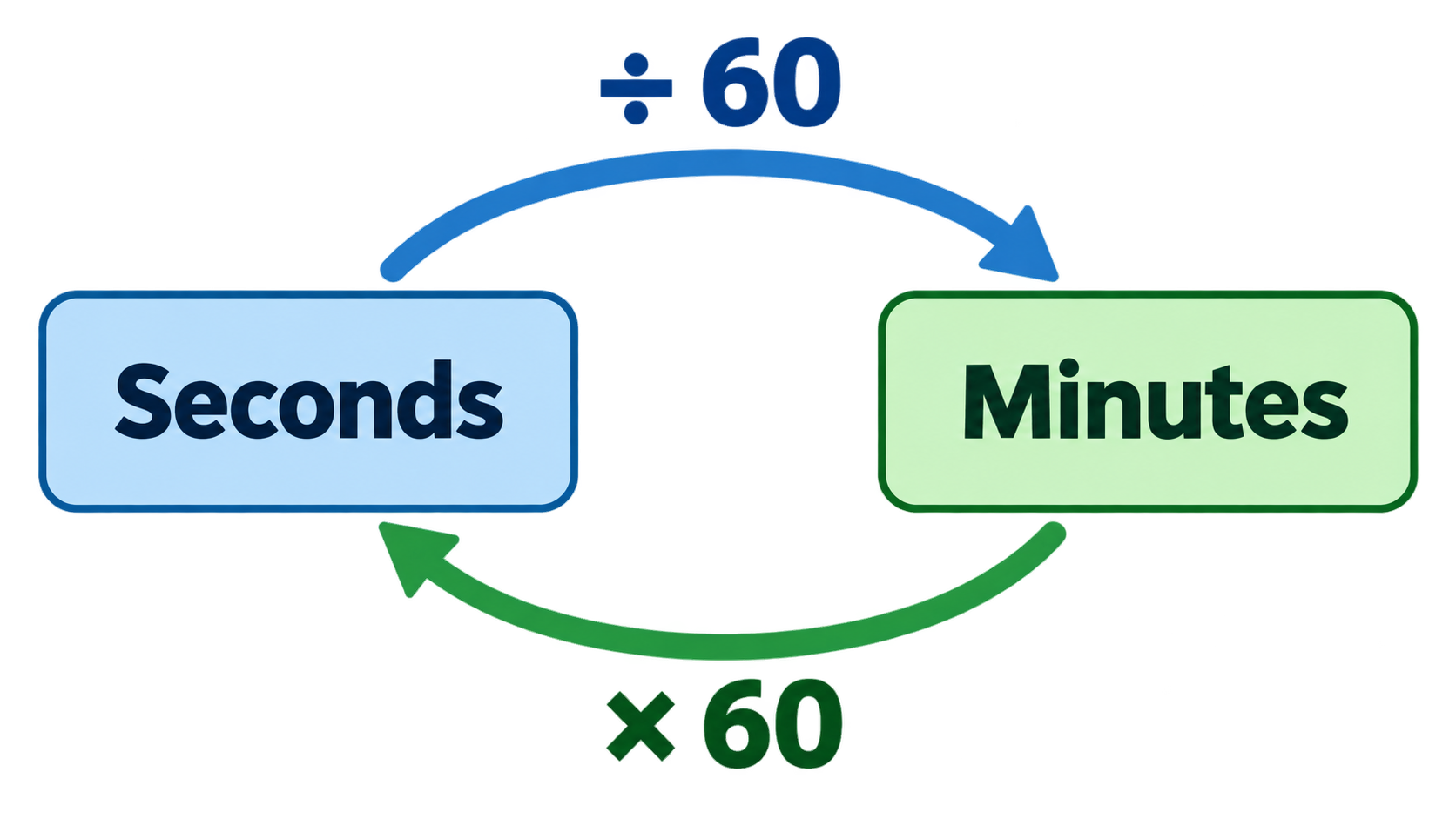
    Circular relationship: Seconds ÷ 60 → Minutes and Minutes × 60 → Seconds

    Worked example: 450 seconds in minutes

    Start with the division: 450 ÷ 60 = 7.5 minutes in decimal form. To express the same value as minutes and seconds, take the whole part as 7 minutes and convert the fractional 0.5 back by multiplying: 0.5 × 60 = 30 seconds. The result is 450 seconds = 7.5 minutes = 7 minutes 30 seconds. Verify by reversing: (7 × 60) + 30 = 450. Brighterly’s conversion guide uses this same 450-second example as its headline worked case.

    Seconds to Minutes Conversion Table (Landmark Values)

    These are the values readers look up most often. Every row is exact by definition — no rounding decisions were made to build the table, and no precision setting changes the numbers.

    Seconds Decimal minutes Minutes and seconds
    60 1.0 1 min 0 s
    90 1.5 1 min 30 s
    120 2.0 2 min 0 s
    300 5.0 5 min 0 s
    600 10.0 10 min 0 s
    900 15.0 15 min 0 s
    1,800 30.0 30 min 0 s
    3,600 60.0 60 min 0 s (1 hour)
    10,000 166.67 166 min 40 s

    The top row is the definition itself: 60 seconds = 1 minute exactly. The 3,600-second row is the boundary worth memorizing — 3,600 seconds = 60 minutes = 1 hour, which is also the divisor that skips the minutes step entirely when jumping straight to hours. MultiCalculators lists the same landmark values in its common-values table, including 90 s = 1.5 min and 3,600 s = 60 min.

    The 10,000-second row shows the two formats diverging: 10,000 ÷ 60 = 166.67 decimal minutes, which is 166 minutes 40 seconds in remainder form. Round numbers like this appear in server timeout settings, stress-test durations, and some regulatory holding periods.

    Decimal Minutes vs. Minutes and Seconds: Which Answer Do You Need?

    Decimal minutes (7.5 min) and minutes-and-seconds (7 min 30 s) are two representations of the same division, and mixing them up is the most common mistake in this conversion. A value like “7.5” means seven and a half minutes; a value like “7:30” means seven minutes and thirty seconds. They describe the same duration, but writing one where the other is expected produces answers that are wrong by a factor that is not obvious at a glance.
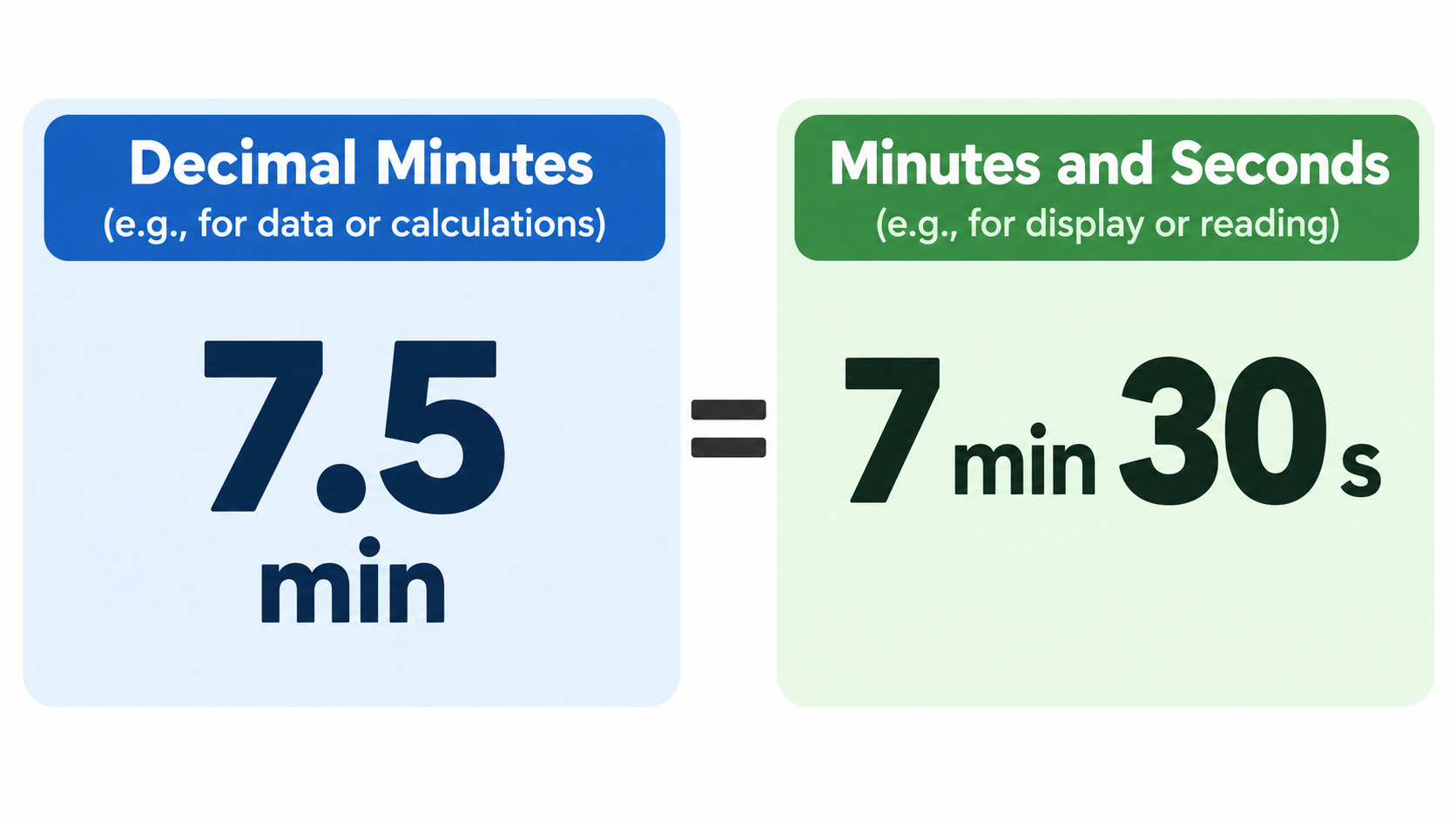
    Side-by-side: 7.5 decimal minutes equals 7 min 30 s

    Match the format to the use case. Decimal minutes suit billing, rates, and any downstream arithmetic — you can add, multiply, and average decimal minutes directly. Minutes and seconds suit clocks, timers, media duration, and anything a human will read aloud, because they map onto how displays and stopwatches actually present time.

    Decimal minutes: 450 seconds = 7.5 minutes

    Decimal minutes come from the plain division with no further processing: 450 ÷ 60 = 7.5. The fractional part is a true fraction of a minute, so 0.5 means half a minute. Brighterly states the result the same way — 450 seconds ÷ 60 = 7.5, meaning 7 minutes 30 seconds — showing both forms side by side, which is the clearest way to present the answer.

    Minutes and seconds: floor + modulo (200 s = 3 min 20 s)

    The remainder form uses two operations. Whole minutes = floor(seconds ÷ 60); remaining seconds = seconds mod 60. For 200 seconds: floor(200 ÷ 60) = 3 minutes, and 200 mod 60 = 20 seconds, giving 200 seconds = 3 minutes 20 seconds. MultiCalculators lays out this floor-and-modulo method with the identical 200-second example. A second check: 450 s → floor(450/60) = 7 min, 450 mod 60 = 30 s → 7 min 30 s.
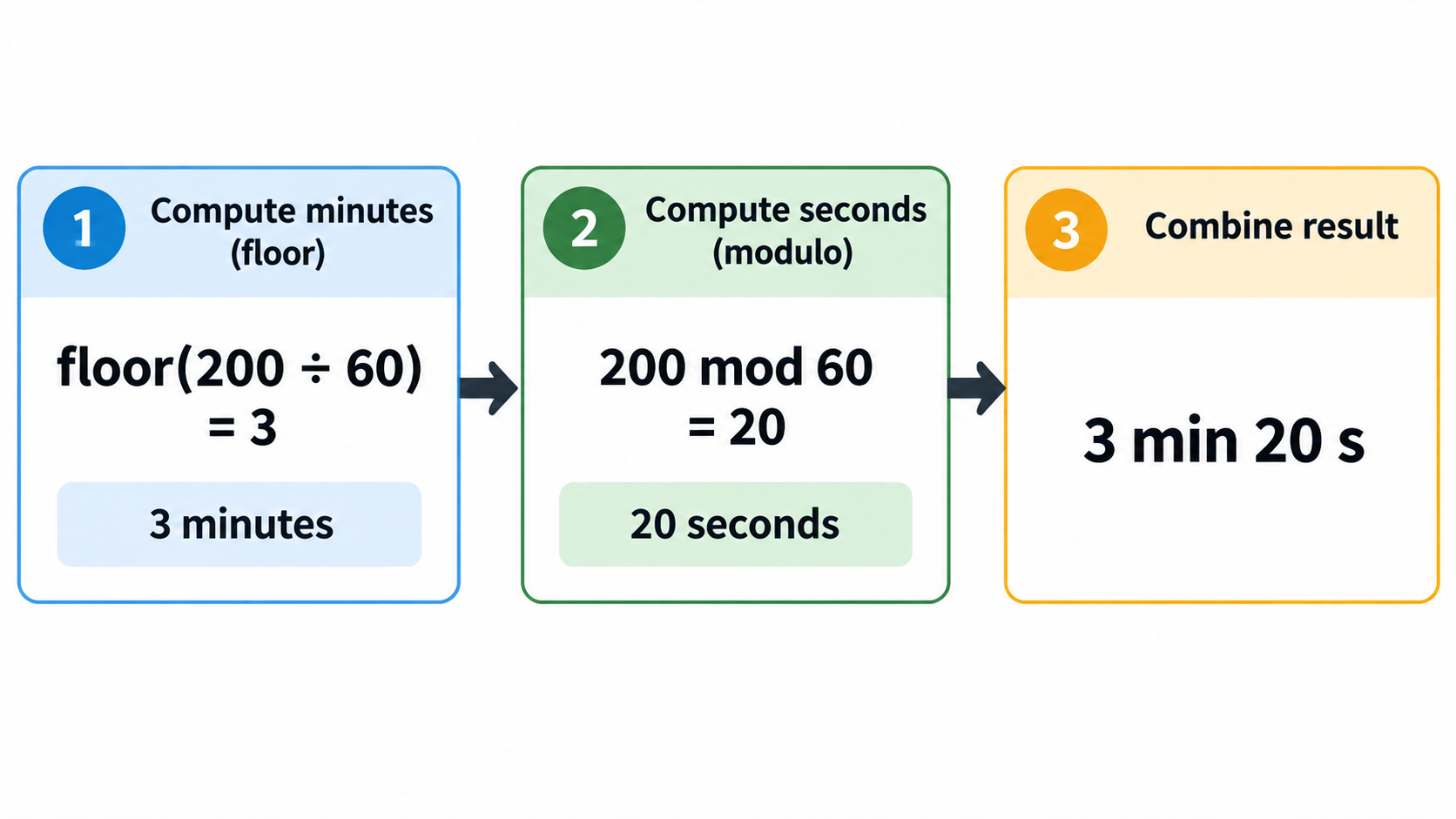
    3-step: 200 s → floor(200/60)=3 min → mod 20 s → 3 min 20 s

    One arithmetic note for readers checking the math itself: Brighterly’s conversion guide carries a named reviewer credential — Jessica Kaminski, who holds a BSc and a Master’s degree in Mathematics — and the page was updated September 30, 2026.

    Timecode is not decimal seconds

    In SMPTE timecode the notation runs HH:MM:SS:FF, where FF is a count of frames, not a decimal fraction of a second. Treating that final field as decimal seconds produces wrong runtimes in video and audio work — a distinction MultiCalculators flags directly, noting the frame count after the last colon is not a decimal fraction of a second. Where an unambiguous duration string is needed in data or documentation, ISO 8601:2019 provides one: 3 minutes 20 seconds is written PT3M20S, which cannot be confused with a decimal value.

    Seconds to Minutes Calculator, Spreadsheet, and Code

    Many people searching this term just want the answer, not the arithmetic. A seconds to minutes calculator returns both formats at once — decimal minutes and minutes-and-seconds — so the user does not have to decide. Keep a converter near the top of the page for that audience, and use the implementations below when the number is recurring or the conversion has to be automated.

    In a spreadsheet (Excel and Google Sheets)

    With seconds in cell A1, this single formula returns the label-ready remainder form:

    =INT(A1/60)&" min "&MOD(A1,60)&" s"
    

    With A1 = 200, the output is 3 min 20 s. INT performs the floor division and MOD extracts the remainder — the same two operations described in the previous section, expressed as spreadsheet functions.

    In code: floor division and modulo

    In virtually any language, whole minutes are seconds // 60 (integer floor division) and the remainder is seconds % 60. This is the same floor-and-modulo pair, and it is the safest implementation because neither operation introduces floating-point error.

    A related developer gotcha involves a different factor. API timeouts and cache TTLs are often specified in seconds while libraries expect milliseconds. Five minutes is 300 seconds, which is 300,000 milliseconds — so the trap is the ×1,000 step, not the ÷60, and always checking which unit a function expects prevents it. The same risk applies to Unix timestamps, which are seconds since the epoch and are routinely misread as milliseconds; sorting or differencing them with the wrong unit skews results by a factor of 1,000.

    Going the Other Way: Minutes to Seconds, Hours, and Days

    The reverse operation is minutes × 60 = seconds, and it belongs beside the ÷60 formula so the page works in both directions. Five minutes × 60 = 300 seconds; 30 minutes × 60 = 1,800 seconds.

    Above minutes, the same base-60 relationship chains upward. 3,600 seconds = 60 minutes = 1 hour, which means dividing seconds by 3,600 skips the minutes step entirely — a shortcut that is faster for large inputs. One step further, 86,400 seconds = 1,440 minutes = 24 hours, produced by chaining the relationship three times (60 × 60 × 24). Brighterly derives the day figure the same way and was updated September 30, 2026; the same 86,400-second day anchor appears in Vicaya’s conversion reference and in Tonton Tools’ time converter.
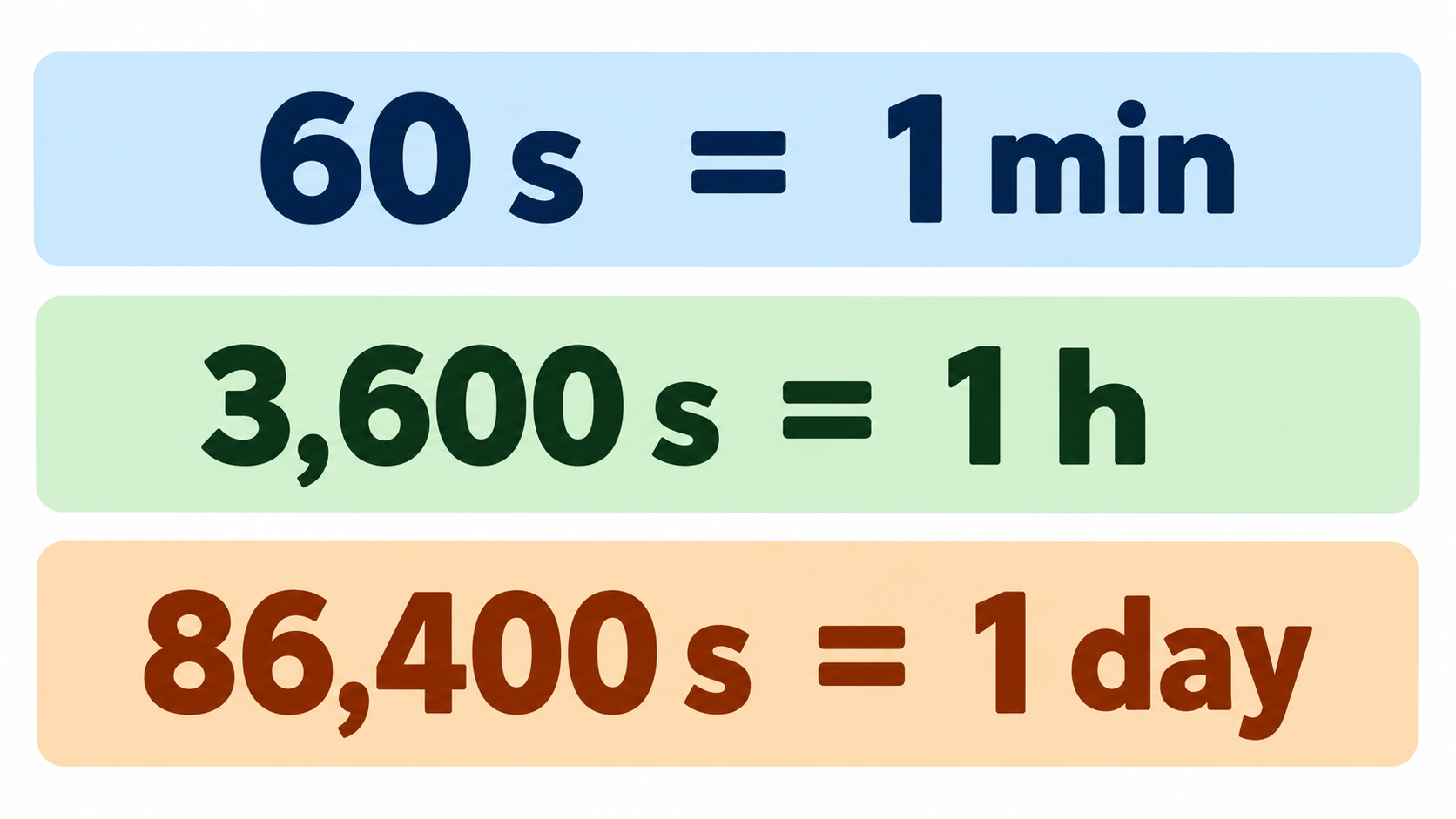
    Three key anchors: 60 s = 1 min, 3,600 s = 1 h, 86,400 s = 1 day

    Scale intuition helps large raw-second values mean something. One million seconds is only about 11.6 days, while one billion seconds is roughly 31.7 years — a comparison Tonton Tools presents as a way to feel the difference between the two magnitudes.

    Why Are There 60 Seconds in a Minute?

    The direct answer is that 60 is a convention inherited from sexagesimal (base-60) counting, not a physical constant. The length of a second is fixed by atomic physics, but the decision to count 60 of them per minute is a definition humans agreed on.

    The origin layer is Babylonian base-60 mathematics, which was adopted by Hellenistic astronomers for angular measurement and time and carried into the degree–minute–second structure. The convenience argument reinforced it: 60 divides evenly by 2, 3, 4, 5, 6, 10, 12, 15, 20, and 30, which makes fractional splits of an hour clean.

    The subdivision layer is documented much later. Al-Biruni first subdivided the hour sexagesimally into minutes, seconds, thirds, and fourths in 1000 CE. Roger Bacon, writing in Latin in 1267, defined divisions of time between full moons using hours, minutes, seconds, thirds, and fourths. Jost Bürgi was the first clockmaker to add a minute hand, on a clock built for astronomer Tycho Brahe in 1577, and the minute hand reached watches only after Thomas Tompion’s hairspring in 1675. The modern layer arrived with the International System of Units, which accepts the minute as a non-SI unit used with the system and fixes it at exactly 60 seconds in the SI Brochure — converting a long-standing convention into an exact standardized factor.

    The takeaway that matters for the rest of this page: because 60 per minute is a definition rather than a measurement, the conversion factor is permanently fixed and cannot drift when a source is updated.

    Where Seconds-to-Minutes Conversion Shows Up in Real Life

    This query isn’t just a homework question. Developers, video and audio editors, payroll and billing staff, coaches, and lab users all convert raw seconds into minutes regularly, and each group needs a different output format.

    Sports timing. Race splits and results are published in raw seconds, so a marathon duration of 7,374 seconds reads as 2 h 2 min 54 s — the figures MultiCalculators uses in its sports-timing example, presented here as an illustration of the arithmetic rather than as an official record.

    Billing and payroll. Mixed durations collapse into one billable decimal number. A task logged at 2 hours 15 minutes 45 seconds becomes 120 + 15 + 0.75 = 135.75 total minutes, the exact output SavvyCalculator’s calculator returns for that worked example.

    Video and audio production. Clip runtimes and render times arrive in seconds, which is precisely where the decimal-versus-timecode confusion described earlier causes practical damage to timelines.

    Science, cooking, and everyday timers. Reaction times, pulse rates, microwave and oven timers, and elapsed-time logs all call for quick conversion between seconds and minutes. For everything downstream of an hour, chain directly to ÷3,600 or use the 86,400-second day anchor rather than converting twice.

    Conclusion

    Converting seconds to minutes is a single exact division — minutes = seconds ÷ 60 — and the only real choice is which output format you need: decimal minutes or minutes and seconds. Use the ÷60 formula for quick mental math, the landmark table when you need a common value at a glance, and a time unit converter, spreadsheet formula, or code one-liner when the number is messy or recurring. For anything involving hours or days, skip the intermediate step: divide by 3,600 for hours, or work from the 86,400-second day. Because the factor is an SI definition, no result on this page will ever change.

    FAQ

    How many minutes is 60 seconds?

    Exactly 1 minute. This is the definition itself, not a rounded result: 60 ÷ 60 = 1 with zero remainder. There is no uncertainty in the answer, and no precision setting changes it.

    How many minutes is 3,600 seconds?

    3,600 ÷ 60 = 60 minutes, which is exactly 1 hour. This is why dividing a number of seconds by 3,600 returns hours directly, skipping the intermediate minutes step entirely.

    How do I convert seconds to minutes and seconds (remainder form)?

    Whole minutes = floor(seconds ÷ 60); remaining seconds = seconds mod 60. For example, 200 s → 3 min 20 s, and 450 s → 7 min 30 s. In a spreadsheet with seconds in A1, use =INT(A1/60)&" min "&MOD(A1,60)&" s".

    How many seconds are in a day?

    86,400 seconds — 60 seconds × 60 minutes × 24 hours. That is 1,440 minutes, or 24 hours. The figure is commonly used for cache lifetimes and scheduling calculations.

    What is 10,000 seconds in minutes?

    10,000 ÷ 60 = 166.67 decimal minutes. In remainder form that is 166 minutes 40 seconds. Round values like this often appear in server timeout settings and stress-test durations.

    Is a minute always exactly 60 seconds — can it ever be 59 or 61?

    Under the SI definition, yes: 1 minute = 60 seconds, always. The one documented exception is UTC, where a positive leap second can make a clock minute 61 seconds long; negative leap seconds, which would produce a 59-second minute, have never been used.

    Why are there 60 seconds in a minute?

    It comes from sexagesimal (base-60) counting in ancient Babylonia, later adopted by Hellenistic astronomers for angles and time. The SI Brochure now fixes 1 min = 60 s exactly — the minute is a non-SI unit accepted for use with the SI — turning the convention into an exact, permanent standard. The full history is covered in the section above.
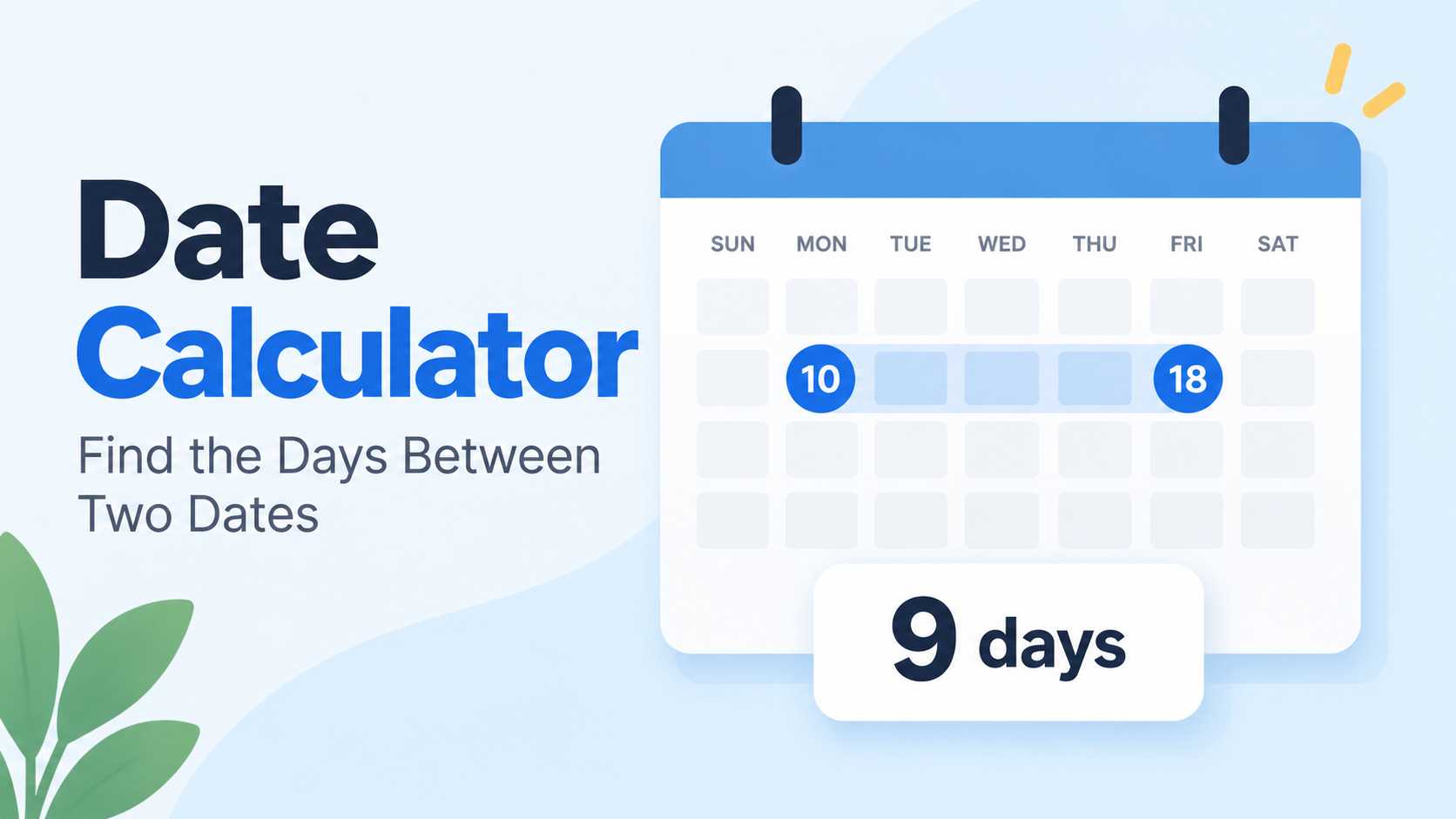
  • Date Calculator Between Two Dates: Days & Workdays

    Date Calculator Between Two Dates: Days & Workdays

    The span between two dates

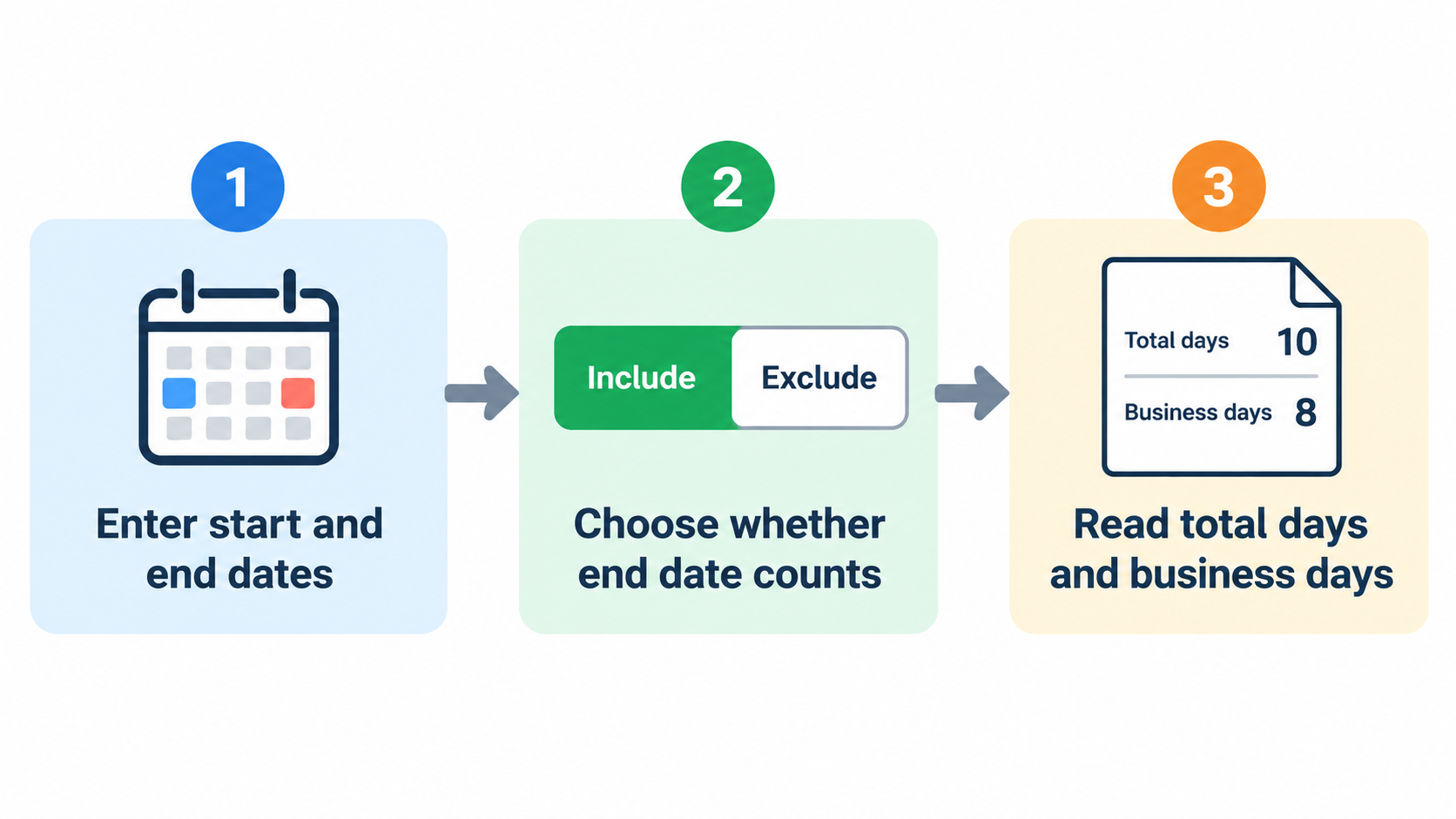
    A date calculator between two dates gives you the exact span between any two calendar dates—total days, weeks, months, and years. Enter a start date and an end date, choose whether the end day counts, and it handles leap years for you.

    How to Use a Date Calculator Between Two Dates (Step by Step)

    A date calculator between two dates turns two calendar dates into a precise duration. It does the math that manual counting often gets wrong: different month lengths, leap years, weekends, and whether the final day belongs in the total. Most tools return the result in several formats at once, so you can pick the unit that fits the task.

    Three-step date calculator workflow

    Step 1: Enter Your Start Date & End Date Inputs

    Open the tool and find the two required fields: Start Date and End Date. Put the earlier date in Start Date and the later date in End Date. If your tool accepts dates in any order, the result is still an absolute span. Use ISO-8601 format when you can, such as 2026-10-01, because 03/04/2026 means April 3 in most countries and March 4 in the US. CalcOpenly notes that ISO dates avoid that day-and-month ambiguity.

    Step 2: Decide Whether the End Date Counts

    Look for an “include end date” or “count end date too” toggle. Most calculators default to exclusive counting: end date minus start date, so the final day is not counted. Turn the toggle on when both the first and last day count, such as leave from Monday to Friday or an event that runs through its closing day. This one setting changes the answer by exactly one day.

    Step 3: Read Total Days, Weeks, Months, and Years

    Read the output in four forms: total days, total weeks and leftover days, calendar-style years/months/days, and business days. For example, CalcOpenly shows that 1 October 2026 to 30 December 2026 is 90 total days, 0 years 2 months 29 days, 12 weeks and 6 days, and 64 business days. Use that worked span as a sanity check. If a tool returns a different total for the same dates, check its end-date and holiday settings before you trust it. The Gregorian calendar is the default basis for these counts.

    Inclusive vs Exclusive Counting: Does the Calculator Count the End Date?

    The default convention in most date calculators is exclusive: the calculator counts the first date but not the ending date. As PK, DQYDJ notes: “it counts the day of the first date but not the ending date.” That is the same convention as subtracting one date from another in a spreadsheet, which is why adding one day to the end date often produces the “missing” day.

    Four Common Day-Count Conventions Compared

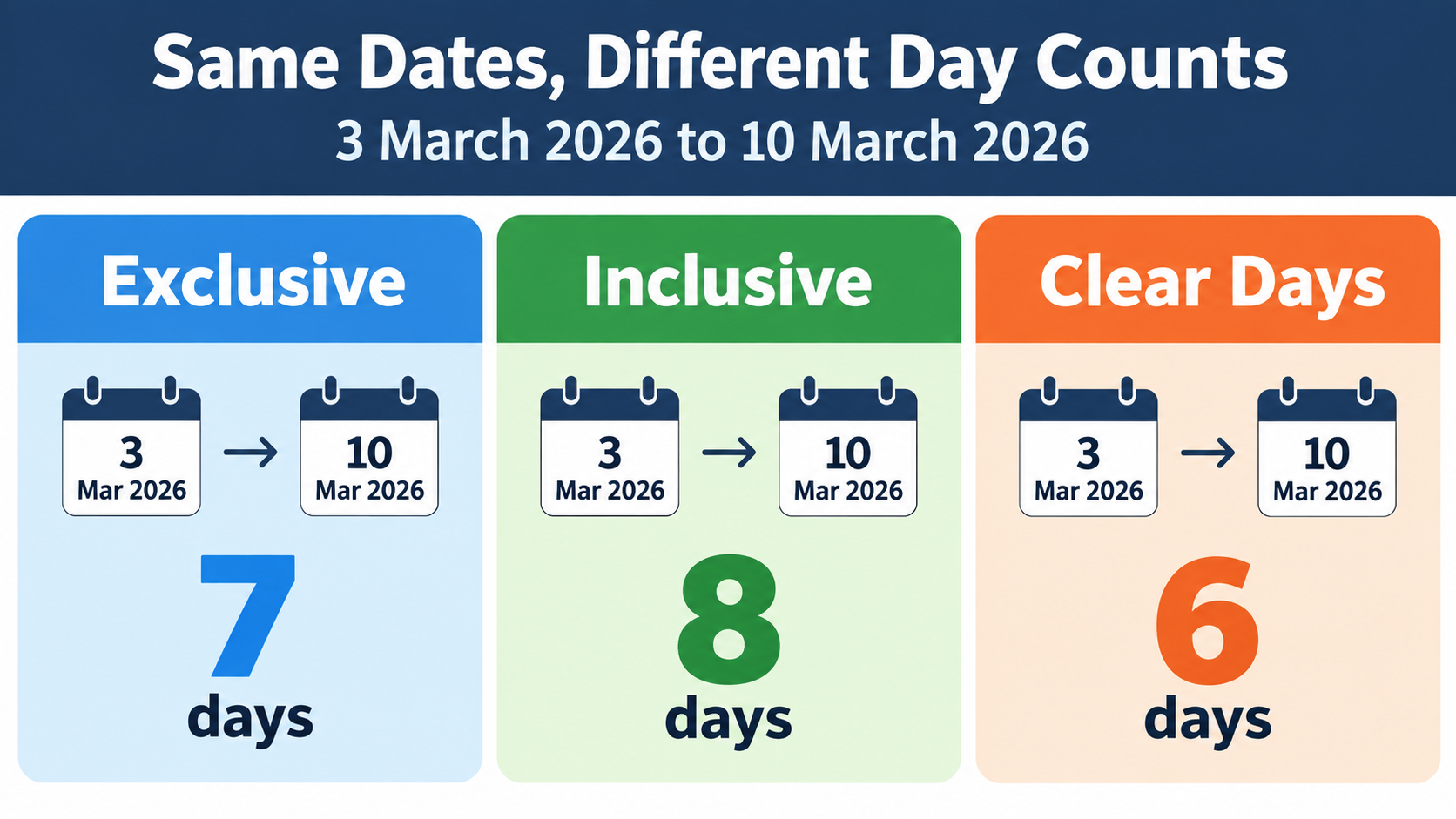
    Four conventions cover most real-world uses. Subtraction, the calculator default, counts the start date and leaves out the end date. Inclusive counting counts both the start and end dates. Clear days exclude both ends. US federal court deadlines use a fourth rule: exclude the trigger day, count every day including weekends and holidays, and include the last day unless it falls on a weekend or holiday. CalcOpenly shows that the same 3–10 March 2026 pair can be 7, 8, or 6 days depending on the convention.

    Why ‘3 March to 10 March’ Can Be 6, 7, or 8 Days

    Take Tuesday 3 March 2026 to Tuesday 10 March 2026. Subtracting the dates gives 7 days. Counting both ends gives 8 days. Counting neither end gives 6 clear days. Contracts, leave policies, and statutes each pick a convention, and choosing the wrong one moves a deadline by a day. The fix is to state the convention in writing, not to assume the calculator’s default matches the rule you are working under.

    Same date pair, three counting conventions

    US Federal Court Deadline Rule: FRCP 6(a)

    US federal courts follow Federal Rule of Civil Procedure 6(a). The rule excludes the day of the triggering event, counts every day including weekends and holidays, and includes the last day—but if that last day is a Saturday, Sunday, or legal holiday, the period runs to the next day that is not. A 10-day period triggered on Wednesday 4 March 2026 would end on Saturday 14 March, so it moves to Monday 16 March. This is a non-default convention, which is why a standard calculator’s exclusive-end result should not be used for court deadlines without adjustment.

    How Leap Years and Unequal Months Affect Your Result

    Leap years and uneven month lengths are the two biggest reasons manual date math fails. A leap year adds one day to any span that crosses February 29. Unequal months mean a month is not a fixed number of days, so month-based output depends on where the span starts.

    Why February 29 Adds One Day

    The Gregorian calendar adds February 29 in years divisible by 4, except century years not divisible by 400. According to datecalculatorbetweentwodates.com, January 1, 2024 to January 1, 2025 is 366 days, while January 1, 2025 to January 1, 2026 is 365 days. A span that crosses February 29 gains one day; a span that does not cross it does not. That single day can change a payroll period, an interest calculation, or a contract deadline.

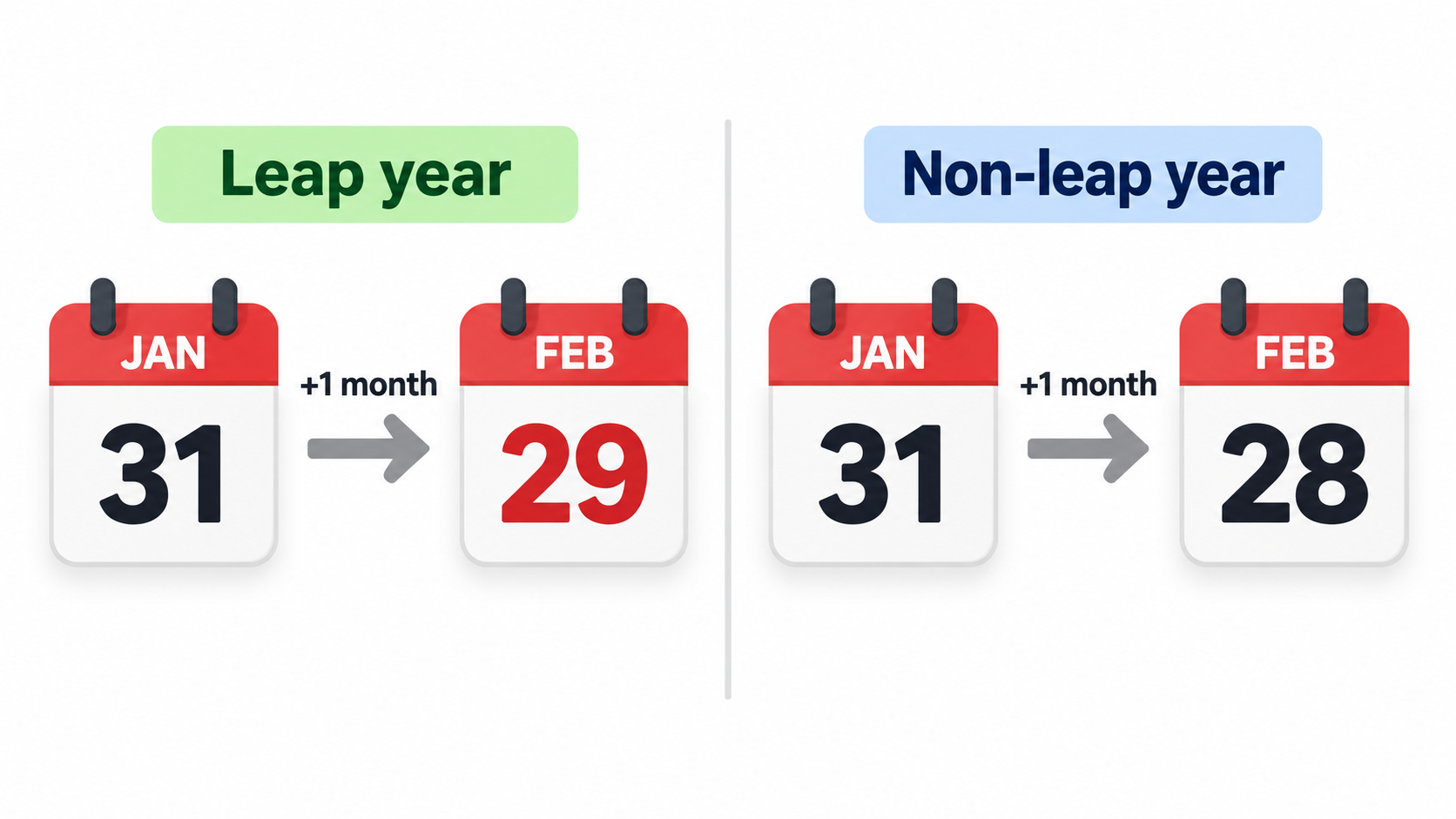
    Month-End Clamping: Jan 31 + 1 Month = Feb 28 or 29

    Month addition uses end-of-month clamping. If the target month does not have the same day number, the result becomes the last day of that month. CalcOpenly gives the example of 2024-01-31 to 2024-03-01: the total is 30 days, which reads as 1 month and 1 day because one month after 31 January is 29 February in a leap year. In a non-leap year, 31 January plus one month becomes 28 February. The same rule explains why 31 January to 1 March 2024 is not a clean two months.

    Month-end clamping and leap year effect

    Gregorian Calendar: The Default Basis for Every Count

    Standard date calculators use the Gregorian calendar for all dates, including dates before the calendar was widely adopted. The Gregorian calendar divides the year into 365 days, with 366 in a leap year, and splits it into 12 months of 28–31 days. Its leap-year cycle is why a calculator can return an exact result while manual counting drifts by a day or more.

    Calendar Days vs Business Days: What Changes?

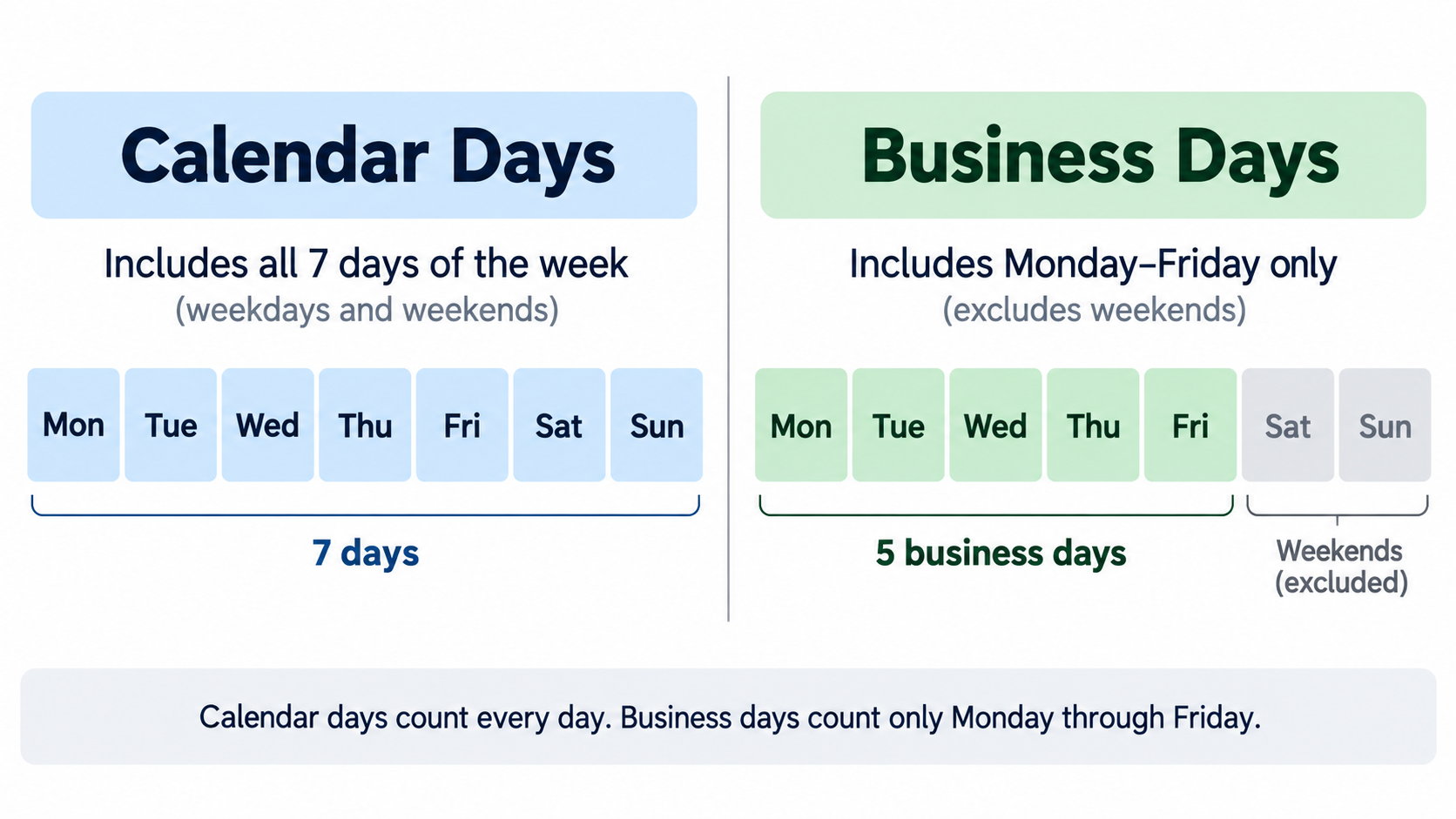
    Calendar days count every date on the calendar, including Saturdays, Sundays, and holidays. Business days, also called working days, usually count Monday through Friday only, and may exclude public holidays. The distinction matters when you are measuring elapsed time versus time available for work.

    How Business Day Counts Treat Weekends

    By default, business day counts treat Saturday and Sunday as non-working days. A tool may also let you change the weekend definition—for example, Friday–Saturday—but the common US setting is Saturday–Sunday. CalcOpenly notes that whole-day counts are unaffected by time zones and daylight saving time; only hour-level counts change when a clock change falls inside the span. If you need Monday–Friday only, use the business-day output rather than the total-days output.

    Calendar days vs business days comparison

    Do Business Day Calculators Exclude US Public Holidays?

    Most basic calculators exclude weekends only and leave public holidays to the user. File Toolbox states plainly that its business-day count skips Saturdays and Sundays only and does not remove public holidays. Some tools offer a US federal holiday option or a custom holiday list; HowLongAgoGo says its business-day calculator includes public holidays for multiple countries, including the US. Check whether observed holidays are included before relying on the result for payroll or legal deadlines.

    The Weekend Holiday Double-Count Trap

    A holiday that falls on a weekend should not be subtracted twice. If a Saturday holiday is observed on Friday, you subtract one working day, not two. CalcOpenly illustrates the principle with England and Wales: over Christmas 2026, 26 December is a Saturday and the Boxing Day bank holiday moves to Monday 28 December, so listing 25, 26, and 28 December removes three days, not four. For US dates, the same logic applies to any federal holiday whose observed date shifts to a weekday.

    Weeks, Months, and Years Breakdown: Why 90 Days Isn’t Always 3 Months

    The calendar-style output expresses total days as X years, Y months, and Z days. That format is useful for human-readable durations, but it is not a fixed fraction of a year. Months have 28–31 days, so the same number of total days can produce different month-and-day labels depending on the start date.

    Reading the Calendar-Style Output

    For the days between two dates such as 1 October 2026 to 30 December 2026, the result is 90 total days, 0 years, 2 months, and 29 days, or 12 weeks and 6 days. CalcOpenly also shows 2,160 hours for that span. Additional outputs may include minutes and seconds, calculated as days × 1,440 and days × 86,400. Read the calendar-style line as a convenience label, not as a substitute for the total-day count.

    When to Trust Total Days Instead

    Use total days when the deadline, billing period, or contract is written in days. In the CalcOpenly example, two spans with the same number of days can show different months-and-days figures because of month-end clamping. If the agreement says “30 days,” use 30 days. If it says “one month,” use the month figure and check the end-of-month case. Total days is the safest unit for legal deadlines, payroll, and interest calculations.

    Add or Subtract From a Date: The Companion Tool

    The add/subtract side of the date calculator answers a different question: what date is X days, weeks, months, or years from a starting point? It is the companion to the between-dates calculator, not a replacement for it. The between-dates calculator measures the span between two known dates; the add/subtract tool projects a new date from one known date and a duration.

    Add/Subtract Years, Months, Weeks, or Days

    Enter a start date, choose add or subtract, and enter the amount and unit. The tool uses the same Gregorian calendar and end-of-month clamping rules as the between-dates calculator. For example, 2024-01-31 plus one month equals 2024-02-29 in a leap year, not March 2 or March 3. When the target month lacks the start day, the result falls on the last day of that month.

    An age calculator applies the same date arithmetic to a birth date and a reference date. It returns exact age in years, months, and days, and may also show total days alive, weeks, and the next birthday. Event countdown tools use the same span logic in the opposite direction, counting down to a future date such as a holiday, wedding, or product launch. Keep the between-dates calculator focused on the two-date span and link out for add/subtract, age, and countdown queries.

    US Scenarios: Payroll, Court Deadlines, and Project Planning

    US users often need more than a simple day count. Payroll, court deadlines, and project schedules depend on business days, holiday observance, and a clearly stated counting convention. The same two dates can produce different answers in each context if the convention is not defined.

    Federal Court Deadlines

    Federal court deadlines follow FRCP 6(a): exclude the trigger day, count weekends and holidays, include the last day, and roll forward if the last day is a weekend or holiday. A 10-day period triggered on Wednesday 4 March 2026 ends on Monday 16 March 2026 because the natural end date is Saturday 14 March. A standard calculator set to exclusive-end counting would return 10 days but would not perform the roll-forward, so use a court-deadline tool or apply the rule manually.

    Payroll and Billing Cycles (Weekly, Biweekly, Semi-Monthly)

    Weekly, biweekly, and semi-monthly payroll cycles depend on business-day counts and holiday observance. Use business-day output to estimate pay periods and billing periods, then subtract any US federal holidays that fall on weekdays. If the holiday is observed on a different date, adjust the count so the holiday is not double-counted. The same logic applies to invoice due dates and notice periods.

    Project Planning with Business Days

    Project schedules should use a holiday-aware business day count, not a simple Monday–Friday filter. For 2026, start from 261 weekdays and subtract US federal holidays that fall on weekdays; verify observed dates for Saturday and Sunday holidays. CalcOpenly reports 261 weekdays in 2026 and, for England and Wales, 253 working days after 8 bank holidays, which shows how much a jurisdiction’s holiday list changes the result. State the counting convention—inclusive, exclusive, or clear days—in the project plan so no one has to guess.

    How to Verify a Date Calculator’s Result Yourself

    A date calculator is only as reliable as its counting convention and its date arithmetic. You can verify the days between two dates without writing a full date library by using serial day numbers, spreadsheet functions with caveats, or public reference algorithms. The goal is to confirm the total-day figure first, then check the business-day and holiday adjustments.

    Manual Check: Serial Day Numbers

    Convert each date to a serial day number, then subtract. CalcOpenly describes the method as counting days since 1 January 1970 in the proleptic Gregorian calendar: 1 October 2026 is day 20,727 and 30 December 2026 is day 20,817, so the difference is 90 days. This method handles leap years and month lengths automatically. If your manual result differs, check whether you counted the end date and whether the dates were entered in ISO order.

    Excel DATEDIF and NETWORKDAYS Caveats

    Excel’s DATEDIF can return incorrect results for specific edge cases. As Dave Bruns, Exceljet, notes: “The DATEDIF function can return incorrect results with date pairs that touch specific edge cases.” Exceljet suggests a custom lambda function as a workaround. NETWORKDAYS has a different trap: it counts both the start and end dates by default. According to Microsoft’s NETWORKDAYS example, 1 October 2012 to 1 March 2013 returns 110 working days, while a calculator with a default exclusive end date returns 109 for the same dates because 1 March 2013 is left out. NumPy’s busday_count also excludes the end date.

    Open Standards and Reference Implementations

    For independent verification, use a published standard and a public algorithm. ISO 8601-1:2019 defines date and time representations for information interchange. Howard Hinnant’s days_from_civil algorithm provides a chrono-compatible low-level date calculation that many implementations use. A calculator that publishes its last-reviewed date and states its default counting convention gives you the two pieces of information you need to trust or challenge its result.

    Conclusion

    A date calculator between two dates is only as reliable as the counting convention behind it. Total days, inclusive versus exclusive rules, leap years, and business-day definitions all change the answer. Before you rely on a result for payroll, court, or project planning, confirm whether the tool includes the end date, excludes US federal holidays, and uses the Gregorian calendar. Run one worked example—2026-10-01 to 2026-12-30 = 90 days and 64 business days—to verify the tool’s behavior before you use it for a real deadline.

    FAQ

    Does the calculator count both the start date and the end date?

    Most date calculators default to exclusive counting: end minus start, so the end date is not counted. An “include end date” toggle adds one day, making the count inclusive. Check the convention before using the result for contracts or legal deadlines.

    How does the date calculator handle leap years and February 29?

    It uses the Gregorian calendar, which adds February 29 in years divisible by 4, except century years not divisible by 400. A span crossing February 29 gains one day; for example, January 1, 2024 to January 1, 2025 is 366 days. Month additions that land on February 29 are valid only in leap years.

    How many working days are there in 2026?

    2026 has 261 weekdays, Monday through Friday, according to CalcOpenly. Subtract US federal holidays that fall on weekdays to get the working-day count; verify observed dates for weekend holidays. The final number depends on the jurisdiction and whether observed holidays are excluded.

    Do business day counts exclude US public holidays?

    Most basic calculators only exclude weekends and leave holidays to the user. Some tools offer a US federal holiday option or a custom holiday list. Always verify whether observed holidays—such as a Friday observance for a Saturday holiday—are included in the exclusion.

    What is the difference between calendar days and business days?

    Calendar days count every date, including weekends and holidays. Business days typically count Monday–Friday only, and may exclude public holidays. Use calendar days for elapsed time; use business days for project schedules, payroll, and legal deadlines.

    Can I calculate the number of days between two dates in the past or the future?

    Yes. The calculator works for any two valid Gregorian dates, past or future. The result is always an absolute span; direction only matters for add/subtract tools. For future dates, confirm whether daylight saving or time zone changes matter—whole-day counts do not.