Category: hicounter

  • Number Counter: Types, Code, and How to Build One

    Number Counter: Types, Code, and How to Build One

    Header: rising number counter concept

    A number counter is any tool or component that increments a value. It could be an online tally clicker, an animated count-up stat on a website, or a dynamic number in slides and video. Pick your platform, then set the target value, duration, and easing.

    What Is a Number Counter? Definition and Core Mechanics

    A number counter is any tool or component that increments a value. It could be a tally clicker in a browser tab, an animated count-up statistic on a page, or a dynamic number in slides and video. The thing they share is the increment itself, not the medium. That’s why a physical clicker and a JavaScript count-up are in the same category.

    Since a counter is defined by the increment rather than the platform, the same basic idea works across very different outputs. Every number counter—whether it’s a click tool or a web animation—is built from six parts: start value, target value, step (usually 1), duration, easing, and trigger.

    Most use cases fall into five families. Tally or click counters add one event per tap. Animated web stat counters reveal a fixed figure on a page. Character counters measure text as you type. Slide and video counters animate a number inside a deck or rendered clip. Live data clocks count continuously against a changing source, not toward a fixed target. A live example is the U.S. Census Bureau Population Clock: as of September 30, 2026, it showed 342,775,604 U.S. residents, with one birth every 8 seconds, one death every 11 seconds, and a net gain of one person every 26 seconds, according to the U.S. Census Bureau.

    The Six Parts Every Number Counter Shares

    Every number counter, whether a browser click tool or a web animation, is configured by the same six attributes:

    1. Start value — where the count begins (usually 0)
    2. Target value — the final figure
    3. Step — how much each increment adds (usually 1, but character counters track every keystroke)
    4. Duration — how long the climb takes
    5. Easing — how the speed accelerates or decelerates
    6. Trigger — what starts the count (a click, a viewport entry, a slide build, or a system clock)

    For a tally counter, the step is 1 and the trigger is a manual click. For an animated web statistic, the step is a computed increment and the trigger is a viewport intersection. The six parts stay fixed; only their settings change.
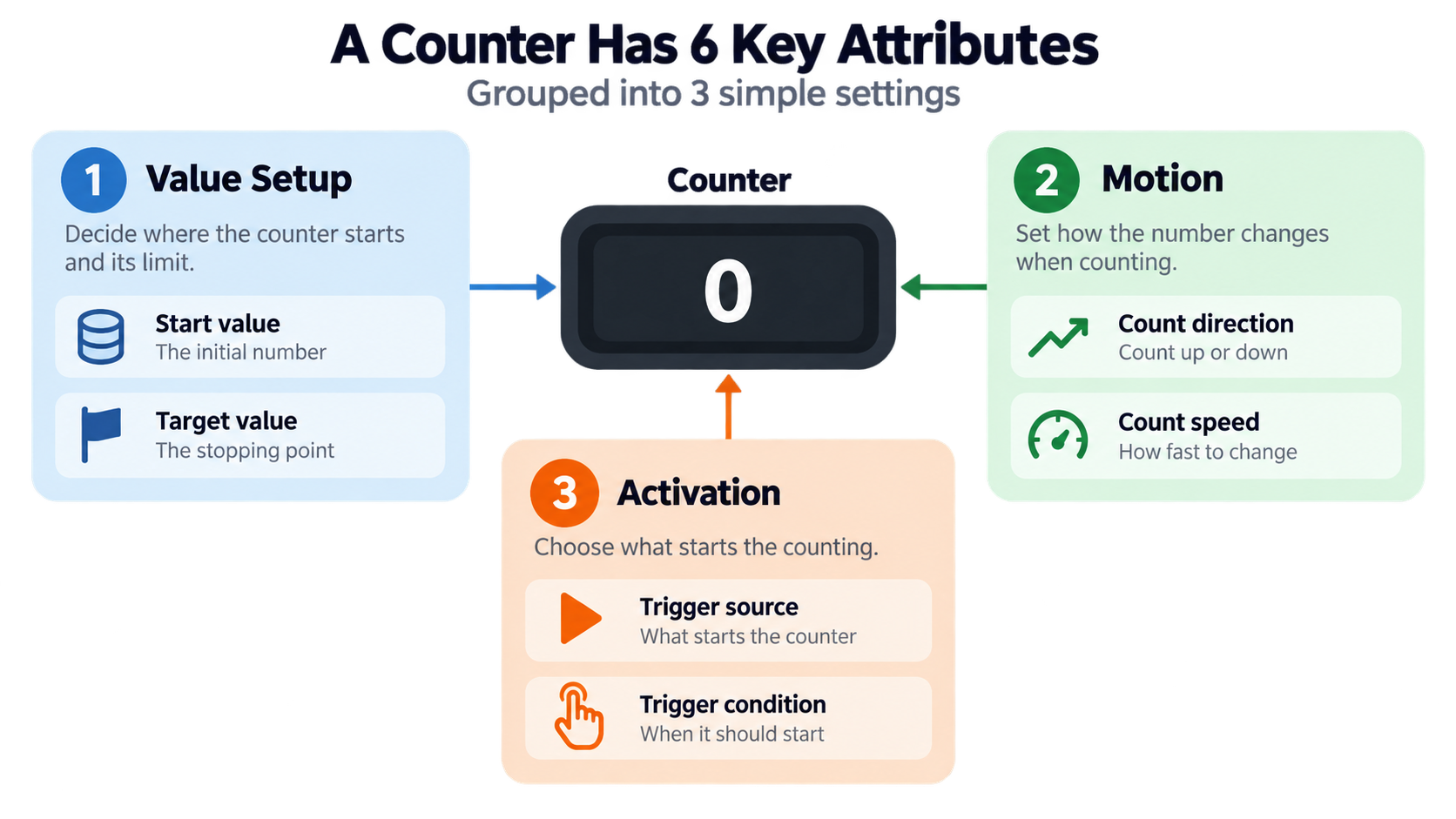
    Six shared counter attributes grouped into three simple settings

    Which Number Counter Do You Need? A Five-Type Decision Table

    Existing results are siloed by platform—a dictionary entry, a Divi 5 module page, a tally tool, a paid snippet, a PowerPoint tutorial—so no single page helps you choose a type. The decision table below does that.

    Use case Counter type Where it runs Trigger What it must persist
    Counting reps, attendance, inventory, outreach Tally / click counter Browser tool Manual click Local (browser) persistence
    Proving a statistic on a landing page or dashboard Animated web stat counter JavaScript or CMS module Viewport entry Nothing persisted
    Fitting copy into a limit Character counter Browser tool Keystroke Live character, word and space totals
    Revealing figures in a deck or video Slide / video counter PowerPoint/WPS, After Effects Slide build or keyframe Fixed target
    Continuously changing public data Live data clock Server-rendered or scripted Wall clock External data source

    Rows 1 and 3 continue in the use-case section below. Rows 2 and 4 continue in the build and platform sections.
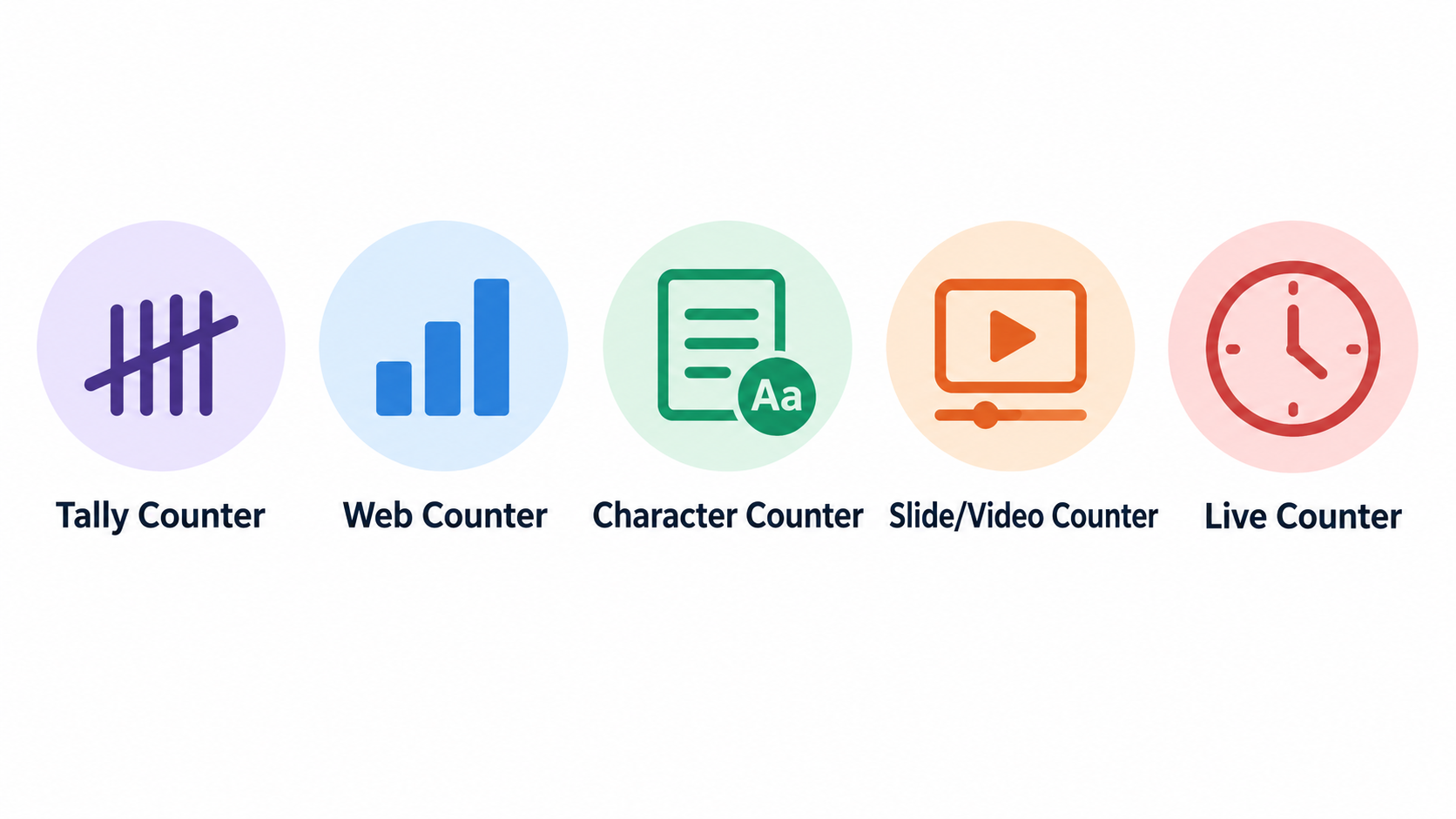
    Five counter types shown as simple icons

    How Do You Build an Animated Number Counter in Vanilla JavaScript?

    The full working code is right here, inline. No €9.90/month paywall, no page-builder lock-in, no After Effects dependency. You need three pieces: an HTML block of stat cards, a CSS rule for tabular-nums, and a script tag.

    Each stat card carries data-target and optional data-suffix or data-prefix attributes, so the same script drives every figure. According to Linkora-social issue #191 (opened September 21, 2026), the required behavior for creator dashboard stat cards is a 0-to-final climb over 1.2 seconds using requestAnimationFrame—no library dependency, ease-out, and respecting prefers-reduced-motion.

    Step 1: Mark Up the Target, Suffix and Step Size

    Start with the HTML. Each stat card holds a value element with its target:

    <div class="stat-card">
      <div class="stat-value" data-target="2847" data-suffix="">0</div>
      <div class="stat-label">Users</div>
    </div>
    

    Add font-variant-numeric: tabular-nums to the value element. That keeps digit widths from jittering and stops the surrounding layout from shifting while the number climbs. If a card needs a unit, either put it in data-suffix or write it in a sibling <small> element. Step size stays at 1 for whole-number statistics, unless you’re counting batches by hand.

    Step 2: Write the requestAnimationFrame Loop with Ease-Out

    Set the duration in milliseconds — 1200 ms is the baseline from the Linkora-social requirement. Derive progress from elapsed time, not from frames completed:

    function animateCounter(el) {
      const target = parseInt(el.getAttribute('data-target'), 10);
      const suffix = el.getAttribute('data-suffix') || '';
      const duration = 1200;
      const start = performance.now();
    
      function update(now) {
        const progress = Math.min((now - start) / duration, 1);
        const eased = 1 - Math.pow(1 - progress, 3); // cubic ease-out
        const current = Math.floor(eased * target);
        el.textContent = current + suffix;
        if (progress < 1) requestAnimationFrame(update);
        else el.textContent = target + suffix;
      }
      requestAnimationFrame(update);
    }
    

    Don’t count frames. Compute progress from elapsed time so a 121 fps display and a 60 Hz display finish together.

    Step 3: Fire the Count Once with IntersectionObserver

    Trigger once when the element enters the viewport, then stop observing so the count never replays when you scroll back. The Effect.Labs CSR report example shows this pattern exactly: six figures in a three-column grid, a counter climbing 0 → 918, fired once by an IntersectionObserver with threshold 0.3.

    const observer = new IntersectionObserver((entries) => {
      entries.forEach(entry => {
        if (entry.isIntersecting) {
          animateCounter(entry.target);
          observer.unobserve(entry.target);
        }
      });
    }, { threshold: 0.3 });
    
    document.querySelectorAll('.stat-value').forEach(el => observer.observe(el));
    

    If the grid is above the fold, it fires on load with no interaction. If it’s below, it waits for the user to scroll into the threshold.

    Step 4: Add the prefers-reduced-motion Short-Circuit

    Write the final value directly on load — no animation, no intermediate frames:

    const reduce = window.matchMedia('(prefers-reduced-motion: reduce)').matches;
    if (reduce) {
      document.querySelectorAll('.stat-value').forEach(el => {
        el.textContent = el.getAttribute('data-target') + (el.getAttribute('data-suffix') || '');
      });
    } else {
      // set up observer as above
    }
    

    This is not a shortened animation. It’s a bypass—the number is simply there.
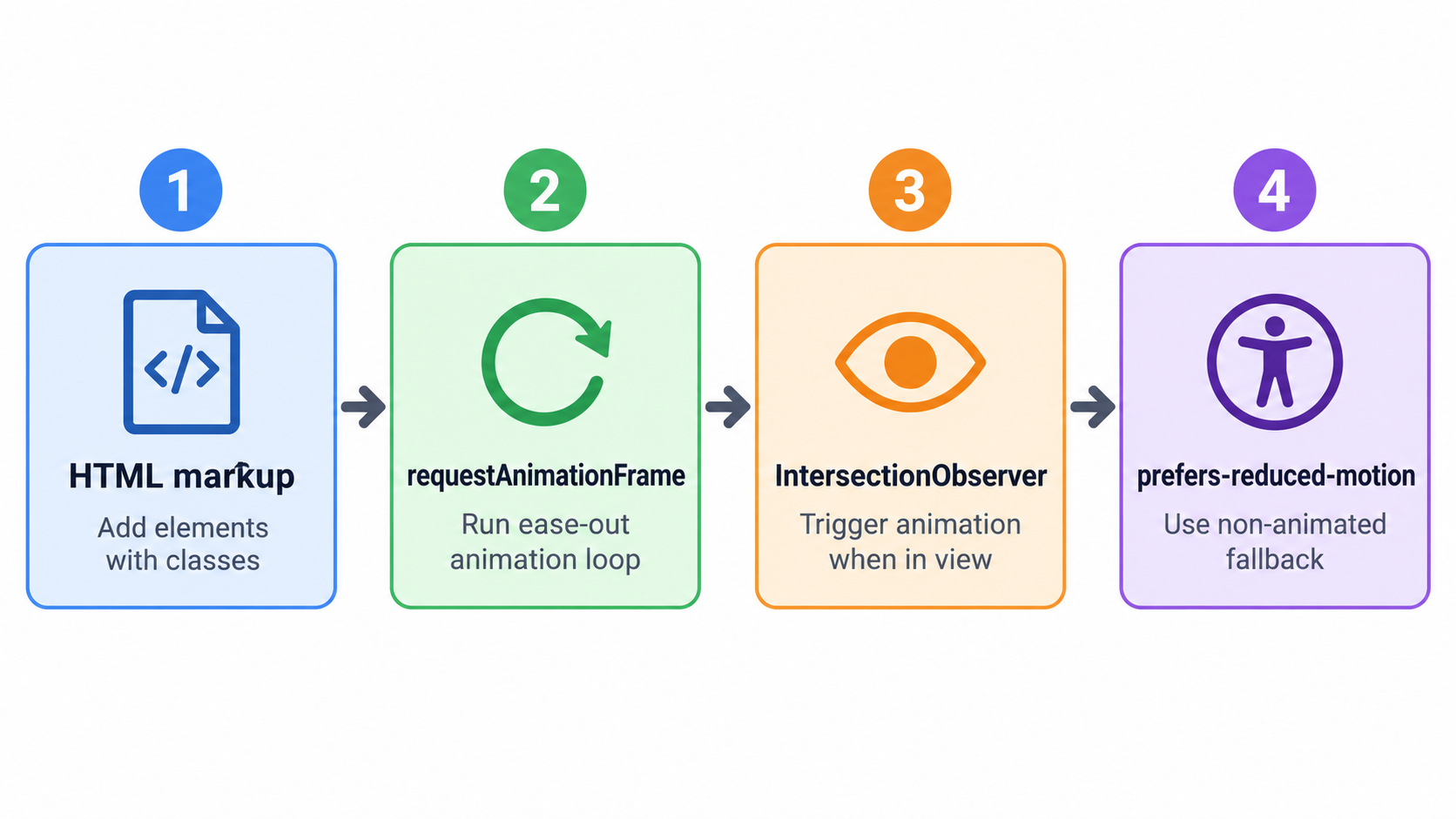
    Four-step vanilla JavaScript counter build flow

    Count-Up Animation Duration and Easing: Frames vs Milliseconds

    Here’s a pitfall no competitor explains: when duration is expressed as a frame count, the same counter runs at different real speeds on different displays. Effect.Labs measured this (updated September 30, 2026): a 125-step climb took 2.08 seconds on a 60 Hz screen but 1.04 seconds at 121 fps, using a step of 22.78 per frame for a target of 2,847.

    The rule: calculate progress as elapsed time divided by duration, never as frames completed. That one change makes the counter finish at the same real-world speed on a 30 Hz laptop in power-saving mode and a 121 fps Chromium.
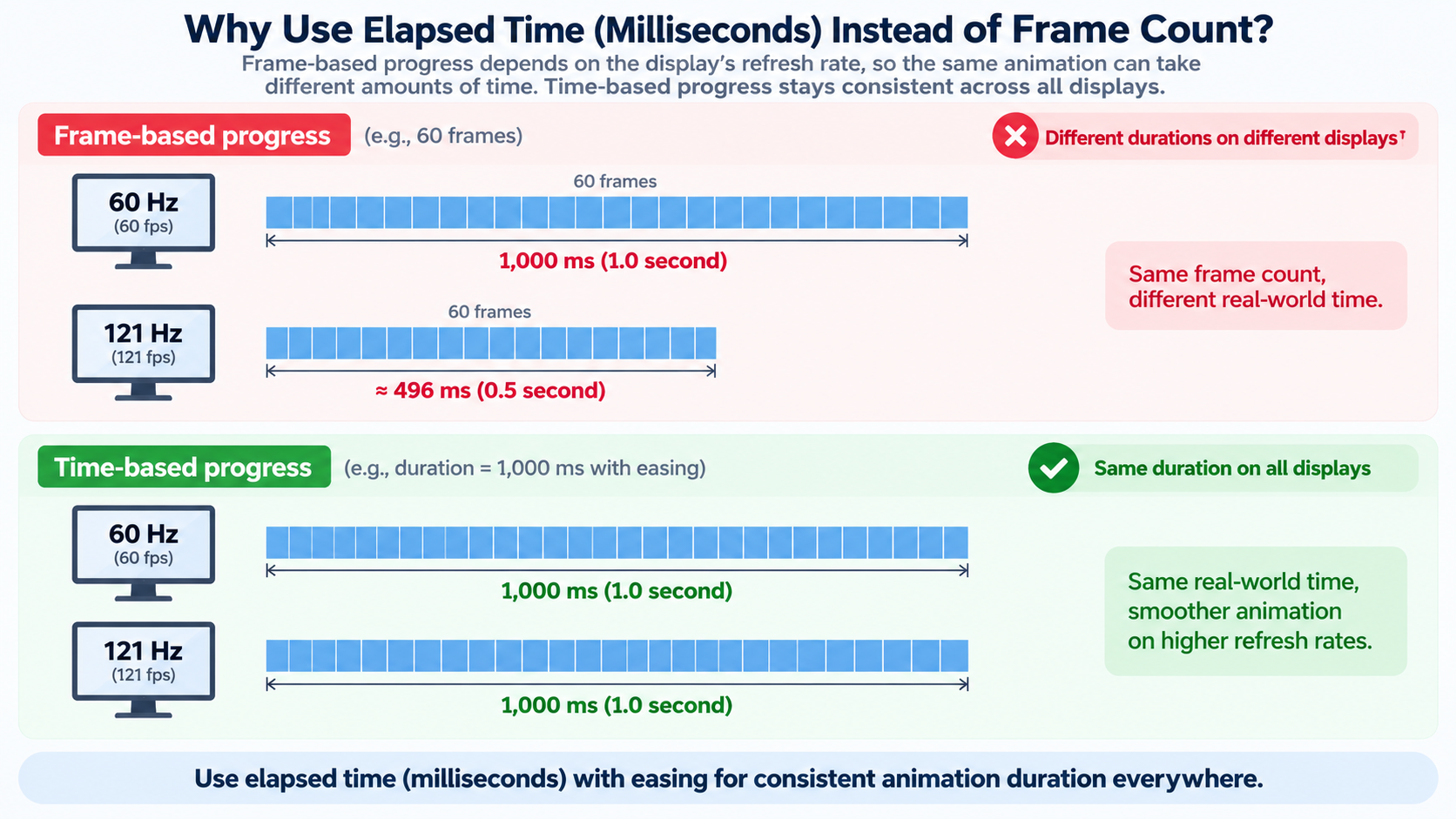
    Frame-count timing vs elapsed-time timing across displays

    Easing guidance by content type: use ease-out for a single hero number so it decelerates into the final value. Use a near-linear climb for equal-weight statistics that should feel simultaneous. Duration guidance by content type: about 1.2 seconds for dashboard stat cards, shorter for rows of four or more figures revealed together. Frame-count animation is still fine for fixed-frame video and slide output, where the author controls the frame rate.

    Animated Number Counter Accessibility and Performance Checks

    Only one source on the SERP touches these trade-offs, and it hides them inside a paid product page. The checks below are the ones that matter most.

    Screen readers: A screen reader that lands mid-climb reads an intermediate value. Hide the climbing digits with aria-hidden="true" and put the final value in an aria-label on the card. According to the Effect.Labs municipal election example, four equal-weight figures (registered voters, votes cast, spoilt ballots, turnout) were animated together in a four-card row with threshold: 0.5, each card carrying an aria-label with the final value and the animated digits hidden from assistive technology.

    Do not use aria-live: Wrapping a climbing number in an aria-live region announces every intermediate value and stutters. Keep the live region off the climbing element.

    Reduced motion: prefers-reduced-motion must write the final value immediately rather than shortening the animation. A shortened animation still triggers motion sensitivity; a direct write does not.

    tabular-nums: font-variant-numeric: tabular-nums stops digit widths from jittering and the surrounding layout from shifting. Without it, every frame reflows the card.

    Contrast: Gradient-filled digits at body-text sizes measured as low as 4.4:1 in the Effect.Labs example. Keep the counter text at or above the 4.5:1 threshold for body text.

    Performance: Use one observer for a whole grid, unobserve after firing, and update via textContent rather than innerHTML to avoid re-parsing the DOM on every frame.

    Number Counters Without Code: Tally Tools, PowerPoint, After Effects and Divi 5

    A free online number counter doesn’t require an account—click to add or subtract, set a custom step size, use keyboard shortcuts, and the count stores locally in your browser. The privacy trade-off is clear: browser-local counting leaves nothing on a server, but clearing your browser data clears the count.

    PowerPoint and WPS Presentation apply the Dynamic Number effect to a text box or table cell, controlled by the slide’s animation timeline. After Effects uses the Numbers preset with Slider Control, where a slider keyframe range supplies the start and end values and the results can be rendered to MP4. Divi 5 provides number, circle, and countdown counter modules, configured through a visual panel instead of a script.

    Version anchoring keeps instructions correct. IntersectionObserver has shipped since Chrome 51, Firefox 55, and Safari 12.1; the background-clip: text shorthand used for gradient digits works in Chrome and Edge 120+, Firefox 49+, and Safari 14+, per Effect.Labs compatibility notes. Skip the code path when slides and video handle one-off storytelling, or when a non-developer owns the site and a page-builder module is the safer maintenance choice.

    Browser Tools: Tally, Click and Character Counters

    A free online tally counter like tallycount.online runs without an account. You can create multiple counters, organize them into categories, set custom step sizes (2s, 5s, 10s, or any value), enable negative counting, and rely on automatic browser saving. This is the right row in the decision table when privacy beats persistence—nothing is stored server-side, but clearing browser data wipes the count. For counting that also needs a target goal with visual progress tracking, a dedicated online number counter adds named counters, quick presets, CSV export, and 30-day totals on top of the same no-account, browser-local setup.

    Slides and Video: PowerPoint, WPS and After Effects

    According to the WPS Office Academy (September 14, 2026), you can apply the Dynamic Number effect to a text box or table cell, control it from the slide timeline, and hold Ctrl to select multiple number boxes and add the effect once. In After Effects, the Numbers preset paired with Slider Control uses keyframe values for start and end, and the composition can be rendered to MP4 for fixed-frame output.

    What Is a Number Counter Used For? Six Real-World Workflows

    Each audience below needs a specific counter type and a specific increment behavior—not a generic one-line link.

    Cold callers and outreach teams use a click counter with a step of 1 and a daily reset. Counting in-browser keeps prospect details off paper.

    Gym-goers and coaches need rep counting with a step of 1 and a decrement button for miscounts.

    Teachers and event staff count attendance and guests, where a negative step corrects over-counts without resetting the total.

    Warehouse and inventory teams run cycle counting on a clicker, where the final total must reconcile against the system figure.

    Devotional counting (Tasbih/Zikar) and habit tracking rely on persistent local counts that survive a page refresh.

    Character and number counting is its own category. According to easycalculator.org (updated September 20, 2026), a standard SMS is limited to 160 characters, Google search titles cut off after around 60 characters, and Twitter/X posts are capped at 280. Reading time averages 200 words per minute and speaking time 130.

    A counter can also act as a data-integrity check instead of a display. According to HPC-SimTools/IPS-framework issue #258 (opened September 25, 2026), a sequence number counter on the Portal Bridge must increment by exactly 1 per event, because a missing number in the sequence implies a missing event.

    Live data clocks close the list. The U.S. Census Bureau ranked the most populous countries as of July 1, 2026: India at 1,429,700,205; China at 1,405,918,803; and the United States at 342,620,143.

    Conclusion

    A number counter is one idea—increment a value—wearing five different costumes. So the real decision is picking the type, not the platform. Pick your row in the decision table, then copy the vanilla JavaScript counter from Steps 1–4 if you’re building for the web. Or jump to the no-code section if a page builder, deck, or video tool already owns the output. Either way, set the duration in milliseconds and ship the reduced-motion fallback before you publish.

    FAQ

    What is the difference between a number counter, a tally counter, and a character counter?

    All three increment a value; the difference is what gets counted. A tally counter adds whole events on a click. A character counter measures the length of text as you type. A number counter is the umbrella term covering both, plus animated web counters. Choose by unit: events, characters, or a statistic you want to reveal.

    How long should an animated number counter take to finish?

    About 1.2 seconds with an ease-out curve is a reliable default for a single hero or stat-card figure. Rows of four or more equal-weight figures should run shorter so they finish together. Measure duration in milliseconds, not frames—a frame-based climb runs at different speeds on 60 Hz and high-refresh displays.

    Do animated number counters hurt accessibility or SEO?

    Not if the final value is in the HTML and the climbing digits are hidden from assistive technology with aria-hidden plus an aria-label. Avoid aria-live on a climbing number, which announces every intermediate value. Crawlers read the static final value, so the animation itself has no SEO cost—only the missing static text would.

    Can you build a number counter without JavaScript?

    For tally counting, yes—a free online click counter or a physical clicker needs no code. For a one-time count-up on a page, CSS-only tricks exist but cannot read a target value or respect reduced-motion cleanly. For slide and video output, the Dynamic Number effect in PowerPoint/WPS or the After Effects Numbers preset replaces code entirely.

    What is a number counter used for in real life?

    Attendance, reps, inventory audits, guest counting, and outreach logging. Proving statistics in CSR reports, dashboards, and election results. Fitting copy to limits—SMS at 160 characters, X posts at 280—and verifying data integrity when a sequence must advance by 1.
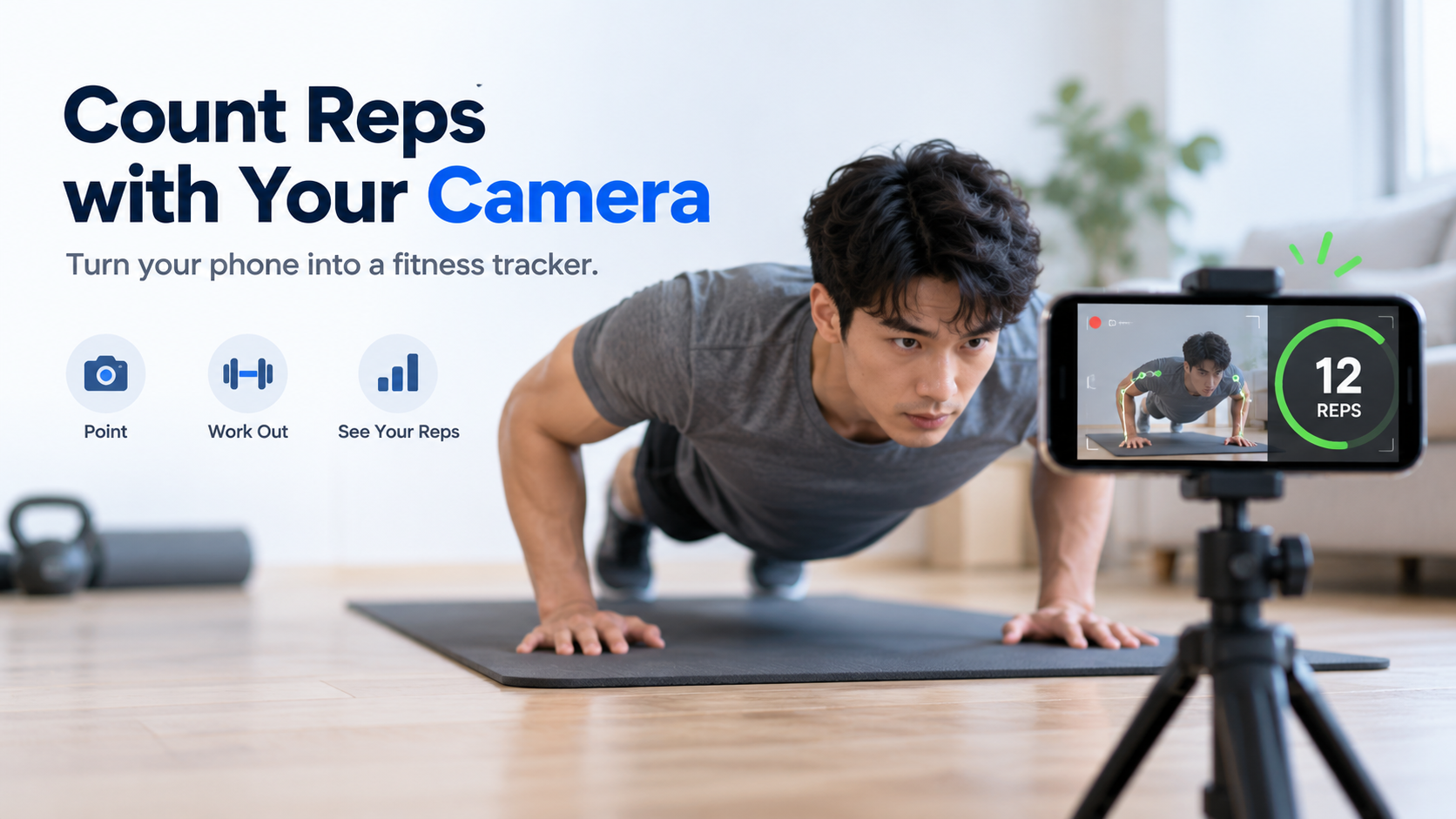
  • Rep Counter: How Automatic Counting Works (2026 Guide)

    Rep Counter: How Automatic Counting Works (2026 Guide)

    Header: automatic rep counting by camera

    A rep counter automatically tracks your repetitions during a set. In 2026, the leading options are camera-based iPhone apps such as RepCount and Push Up Counter. They follow your body on-device, count only full reps, and need no wearable or sensor.

    If you actually searched for “Rep.” seat counts, the CSS counter-reset property, or a WoW reputation boost, jump to the disambiguation section below—this guide points each of those intents to where it belongs.

    What Is a Rep Counter—and What Is It Actually Counting?

    In a fitness context, a rep counter is a tool that automatically records how many repetitions you complete in a set. In 2026, the mainstream form factor is a phone app that uses the device camera rather than a wearable, a sensor, or a smart mat. Push Up Counter describes its own product the same way: it “turns your iPhone into a hands-free rep counter,” with “no wearables, no tapping between reps.”

    The core question a rep counter answers is narrow and specific: how many did I just do? That matters because counting in your head drifts, and a partner counting out loud is not available to most people training at home. Moving the count to software returns attention to the set itself—pace, depth, and whether your hips held position.

    Three things define the category as it stands today:

    • A primary movement is counted. Camera apps in the current market are built around one flagship exercise, most often the push-up.
    • Counting is automatic. The app advances the number when it sees a completed repetition, not when you tap.
    • Form is part of the count. A repetition that does not meet a depth or alignment threshold is typically rejected rather than added to the total.

    “Rep Counter” vs. Three Other Meanings of “Rep”

    The phrase “rep counter” competes with at least three unrelated intents, and it is worth routing them explicitly.

    Politics. In political coverage, “Rep.” is the abbreviation for Representative, a member of the U.S. House. A “rep counter” in that context is a tally of House seats. According to the House Press Gallery, the 119th Congress stands at 218 Republicans, 214 Democrats, one Independent, and two vacancies—the vacancies following the resignations of Rep. Tony Gonzales (R-TX) on April 14, 2026 and Rep. Sheila Cherfilus-McCormick (D-FL) on April 21, 2026.

    CSS. The counter-reset property creates and initializes named CSS counters; it has been baseline-available across browsers since July 2015, per MDN Web Docs. Counterintuitively, it is counter-set, not counter-reset, that resets the value of an existing counter.

    Gaming. A “rep boost” in World of Warcraft refers to paid reputation farming. One vendor, Gamingcy, sells a Consortium reputation boost from $19 with a stated ETA of 7–21 days.

    This guide covers only the fitness meaning.

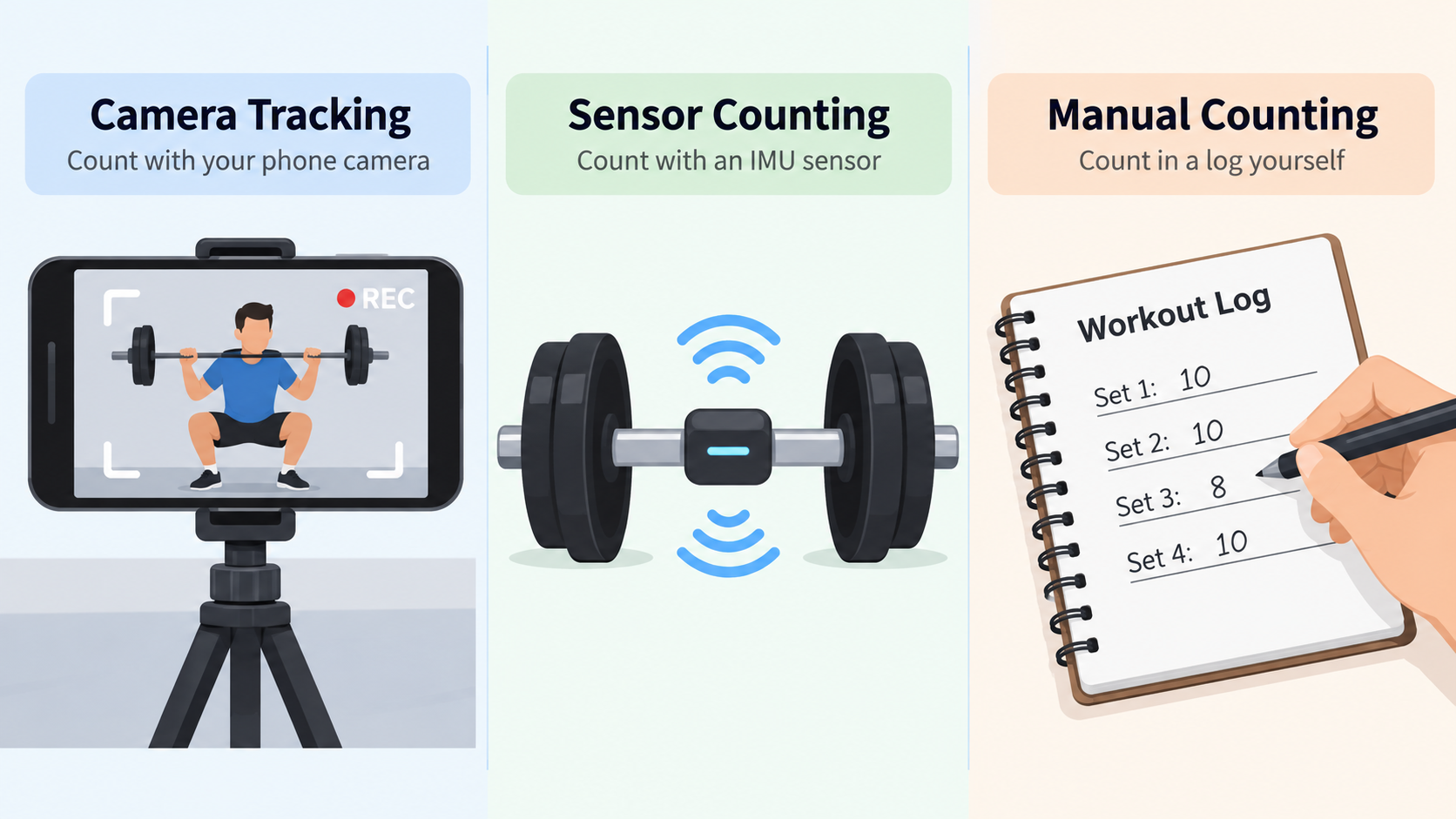
    How Does Automatic Rep Counting Actually Work? Camera, Sensor, and Manual Compared

    Automatic rep counting is not one technology. There are three distinct paths, and the differences between them explain almost everything about which one works where.

    Three counting paths: camera, sensor, manual

    Camera-Based Pose Tracking: Landmarks, Joint Angles, and a State Machine

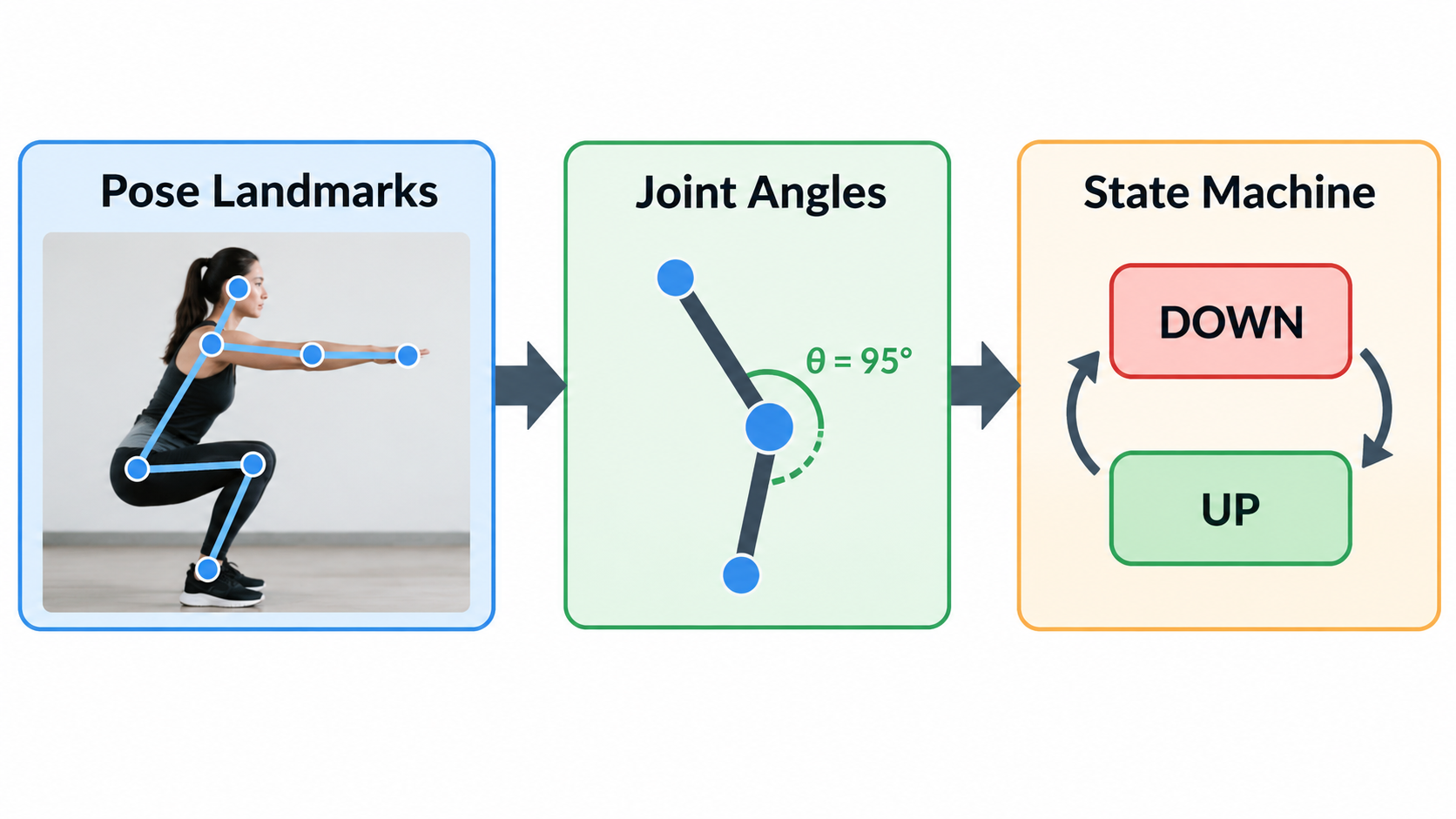
    The camera path has three stages. First, a pose model finds body landmarks in each video frame. Second, the system computes joint angles from those landmarks. Third, a state machine decides when a repetition has started and finished.

    The landmark models are the same ones used across mobile computer vision. RepCount uses the iPhone’s front camera together with Apple Vision to detect body movement in real time—its product description states it “automatically counts your exercise reps so you can focus on your workout—not the numbers,” with no manual input required.

    An open-source project, PushForm, documents the same pipeline in more detail in a GitHub specification. It runs a MediaPipe Tasks Vision pose landmarker on-device—the lite model, with a GPU delegate and CPU fallback, targeting 30 frames per second—and streams 33 landmarks per frame to a backend that computes angles in 2D. Elbow angle is computed for both sides each frame, median-filtered over five frames, and passed through a hysteresis state machine: the phase enters DOWN below 95 degrees and leaves DOWN above 155 degrees, with no transition inside that band. A rep is the interval from entering DOWN to leaving DOWN.

    Camera pipeline: landmarks to angles to state machine

    Sensor and IMU Counting: Why It Works on Barbells and Fails on Cables

    The sensor path relies on an inertial measurement unit. Acceleration data is integrated to estimate a driving impulse, and thresholds decide when a repetition has occurred. This works on barbells because barbell travel is geometrically predictable.

    The failure mode is documented. A BarSpeed issue reports that the impulse counter’s thresholds were “fitted at travelRatio 1.0 and are not converted through the pulley ratio, so on a stack they are applied in the wrong frame.” The measured collapse on paced machine captures was stark: a leg curl set of 10 reps produced 2 calls, a leg curl set of 12 produced 0, a single-leg press set of 8 produced 0, and a pull-up set of 8 produced 0.

    Worth noting: the same issue reports that the alternative detector was measured at 108 calls against 253 over the same corpus—so narrowing the gate is not a free win either.

    Manual Counting: Still the Only 100% Reliable Option (and Why That’s Fine)

    Manual counting remains the correct choice in two situations: movements the camera cannot see clearly, and test sets where you need absolute certainty. A one-tap online rep counter does that job without any camera at all. It is not a failure of the technology. It is the honest answer when the sensor geometry does not match the exercise.

    What Counts as a Full Rep? Depth, Lockout, and the Partial Rep Problem

    Every automatic counter has to make a judgment call: is this a complete repetition, or is it a half-range wobble? The rules that decide this are where products differ most, and where a counter’s number either means something or does not.

    Hard Rules First, Classifier Second: A Layered Form Gate

    One public example shows how a layered gate can be built. In the PushForm specification, deterministic hard rules are evaluated at the end of each rep, in a fixed order of precedence:

    Rule Threshold Fault label
    Hip sag mean signed hip deviation below −20° hip sag
    Hip pike mean signed hip deviation above +20° hip pike
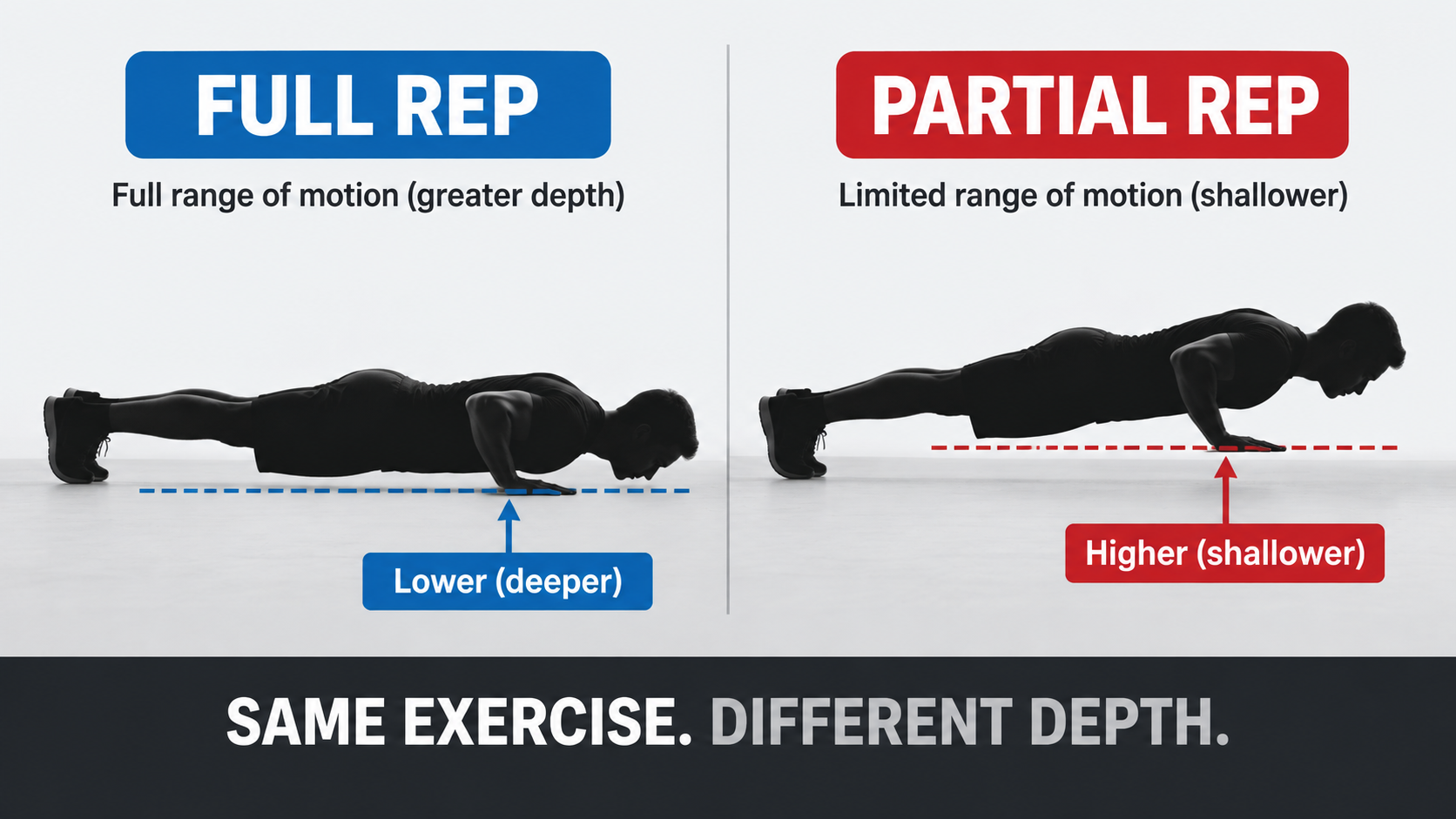
    Partial range of motion minimum elbow angle exceeds 110° partial ROM

    Alongside these, the specification defines timing behavior: a DOWN phase shorter than 400 ms is a Bounce—the phase still changes, but no rep event is emitted. If the smoothed elbow angle stays inside the hysteresis band for more than 1.5 seconds, a stall event fires once and clears when the angle leaves the band. Tracking loss is declared when the tracked side’s elbow landmarks fall below 0.6 visibility for more than five consecutive frames; the machine freezes in its current phase, and the rep resumes when tracking returns.

    If no hard rule fires, a trained classifier evaluates the rep’s feature vector—but a fault label is applied only when the predicted probability is at least 0.7. Below that confidence floor, the rep counts. These thresholds come from an individual open-source project, not an industry standard, and are useful as a reference point rather than a prescription.

    The commercial version of the same philosophy is simpler to state. Push Up Counter says a rep “has to reach depth,” that anything shallower “is recorded as a partial rather than counted,” and that partials “form the denominator of your form score—so the number you finish with is the number you actually earned.”

    Full-depth rep vs shallow partial rep

    Why You Can’t Judge Depth From a Front-Facing 2D Pose

    A front-facing camera cannot reliably determine how far you lowered your chest—there simply is not enough depth information in a 2D pose from that angle. Push Up Counter addresses this directly: the side view is the position that checks depth, and from a front-facing 2D pose the app “counts reps but leaves the depth verdict to a side view.” If you want depth gating, camera placement is not optional.

    Which Exercises Can a Rep Counter Handle—and Which Ones Break It?

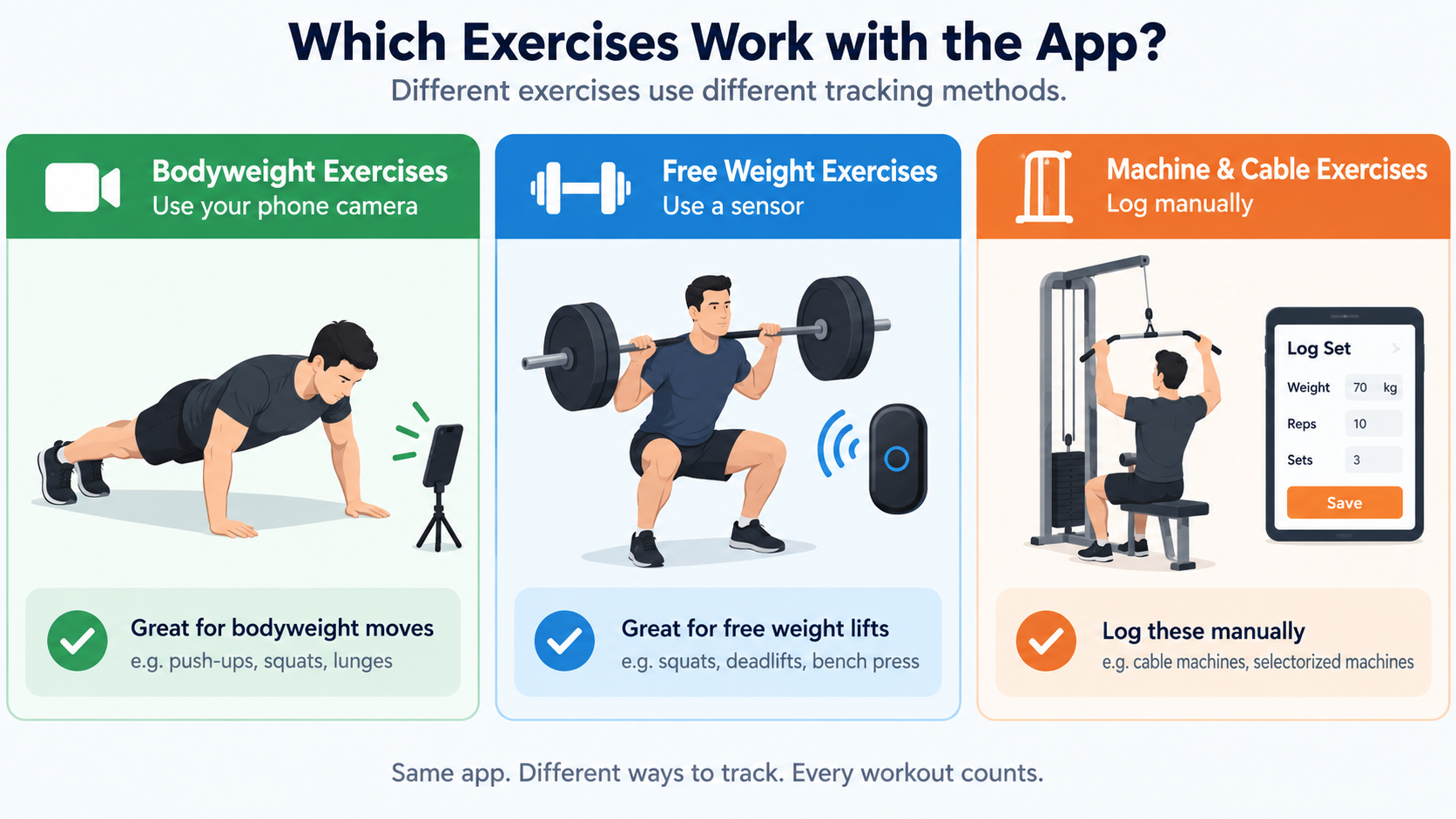
    This is the question the current market does not answer well. Product pages rarely state which exercises a counter handles and which ones it quietly fails on. The following decision table consolidates what the available evidence supports.

    Exercise × Equipment Decision Table

    Exercise / equipment Recommended counting Known failure risk Basis
    Push-up (bodyweight) Camera Needs a side view for depth; knee push-ups out of scope in PushForm v1 Push Up Counter, PushForm spec
    Barbell squat / bench / deadlift Sensor or IMU Thresholds fitted to barbell travel; tempo’d sets may not be counted at all BarSpeed #303
    Pull-up (bodyweight + bar) Unreliable—verify before trusting 8 performed reps produced 0 calls in measured data BarSpeed #303
    Leg curl (machine) Manual 2/10 and 0/12 correctly detected BarSpeed #303
    Single-leg press (machine) Manual 0/8 correctly detected BarSpeed #303
    Cable row, face pull, Pallof press Manual No rep marks exist in the public corpus to score them BarSpeed #303

    Exercise suitability: camera, sensor, or manual

    Why Cable and Machine Sets Are the Hardest Case

    Cables and machines break automatic counting for a structural reason, not a tuning reason. An impulse counter’s thresholds are numbers in a drive frame fitted at a travel ratio of 1.0—the geometry of a barbell moving freely. On a stack, the cable and pulley ratio changes the relationship between how far the handle moves and how far the load moves. Apply barbell-frame thresholds to a stack and they land in the wrong frame.

    The pull-up result is the most instructive row in the table. It is a bodyweight movement on a bar, which sounds like an easy case, yet 8 performed reps produced 0 detected calls in the measured set. “Bodyweight plus bar” does not automatically mean a camera counter will handle it either—visibility, occlusion, and the movement path all matter.

    The practical conclusion is unglamorous: for cable and machine work, keep logging manually — a manual rep counter is still the reliable tool — until the technology catches up.

    Does a Rep Counter Record or Upload Your Workout Video?

    For camera-based apps, the privacy dividing line is simple to state: does the video ever leave the device?

    The leading products in this category say no. Push Up Counter states that all processing happens on device, that no video is ever recorded or uploaded, that there are no accounts and no ads, and that counting runs offline. RepCount similarly performs detection on-device using the front camera and Apple Vision.

    This is a structural advantage of the camera path rather than a marketing choice. Pose inference is light enough to run locally, so there is no technical reason to upload frames to a server for the core counting function. A cloud-dependent design would introduce both latency and a privacy surface that the on-device approach avoids.

    Before installing any rep counter app, ask four questions:

    1. Is video ever stored on the device?
    2. Is any video or landmark data uploaded?
    3. Is an account required?
    4. Does counting still work with the network off?

    A camera-based counter that answers “no, no, no, yes” is behaving the way the category’s leading products do.

    Sets and Reps: How a Rep Counter Fits Into Your Training Log

    The terminology matters because automatic counting has to understand all three terms to be useful.

    • Set — a continuous block of repetitions performed without rest.
    • Rep — one complete repetition within that block.
    • Rest — the interval between sets.

    A counter that only knows reps produces a number with no structure. A counter that understands sets can close a set when you stop to rest and open a new one when you start again. Push Up Counter describes exactly this behavior: “Stop to rest and the app closes the set. Start again and it opens a new one—no buttons in the middle of a workout.” The PushForm specification uses the same vocabulary in a defined glossary, distinguishing a Set, a Connection, and a Rep as separate concepts.

    Why does set structure matter beyond convenience? Training volume is calculated as sets × reps × load. If set boundaries are wrong, volume is wrong, and every downstream metric built on volume inherits the error. Getting sets and reps correctly segmented is the precondition for any strength-tracking logic layered on top—including estimated one-rep max.

    Rep Counter Apps Compared: RepCount, Push Up Counter, and PushForm

    Three products illustrate the range of approaches available in 2026.

    RepCount is an iOS app that uses the iPhone’s front camera and Apple Vision to detect body movement in real time and count reps automatically, with no manual input. Its framing is about attention: count the reps so you can focus on the workout, not the numbers. Source: App Store listing.

    Push Up Counter: Muscles is an iPhone and iPad app built specifically around the push-up. It offers three phone placements—facing you, beside you for a side view, or flat on the floor below your face—counts only reps that reach depth, records shallower attempts as partials that form a form score denominator, groups sets automatically, shows live pace in reps per minute, and includes a six-week program that opens with one max-effort set to set your level. Pricing is a free download with a 7-day trial, after which either a monthly subscription or a one-time lifetime unlock applies. Source: pushupcounter.app.

    PushForm is an open-source Python web app documented in a public specification. Version 1 supports standard push-ups only; knee push-ups and any exercise-mode selector are explicitly out of scope, as are front-on or overhead orientations and multi-person tracking. Its value here is transparency: the full decision logic, thresholds, and acceptance criteria are readable. Source: GitHub issue #1.

    Pricing models differ meaningfully. Free trial plus subscription suits users who want a maintained product without a large upfront cost. A one-time lifetime unlock suits users who dislike recurring charges. Fully open source suits developers who will self-host. Note that PushForm and BarSpeed are individual GitHub projects—they are not industry standards, and their specifications should be read as documented engineering decisions rather than consensus rules.

    How to Choose: Four Questions That Decide It for You

    1. Which exercise do you actually train most? If it is the push-up, a purpose-built counter will be more accurate than a general one.
    2. Can you place your phone for a side view? Depth gating depends on it, so if your training space does not allow it, expect counting without depth judgment.
    3. Does the app promise on-device processing? Confirm this in the privacy policy before installing.
    4. Which pricing model fits how you train? A subscription is only worth it if you will still be using the app in six months.

    Turning Rep Counts Into Progress: e1RM and RPE Baselines

    Most of the search results in this space split into two camps: rep counting apps that never mention estimated one-rep max, and 1RM calculators that never mention rep quality. That split is a mistake, because rep quality directly determines how much you should trust an e1RM.

    An e1RM is a prediction of the most weight you could lift for a single repetition, based on a submaximal set. Barbell Medicine’s 1RM calculator incorporates RPE into the estimate and notes that “lower-repetition sets, especially sets of 1 to 5 reps performed at higher RPEs, tend to produce more useful 1RM estimates.” The calculator also cautions that e1RM is a ballpark figure, not a prescription: fatigue, technique, range of motion, and day-to-day performance all affect the relationship between a training set and a true 1RM.

    The dependency is direct. A set of 5 reps at RPE 9 only estimates your maximum usefully if those 5 reps were full-range. Five partial reps at the same RPE would overstate or understate your capacity depending on how the depth shortfall was scored. This is where rep counting and 1RM estimation connect: accurate counting is the input, e1RM is the output.

    For context on what strong looks like, a 2024 analysis of more than 800,000 raw, drug-tested powerlifting competition results reported the following averages, as summarized by Barbell Medicine:

    Lift Men Women
    Squat 2.17× bodyweight 1.64× bodyweight
    Bench press 1.5× bodyweight 0.95× bodyweight
    Deadlift 2.51× bodyweight 1.98× bodyweight

    For health rather than performance, a dataset of nearly 9,000 men aged 20 to 82 found that a leg press 1RM of 1.9× bodyweight and a bench press 1RM of 1.1× bodyweight were associated with the lowest risk of mortality (underlying study indexed at PubMed 18595904). No equivalent dataset exists for women, but extrapolating from data showing women average roughly 50% of male upper-body strength and 60% of lower-body strength yields targets of about 0.55× bodyweight on bench press and 1.14× on leg press.

    The operating order is: get counting accurate and depth-compliant first, then use your cleanest qualifying sets to estimate e1RM, then track e1RM over time.

    How to Build Your Own Rep Counter (Developer Path)

    For developers, the search results in this space offer scattered GitHub issues and no consolidated path. The following six-step sequence reflects the pipeline documented in the PushForm specification.

    1. Extract pose landmarks. Run a pose landmarker on-device—in this example, MediaPipe Tasks Vision’s lite model with a GPU delegate and CPU fallback, targeting 30 fps and streaming 33 landmarks per frame.
    2. Compute joint angles. Calculate elbow angle for both sides every frame. Select the tracked side as the one with higher mean landmark visibility over the last 10 frames, and re-evaluate that choice only while in the UP phase.
    3. Build a hysteresis state machine. Enter DOWN below 95 degrees, leave DOWN above 155 degrees, and do not transition inside the band. Defaults should be overridable between sets, never during one.
    4. Apply hard rules. Evaluate deterministic faults in a fixed order—hip sag, hip pike, then partial range of motion—so the system produces form feedback even with no model loaded.
    5. Add a grey-zone classifier. When no hard rule fires, classify the rep’s feature vector and apply a fault only at or above a confidence floor. The documented floor is 0.7: a stub classifier at 0.69 probability counts, at 0.70 it rejects.
    6. Deploy on-device. Normalize rep features by torso length so they do not drift with camera distance, and hold the last good angle for five frames when landmark visibility drops before declaring tracking lost.

    For measurable acceptance criteria, the same specification targets a macro-F1 of at least 0.85 on stratified cross-validation and at least 0.75 on a held-out collection day, over a dataset of roughly 40 reps per class collected across at least three sessions, two lighting conditions, and both facing directions.

    These thresholds come from one individual open-source project. They are a concrete starting point, not a standard you are obliged to meet.

    Conclusion

    A rep counter in 2026 is genuinely useful—camera-based, on-device, and accurate on full reps—but its value depends entirely on knowing what it can and cannot see. Pick one camera-based app, set your phone at a side angle so depth can actually be judged, and accept that only full reps count toward your total while partials feed your form score instead. Then use your cleanest low-rep, high-RPE sets to estimate e1RM and track real strength progress. For cable and machine work, keep logging manually until the technology catches up.

    FAQ

    Do I need a wearable or smart mat to use a rep counter?

    No. In 2026 the leading rep counters are camera-based phone apps—RepCount and Push Up Counter both work with just your phone’s camera. No wearable, sensor, or smart mat is required. The trade-off is that you need a clear camera angle and enough space in frame.

    Does a rep counter count partial reps, and what happens to them?

    Most quality apps deliberately do not count partial reps toward your total. Push Up Counter, for example, records anything shallower than its depth threshold as a “partial” rather than a completed rep. Those partials still show up—they form the denominator of a form score—so you can see how many attempts fell short.

    Is my workout video recorded or uploaded to a server?

    With the leading camera-based apps, no. Processing happens entirely on-device: no video is recorded, nothing is uploaded, no account is required, and the app works offline. Always verify this in the app’s privacy policy before installing, but on-device pose inference is now the norm for this product category.

    Can a rep counter track cable, machine or leg-press sets?

    Not reliably today. Sensor-based counters tuned to barbell geometry have measured near-total failure on cables and machines—one public dataset showed 2/10, 0/12, 0/8, and 0/8 reps correctly detected across four machine sets. Camera-based counting needs a clear side view and may struggle when the body moves with the cable path. For now, manual logging — or a simple online rep counter — remains the safe choice for machine work.

    Is a rep counter app free, or do I need a subscription?

    It varies. Push Up Counter offers a free download with a 7-day trial, then either a monthly subscription or a one-time lifetime unlock. Open-source projects like PushForm are free but require self-hosting and currently support only standard push-ups. No single pricing model dominates the category yet.

    What does “rep counter” mean when it refers to Congress?

    In political coverage, “Rep.” is short for Representative—a member of the U.S. House. A “Rep counter” in that context means a tally of House seats. As of the 119th Congress, the House stands at 218 Republicans, 214 Democrats, one Independent, and two vacancies (source: House Press Gallery). This is unrelated to fitness rep counting.

  • Tally Counter: What It Is, How to Use It & Which to Buy

    Tally Counter: What It Is, How to Use It & Which to Buy

    Header: Tally counter forms and one-press counting

    A tally counter is a handheld or digital clicker that keeps a running count — people, laps, reps, or inventory — with one press per item. Most mechanical models show four digits and reset to zero with a rotating knob; phone apps and watch widgets do the same job without hardware.

    What Is a Tally Counter?

    A tally counter is a small device that adds one to a running total each time you press its button. It records how many times something happened — pitches thrown, laps swum, people through a door — instead of storing a number you choose ahead of time.

    That difference matters: it separates a consumer tally counter from an industrial preset counter. A preset counter like the Omron H7CX-AWD1-N Multifunction Preset Counter, which sometimes appears next to tally counters in marketplace listings, is built to count down to a target and trigger an output. A tally counter just adds upward, one press at a time.

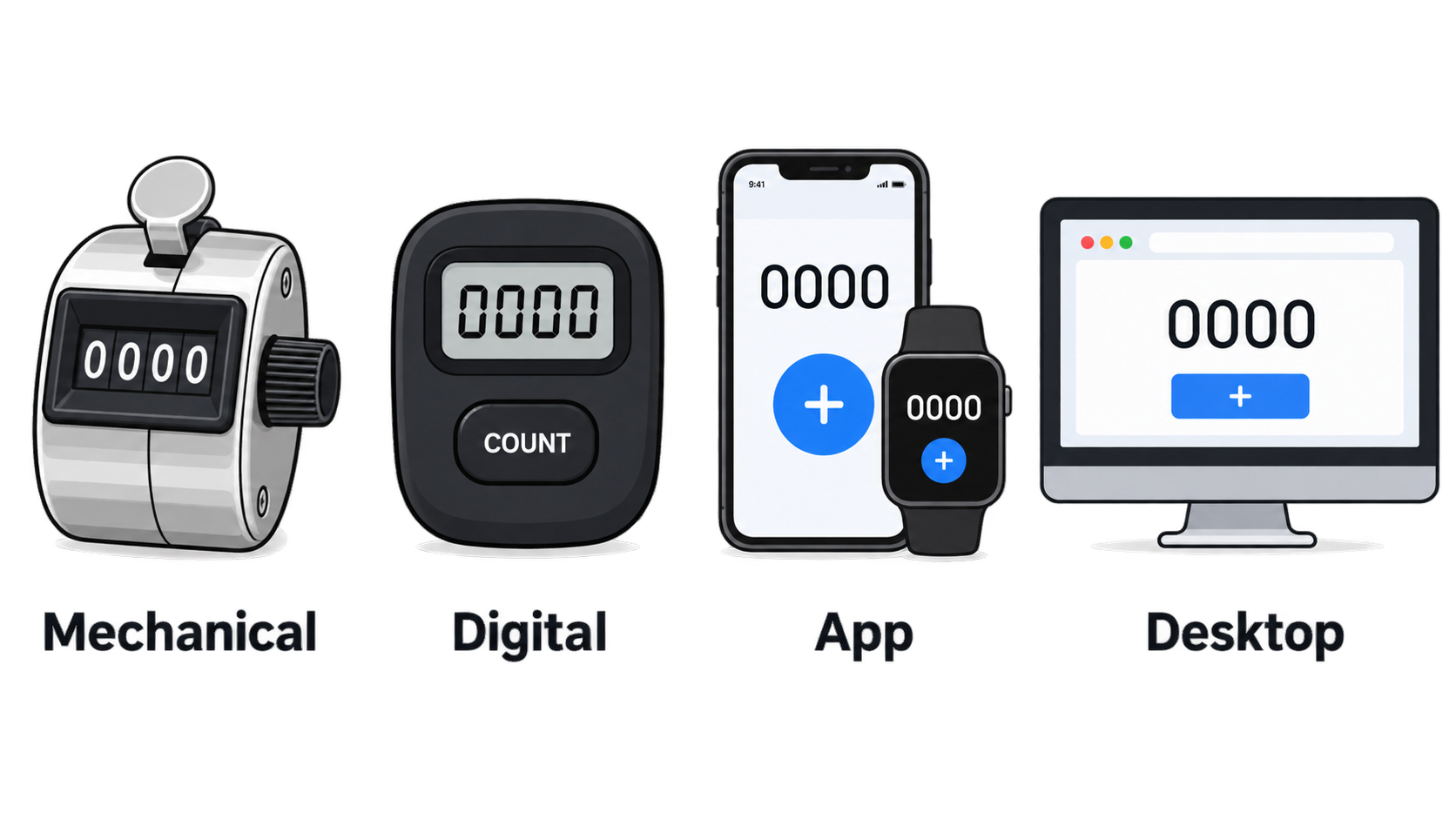
    These devices come in four physical forms:

    • Mechanical handheld tally counter — a spring-loaded clicker with a numbered wheel and a side reset knob
    • Digital tally counter — a battery-powered electronic unit with an LCD or LED readout
    • Tally counter app — a phone, tablet, or Apple Watch app that turns a screen tap into a count
    • Desktop or browser tools — a free online tally counter for tracking items while seated at a computer

    Four tally counter form factors at a glance

    The same device also goes by several names. Clicker counter, hand counter, handheld tally counter, pitch counter, and lap counter all describe the same core mechanism. The label usually reflects the job, not a structural difference.

    Tally Counter vs. Tally Marks vs. Clicker: Same Words, Different Things

    People often use these three terms interchangeably, but they are not the same. Tally marks are a notation system — marks made on paper or a chalkboard, traditionally grouped in fives. Clicker is casual shorthand for the hardware, borrowed from the sound the button makes. Tally counter is the device itself: a mechanical or digital unit that advances a displayed number automatically.

    The practical difference is who keeps track of the total. With tally marks, the person writes and groups the marks in their head. With a tally counter, the mechanism does the arithmetic and the user only presses. Tally marks are still useful when no device is available; a counter is faster when large volumes build up.

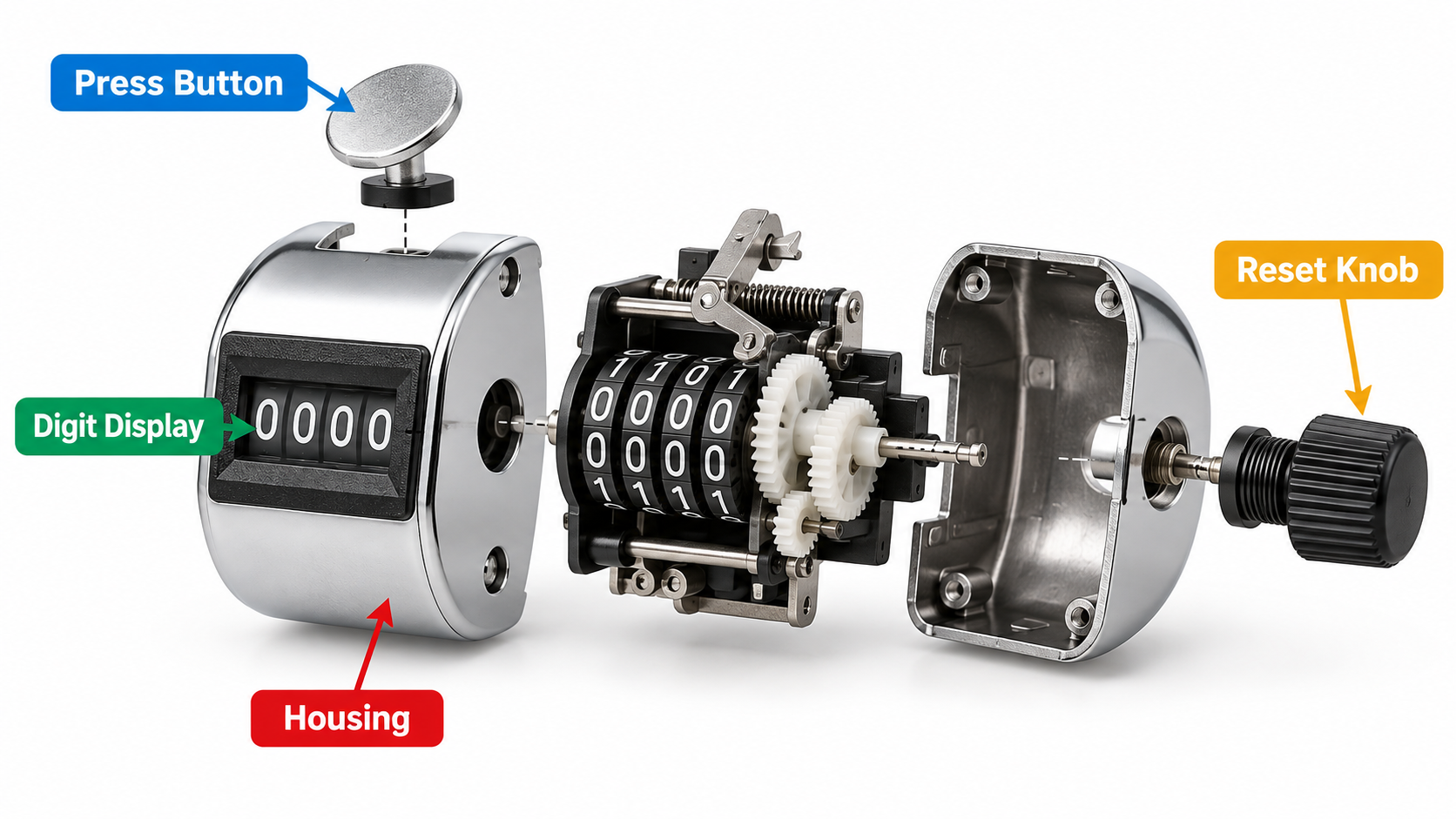
    The Four Parts of a Standard 4-Digit Hand Tally Counter

    Nearly every consumer mechanical tally counter is made from the same four parts.

    1. The press button — a top-mounted key that moves the counter forward exactly one position per full press.
    2. The digit display window — four numbered wheels under a small lens, showing a range from 0000 to 9999.
    3. The reset mechanism — a rotating knob on the side of the housing (some models use a top button) that returns all wheels to zero.
    4. The housing and internals — a metal or plastic shell around a ratchet-and-spring assembly that moves the wheels.

    Exploded view of a standard mechanical tally counter

    Metal tally counters usually use a metal shell around the same internals, which is why they tend to survive drops and sweaty hands better than plastic-bodied versions. The trade-off is weight.

    How to Use a Tally Counter and Reset It to Zero

    Using a tally counter is simple, but the problems people run into are almost always mechanical, not conceptual. Full presses, clean resets, and knowing the digit limit solve most of them.

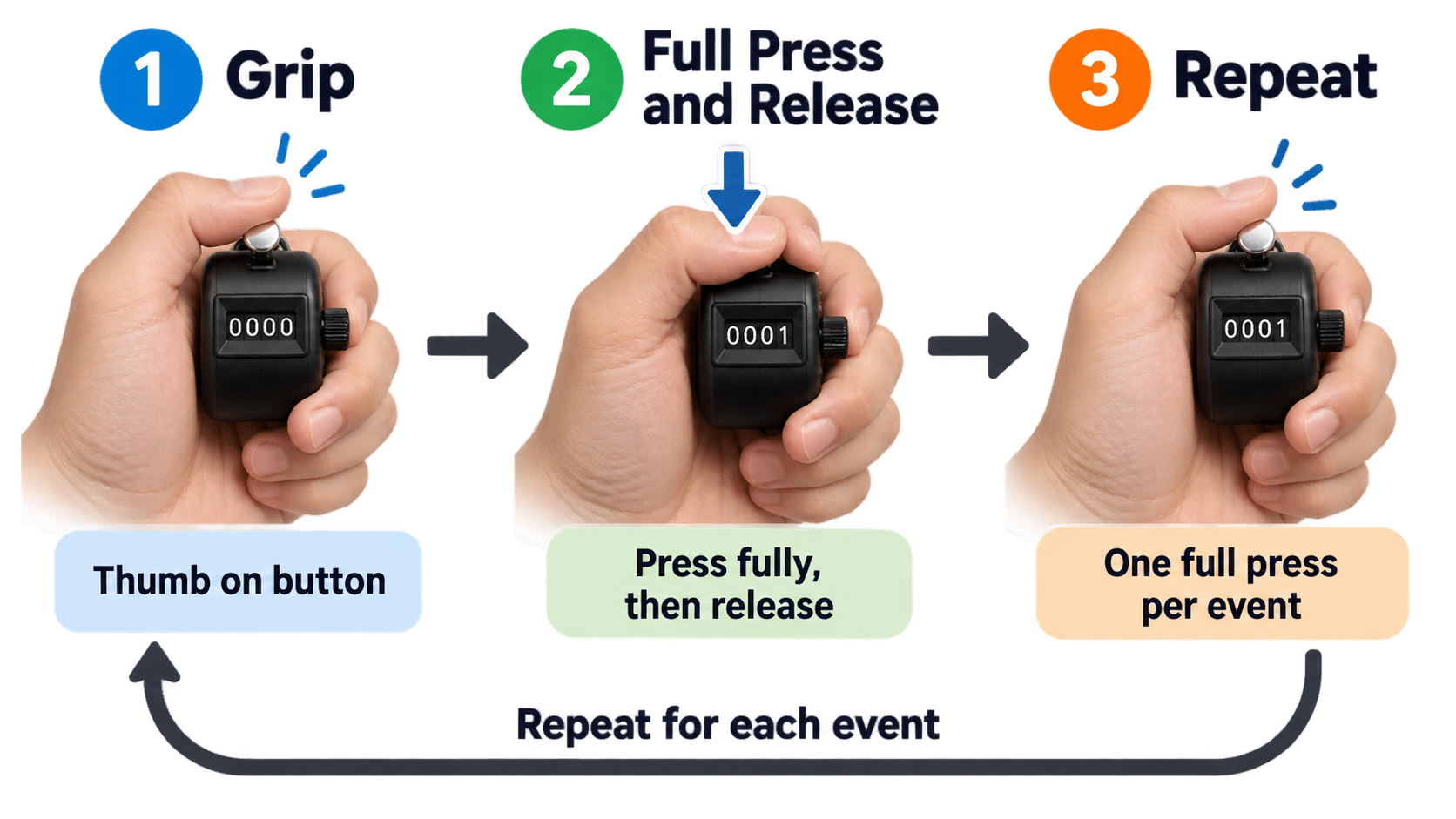
    Step by Step: Operating a Handheld Clicker One-Handed

    1. Grip the body in your non-dominant hand (or dominant, if that hand is free), wrapping your fingers around the housing so the button sits under your thumb.
    2. Position the display so it faces you, but keep your eyes on the target — the pitcher, the swimmer, the doorway.
    3. Press the button fully until you feel or hear the click, then release completely. Every full press advances one digit.
    4. Repeat on each event, keeping a steady rhythm instead of a fast series of partial presses.
    5. Check the display periodically — every 25 or 50 counts is usually enough — to confirm the number is tracking what you observed.

    Simple one-handed tally counter press sequence

    The most common beginner mistake is the half-press. A partial press can fail to register a count, or it can slip past the ratchet and jump two positions. Pressing deliberately, with a clear release between counts, avoids both.

    What Happens After 9,999 — and How to Reset

    A 4-digit counter holds values from 0000 to 9999. Press the button once more and the display rolls back to 0000 and starts counting again. There is no error state and no lockout — the counter simply loses continuity.

    For long continuous counts, that rollover matters. Anyone counting more than 9,999 events in one session needs to either record a subtotal before rollover or use a device with more digits, such as a digital tally counter or an online number counter with no digit ceiling.

    Resetting differs by type:

    • Mechanical tally counter: rotate the knob on the side of the housing until every wheel reads zero.
    • Digital tally counter: press the reset button, or hold it for a second or two on models that require a long press to prevent accidental clearing.
    • App: tap the reset icon, swipe the counter, or use the reset control on a widget.

    Resetting does not damage the device, but the reset knob is a moving part, and repeated rotation adds wear.

    Troubleshooting: Skipped Counts, Stuck Digits, Weak Springs

    Most tally counter problems have mechanical causes. Matching the symptom to the cause narrows down the fix quickly.

    Symptom Likely cause What to do
    Counts skip or jump by two Partial press, or worn ratchet teeth Press fully and deliberately; retire the unit if skipping persists
    Digits stick or fail to advance Debris in the wheel mechanism Clear the window area; avoid lubricants that attract grit
    Button feels weak or does not return Fatigued return spring Replace the unit — springs are not typically user-serviceable
    Button is stiff or hard to depress Tight housing or grit around the plunger Work the button repeatedly; replace if it stays stiff

    App users face a different set of issues: a locked screen preventing a tap, battery drain during long sessions, or an accidental swipe resetting the count. Lock-screen and Dynamic Island widgets reduce — but do not eliminate — the first problem.

    Mechanical vs. Digital vs. App: Which Tally Counter Should You Use?

    There is no single best tally counter. The right pick depends on how long you count, where you count, and whether you need the data afterward.

    A mechanical handheld clicker never needs a battery, has no startup time, and works in rain, cold, or gloves. It stops at four digits and keeps no history. A digital tally counter may offer larger digit ranges, backlighting, and sometimes segmented timing, but it depends on a battery and costs more. A phone or watch app is always with you, supports multiple counters, and can export records — at the cost of battery dependence and screen-based distraction. An online tally counter suits desk work but is useless for one-handed outdoor counting.

    Comparison Table: Mechanical Clicker vs. Digital Counter vs. Phone and Watch App

    Feature Mechanical tally counter Digital tally counter Phone / watch app
    Power source None Battery Device battery
    Display 4-digit wheel window LCD/LED, often more digits Screen, unlimited counters
    Maximum count 9,999 per cycle Varies by model, often higher Effectively unlimited
    Reset Side rotating knob Reset button or long press Tap, swipe, or widget control
    Durability Metal-bodied versions handle drops and sweat well Depends on housing and sealing Depends on the phone’s own protection
    One-handed use Yes, thumb-operated Usually yes Yes, but requires looking at a screen
    Records and export None Rare, model-dependent Common
    Best for Sports, coaching, outdoor work, long sessions Settings needing larger ranges or backlighting Everyday counting, habit tracking, multi-counter use

    Tally Counter Apps for iPhone, iPad, and Apple Watch

    The App Store listing for Tally Counter: Tap & Count shows what a modern app-based counter can do. The app supports iPhone, iPad, Apple Watch (watchOS 10.0 or later), and Macs with an Apple M1 chip or later on macOS 14.0 or later. It requires iOS 17.0 or later, weighs 30.7 MB, and is rated 4+ in the Utilities category.

    Listed features include one-tap counting, unlimited counters, Home Screen and Lock Screen widgets, Dynamic Island and Live Activities, and StandBy widgets. The app is free to download with in-app purchases; the listing states United States pricing of $0.99 per week or $4.99 per year for unlimited access. The most recent version shown is 1.30, dated 7 September.

    Other apps in the same category that appear in the App Store’s “You Might Also Like” section include CountHub, Count Me, Countr, Counter Widget 26, and Counter Widget – Tally Counter. If you prefer a desktop tool, browser-based options exist too — though note that a Chrome extension named Tally is a Claude token counter with 100,000 users, not a counting device. Version 0.4.2 was updated August 31, 2026, and pricing runs from a free tier to Pro at $4 per month, $20 per year, or $30 for lifetime access.

    Which Tally Counter for Which Job: Pitch, Lap, Rep, Row, and People Counting

    The same mechanism shows up in very different settings, and the name usually follows the job. Matching the form factor to the task prevents most buying mistakes.

    Sports and Coaching: Pitch Counters and Lap Counters

    A pitch counter tracks pitches thrown, usually in baseball and softball, where coaches and parents need an accurate count without taking their eyes off the field. These are typically small, one-handed units that can be worked with the thumb while standing.

    A lap counter serves swimmers and runners tracking laps. Mechanical versions work fine for straight lap counts; digital models with segmented recording are more useful when splits matter. In both cases, a metal tally counter body resists sweat and repeated handling better than a plastic one.

    People Counting, Inventory, and Field Tallies

    Door staff and event teams counting attendees need a large, easy-to-press button, fast reset between shifts, and enough durability to survive being passed from person to person. A handheld tally counter clicker with a metal housing fits that profile.

    Retail and warehouse inventory work benefits from counters bought in multi-packs — one unit per aisle or per worker — that accumulate across a full counting session. Outdoor and forestry work has its own tradition: the dot-and-line tally, where dots represent counts from 1 to 4, lines 5 to 8, and diagonal lines 9 and 10. This method appears in forestry literature as far back as an 1898 United States government report on forest mensuration. Paper tallies remain common in the field, and a mechanical counter can complement them when volume grows.

    What to Look For in a Handheld Tally Counter: Metal Body, 4-Digit Display, Pack Size

    Only a few specs determine whether a tally counter works for you. Digit count, reset mechanism, housing material, and pack size cover most of the decision.

    Digit Count and Reset Mechanism: The Two Specs That Matter Most

    Four digits is the consumer standard, which caps one counting cycle at 9,999 before rollover. If your sessions routinely go past that, a digital tally counter with more digits or an app with unlimited counters removes the ceiling.

    The reset mechanism affects speed and error risk. A side rotating knob is the classic mechanical solution, but in practice it takes two hands — one to hold, one to twist. A top-mounted reset button is faster but easier to trigger by accident. Electronic reset buttons sometimes require a deliberate long press specifically to prevent accidental clearing mid-count. Decide which failure mode you can tolerate: slow resets or accidental ones.

    Single Pack vs. Multi-Pack: A Named 4-Digit Example

    Multi-pack listings are common for a reason. eBay results for handheld tally counters include listings such as “Handheld Tally Counter 4 Digit Mechanical Clicker Counters 4 Pcs,” which suits teams giving one counter to each person, and single-unit listings such as a “1x Metal Tally Counter Clicker Handheld Pitch Counter,” which suits individual buyers.

    A frequently listed model name is the White Deer 4D-2P Tally Counter, which appears in black in the marketplace results alongside generic “4-digit metal tally counter clicker” listings.

    One caution applies across all of these: six of the ten search results reviewed for this guide were eBay product pages, and those listings did not provide verifiable prices, quantities, or specifications. Before buying, confirm the actual housing material, the spring construction, the true digit count, and the per-unit price when buying in bulk. Listings that use words like “metal” and “heavy duty” in the title do not always say whether the internals match the shell.

    Tally Marks vs. Tally Counter: Where the Device Came From

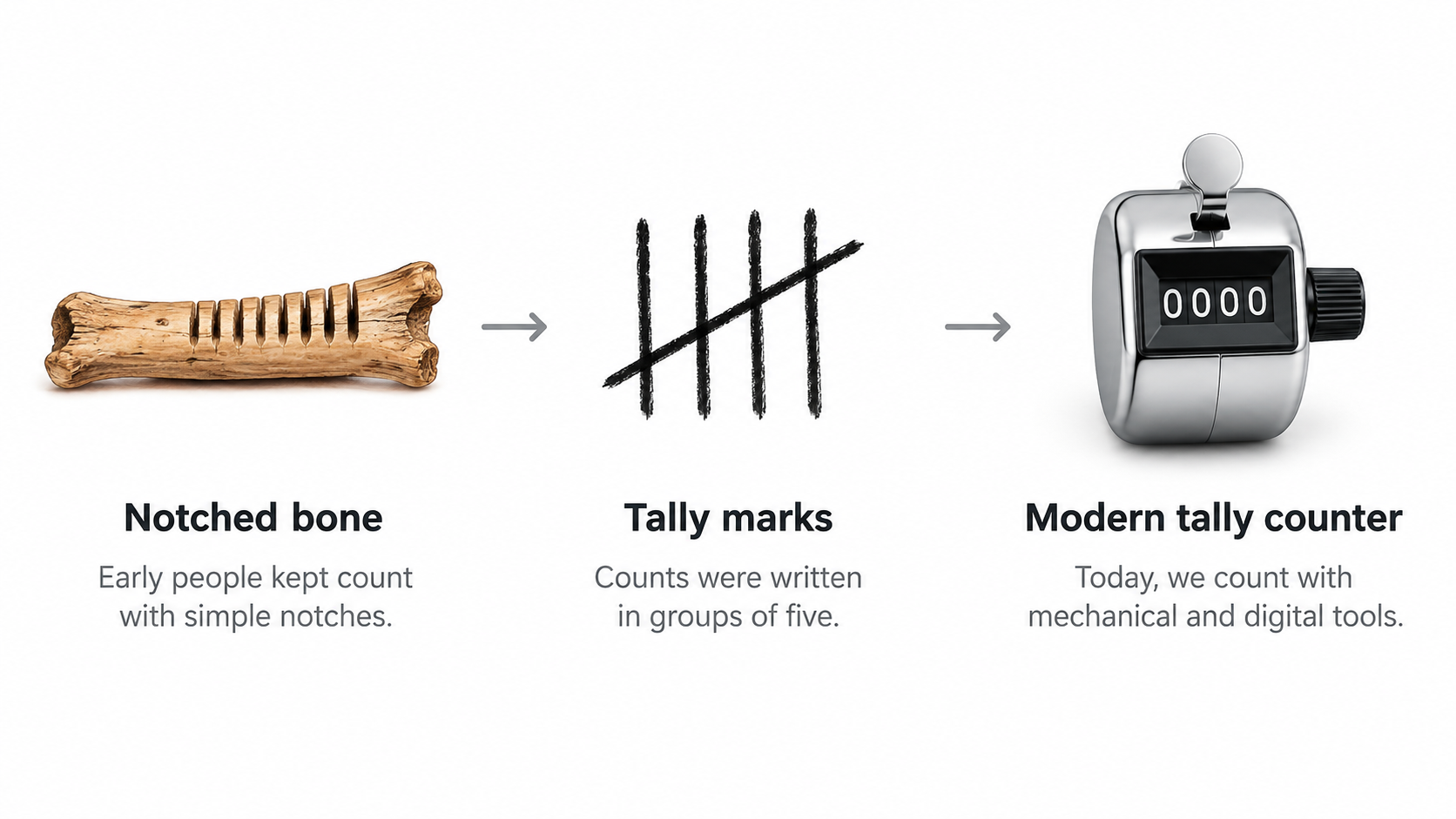
    The tally counter is a recent form of an extremely old habit. According to Wikipedia’s overview of tally marks, the oldest tally sticks date to between 35,000 and 25,000 years ago, appearing as notched bones from the European Aurignacian and Gravettian periods and from Africa’s Late Stone Age. Counting by marks predates writing and has outlasted it in everyday use.

    From notched bones and tally marks to modern tally counters

    From Notched Bones to Unicode: A Brief Lineage

    The Wolf bone is one of the best-documented early examples. It was discovered in 1937 at Dolní Věstonice in Moravia, during excavations led by Karl Absolon, and is dated to the Aurignacian, roughly 30,000 years ago. The bone carries 55 marks that may be tally marks, and the head of an ivory Venus figurine was excavated nearby.

    The Ishango bone, found in the Ishango region of the present-day Democratic Republic of Congo, is dated to more than 20,000 years old. On discovery, it was thought to portray a series of prime numbers. As Peter Strom Rudman writes in How Mathematics Happened: The First 50,000 Years (2007, p. 64), “no attempt has been made to explain why a tally of something should exhibit multiples of two, prime numbers between 10 and 20, and some numbers that are almost multiples of 10.” Alexander Marshack examined the bone microscopically in 1971 and concluded it may represent a six-month lunar calendar.

    Calendar use also appears at Little Salt Spring, where artifacts suggest a tally system used for calendric purposes about 10,000 years ago. As Caleb Everett notes in Numbers and the Making of Us (2017, p. 33), “the antler ‘calendar’ at Little Salt Spring may represent one of the clearest cases of a Paleolithic tool used for tracking the lunar cycle.”

    Clustering into fives is the other long-running convention. Tally marks are typically grouped in fives for legibility — a pattern that also appears in Chinese-character tallying, where the character 正 is built from five strokes. The same source notes that the claimed advantage of five over ten for easy identification is marked as needing a citation, so the grouping convention is well attested while the explanation for it remains less firmly documented.

    The lineage reaches modern standards as well. Ken Lunde and Daisuke Miura submitted proposals to encode tally marks in the Unicode Standard in 2015 and again in 2016. Ultimately, the box tally and dot-and-dash tally characters were not accepted; only five ideographic tally marks and two Western tally digits were added to the Counting Rod Numerals block in Unicode version 11.0 in June 2018. Only the tally marks for 1 and 5 are encoded, with 2, 3, and 4 intended to be composed from sequences of the mark for 1.

    Name Collision: The ‘Tally’ Chrome Extension Is Not a Counter

    Searching for “tally” software turns up a tool that has nothing to do with counting objects. Tally — Claude token counter is a Chrome extension that tracks remaining Claude messages, splits chats, and moves conversations to other AI tools. It has 100,000 users and 2.4K ratings averaging 4.5 stars, with version 0.4.2 updated August 31, 2026. The developer states it is not affiliated with Anthropic.

    The shared word is the only connection. If you want a device or app that counts laps, reps, or people, this extension will not do it.

    Conclusion

    A tally counter is the same simple idea in four forms — a mechanical clicker, a digital counter, a phone or watch app, or a desktop tool — and the right choice depends on how long you count, where you count, and whether you need the data afterward. Start by confirming how long a single session will run and where you will count, then choose hardware or an app. If you buy a mechanical unit, verify the digit count (four is standard), the reset mechanism, and the housing material, and check the actual specs and per-unit price that marketplace listings often leave unstated.

    FAQ

    How do you use a tally counter?

    Hold the body in one hand with the button under your thumb, then press fully and release once per item. Full presses matter — half-pressing can skip or double a count. On mechanical models, the side knob resets to zero; digital units use a reset button, and apps use a tap or swipe. Keep your eyes on the target, not the display.

    How many digits does a standard hand tally counter have, and what happens when you reach 9,999?

    Most consumer handheld counters show four digits, covering 0 to 9,999 in a single cycle. Press once past 9,999 and the display rolls back to 0000 with no error and no warning, so the count simply restarts. For longer sessions, record a subtotal before rollover or use a digital counter or app with a higher ceiling.

    How do you reset a tally counter to zero?

    Mechanical counters reset by rotating the knob on the side of the housing until the wheels read zero. Digital models use a reset button, and some require a deliberate long press to prevent accidental clearing mid-count. Apps typically offer a tap-to-reset icon, a swipe gesture, or a reset control on a widget. Resetting is safe, though the knob is a part that wears down.

    What is the difference between a tally counter and tally marks?

    Tally marks are a notation system — written strokes, traditionally grouped in fives, used to record a running total by hand. A tally counter is a physical or software device that advances a displayed number automatically with each press. Both track cumulative counts, but one relies on writing and the other on a mechanism.

    Is there a tally counter app for iPhone and Apple Watch?

    Yes. Tally Counter: Tap & Count supports iPhone, iPad, Apple Watch (watchOS 10.0 or later), and Macs with an Apple M1 chip or later, requiring iOS 17.0 or later. The listing shows United States pricing of $0.99 per week or $4.99 per year, with version 1.30 dated 7 September. Alternatives listed in the App Store include CountHub, Count Me, Countr, and Counter Widget 26 — or skip the install entirely with a browser-based tally counter.

    Why do some tally counters say “pitch counter” or “lap counter” instead of “tally counter”?

    These are the same type of device, named for the job rather than the mechanism. A pitch counter tracks pitches in baseball or softball and is usually a small one-handed unit. A lap counter tracks swimming or running laps and sometimes records segments. When buying, match the form factor to your activity — the underlying function is still one press, one count.

  • Social Media Character Limits in 2026: A Creator’s Guide to Getting Seen and Heard

    Social Media Character Limits in 2026: A Creator’s Guide to Getting Seen and Heard

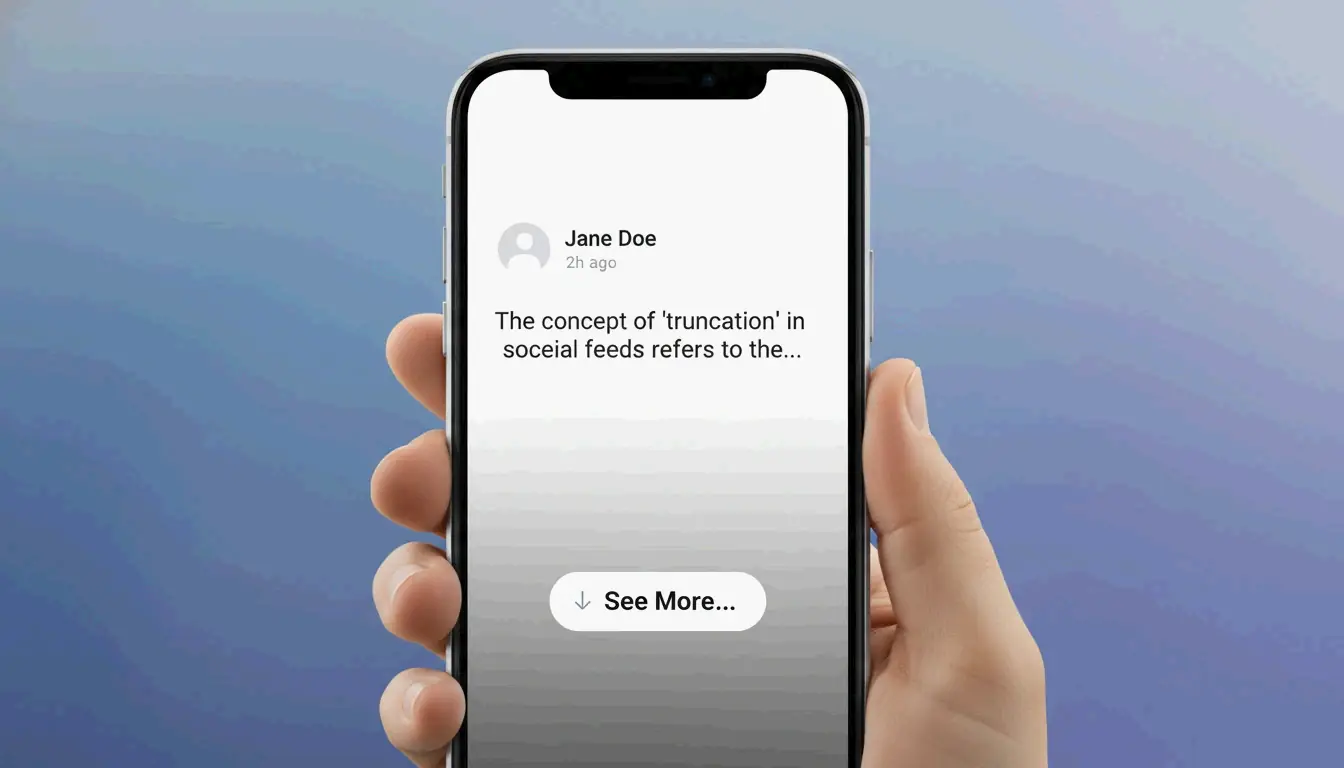
    You spend twenty minutes crafting the perfect post. You hit publish, pull up your phone to check how it looks, and your best line — the one that was supposed to make people click — is hidden behind a “See More” button. Sound familiar?

    As of 2026, social media character limits range from 280 on X (Twitter) to 63,206 on Facebook. But here is what really matters: Instagram captions truncate at just 125 characters, and LinkedIn cuts you off at 210. If your hook is buried past that point, most people will never see it. Think of it like packing for a trip — you can bring a massive suitcase, but if the most important items are stuffed at the bottom, you will never reach them when you need them.

    The 2026 Cheat Sheet: Where Your Posts Actually Get Cut Off

    The number that should keep you up at night is not the “maximum limit.” It is the truncation point — the exact spot where a platform hides your text behind a “See More” link. Research shows that most mobile users decide whether to keep reading in under two seconds. If your call-to-action or best insight is past that cutoff, it is essentially invisible.

    Here is the full picture for every major platform in 2026:

    Platform Max Character Limit What People Actually See (Truncation Point)
    X (Twitter) 280 (Free) / 25,000 (Premium) 280 characters (even Premium posts get cut with “Show More”)
    Instagram 2,200 ~125 characters
    LinkedIn 3,000 ~140-210 characters
    Facebook 63,206 ~477 on desktop, ~125 on mobile
    TikTok 4,000 ~100 characters
    Threads 500 (+10,000 for attachments) 500 characters (full main post visible)
    YouTube 5,000 (description) ~157 characters in search results

    Notice something? On most platforms, the visible window is shockingly small. That is not a bug — it is by design. Platforms want short, punchy content that keeps people scrolling. Your job is to make those first few characters count.

    The Pixel Problem: Why “W” Takes More Space Than “i”

    According to PickBlend, platforms often measure display space in pixels rather than raw character counts. A wide letter like “W” physically takes up more room than a skinny “i.” This means your actual visible text can vary depending on what words you choose. Research from TypeCount confirms that if your hook is not settled within those first 125 to 210 characters, readers are far more likely to keep scrolling past your post entirely.

    Finding Your Rhythm: Platform-by-Platform Strategies

    Knowing the limits is step one. Knowing how to work with them is where the magic happens. Each platform has its own personality, and the best creators adjust their approach like a musician tuning for different venues.

    X (Twitter): The Sprint

    X is still the land of the quick take. The 280-character limit for standard accounts keeps things fast. Even X Premium users who can write up to 25,000 characters still face truncation — those first 280 characters have to earn the click. As SocialRails notes, long posts get a “Show more” link, so the opening line remains your most valuable real estate.

    Data from WordCountChecker shows that X posts between 71 and 100 characters perform about 17% better than longer ones. That is the sweet spot — long enough to say something meaningful, short enough that nothing gets cut off.

    Facebook: Short Wins Big

    Here is a number that might surprise you: TypeCount reports that Facebook posts under 80 characters get a 66% engagement boost. Sixty-six percent. That is the difference between a post that fizzles and one that sparks a real conversation. Keep it brief, lead with your point, and save the backstory for the comments.

    LinkedIn: Where Depth is Rewarded

    LinkedIn is the exception to the “shorter is better” rule. Posts between 1,800 and 2,100 characters tend to see the most engagement because the professional audience values detailed insights and lived experience. This is your chance to share a real story — what you learned from a failure, how you solved a problem over months of effort, or the habit that changed your career trajectory. People come to LinkedIn to learn, not just scroll.

    TikTok: The 100-Character Window

    TikTok bumped caption limits to 4,000 characters to help its search engine categorize videos, but the visible portion in the feed is still only about 100 characters. Your caption needs to do two things: hook the viewer and include searchable keywords. Front-load the hook, then use the rest for SEO juice.

    The Threads Strategy: 10,000-Character Attachments

    Late 2025 brought a game-changer. Meta’s Threads introduced Long-form Attachments that hold up to 10,000 characters — without cluttering the main feed. According to WordCountChecker, these expandable sections let creators keep their posts clean while still offering deep dives for interested readers. Unlike X Premium, this feature is currently free for everyone, making it one of the best tools for organic growth in 2026.

    Think of it like a book cover and its first chapter. The 500-character post is your cover — it needs to be compelling enough to open. The attachment is the chapter — where you deliver real value.

    The Emoji and Link Traps: Hidden Character Costs

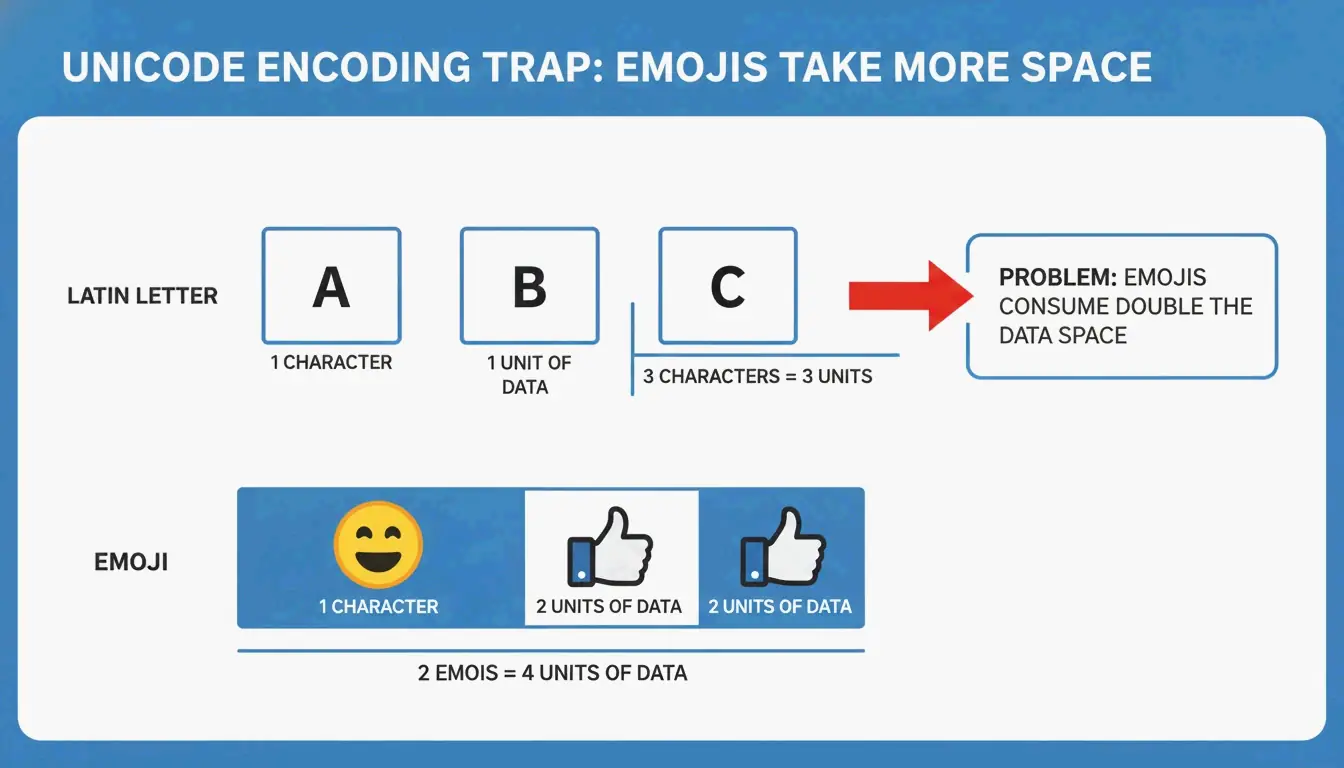
    Here is a detail that catches many people off guard. Most platforms use Unicode encoding, and emojis do not always count as one character. According to SocialRails, a single emoji is typically counted as 2 characters because it is a “double-width” character in the code. Add three emojis to your X post, and you have just lost six characters of your precious 280.

    The SMS world is even more dramatic. A standard text allows 160 characters using GSM-7 encoding. Add just one emoji, and the whole message switches to UCS-2 encoding, slashing your limit to just 70 characters. That is more than a 50% reduction from a single symbol.

    A simple comparison showing how an emoji consumes more space than a standard letter.

    How Links Affect Your Count

    On X (Twitter), every link counts as exactly 23 characters, regardless of how long the actual URL is. X automatically shortens links using its t.co service. On other platforms, long URLs eat into your visible text, so using a URL shortener is a smart habit to keep your posts looking clean and prevent truncation.

    Building the Habit: A Daily Workflow That Works

    The difference between creators who grow and those who stay stuck often comes down to one simple habit: checking their character count before they post. It takes less than ten seconds but saves you from publishing content where the best parts are invisible.

    Here is a practical routine you can start today:

    1. Write your hook first. Before you write anything else, craft the first 100-125 characters. That is your guaranteed visible space on most platforms.
    2. Use a real-time counter. A character counter that shows you exactly where each platform will cut off your text removes the guesswork entirely.
    3. Match your length to the platform. Under 80 characters for Facebook, 71-100 for X, 1,800-2,100 for LinkedIn. Treat these like guardrails, not suggestions.
    4. Test on mobile. Pull up your post on your phone before you hit publish. If the hook is hidden, rearrange.

    Consistency compounds. Do this every day for a month, and you will develop an intuitive feel for how long each post should be — no counter needed. That is the kind of small, daily practice that separates hobbyists from professionals.

    Conclusion

    Maximum character limits are bigger than ever in 2026, but the real battle is won in those first 125-200 characters. Your truncation point is the gatekeeper between your content and your audience. The creators who grow are not the ones who write the most — they are the ones who make every visible character count.

    Start with your hook, match your length to each platform’s personality, and build the daily habit of checking before you publish. It is a small investment that pays off with every single post.

    FAQ

    Do emojis count as one or two characters on social media in 2026?

    Most social platforms display emojis as 1 character in the user interface. However, from a technical standpoint, complex emojis (such as those with skin tones or family groups) use Unicode joiners and may count as 2 to 7 characters in backend limits or SEO metadata. For X (Twitter), a standard emoji typically counts as 2 characters.

    How does X (Twitter) count URLs toward the character limit?

    X automatically shortens every URL using its t.co service and counts it as exactly 23 characters, regardless of the actual URL length. This means even long tracking URLs will not consume your entire character allowance.

    What are the character limits for social media bios and profile names?

    As of 2026, X bios allow 160 characters, Instagram allows 150, LinkedIn provides a 2,600-character “About” section, and TikTok allows only 80 characters for bios. Keeping bios concise is essential to avoid truncation on mobile profile views.

    Why does my Instagram caption look cut off even though I am under the 2,200 limit?

    Instagram truncates captions at approximately 125 characters in the feed. Even though the maximum is 2,200, only the first 125 characters are visible before users see a “more” prompt. Your most important message needs to be in that opening window.

    Is there a free way to post longer content on Threads?

    Yes. Threads allows you to add Long-form Attachments holding up to 10,000 characters for free. These attachments do not clutter the main feed and give interested readers a way to dive deeper into your content.