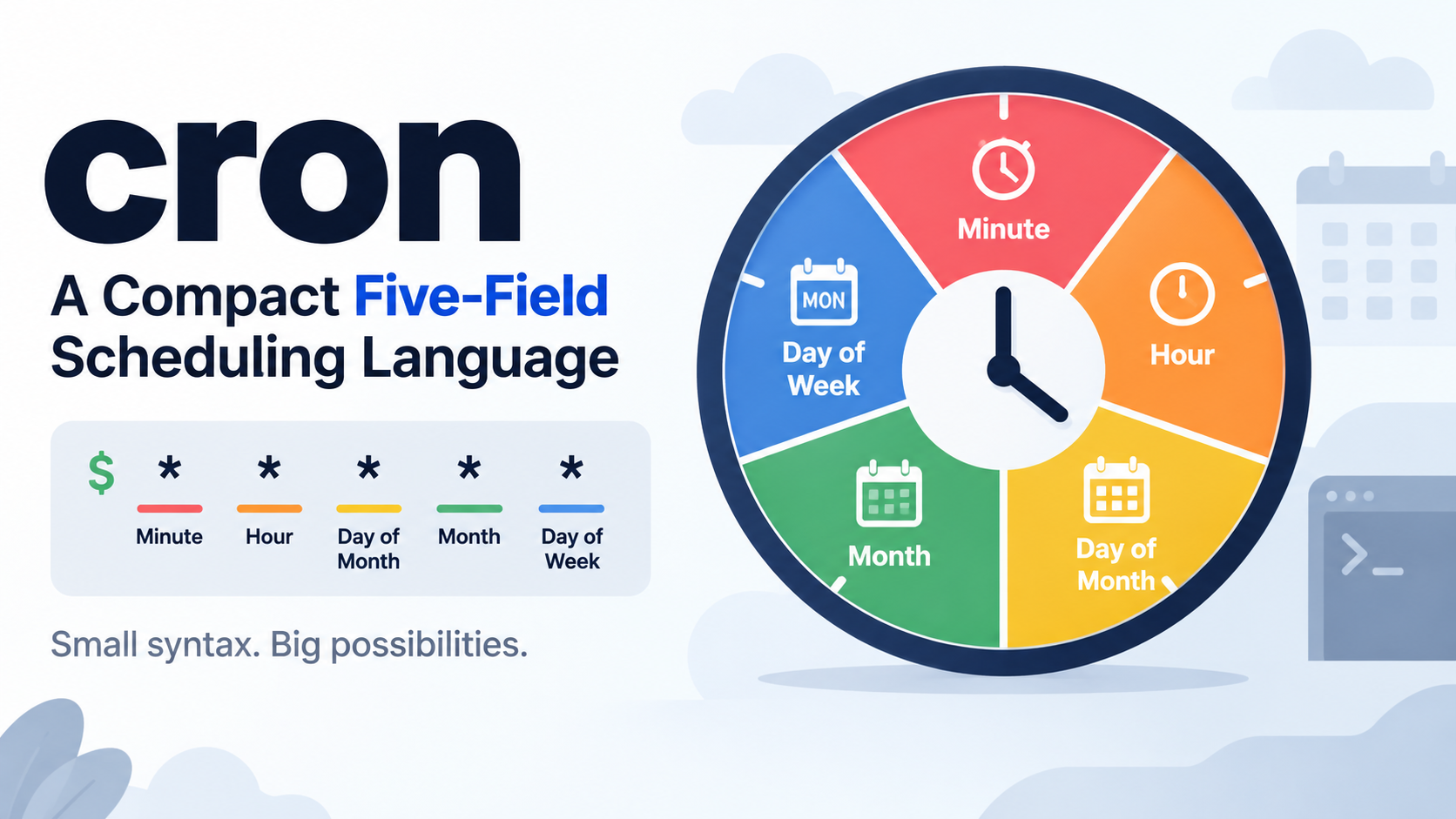
Cron expression syntax is built from five space-separated fields — minute, hour, day of month, month, and day of week — that tell a scheduler when to run a job. Each field can hold a value, list, range, step, or *, so 0 9 * * 1-5 runs at 09:00 every weekday.
What Is Cron Expression Syntax?
Cron expression syntax is the compact string format a scheduler uses to decide whether the current clock time matches a schedule. A cron expression describes a set of times, not a countdown. The scheduler compares the current minute, hour, day, month, and weekday against the expression; when every field matches, the command runs.
That difference matters: cron is not an interval timer. Writing */5 in the minute field does not mean “wait five minutes and then run again.” It means “match minute values 0, 5, 10, 15, 20, 25, 30, 35, 40, 45, 50, and 55.” Cron has no memory of the last run and does not measure elapsed time, so the expression is a pattern-matching rule, not a stopwatch. Wikipedia makes the same point plainly: cron is a mere pattern-matcher, not a frequency counter (Wikipedia).
A standard cron line has five time-and-date fields followed by the command to execute. The field order never changes: minute, hour, day of month, month, day of week. System crontabs add a sixth column for the user, and some non-Unix schedulers put seconds first or a year last, but the traditional five-field form is still the baseline. This article focuses on writing the expression correctly. Execution failures, permissions, logging, and notifications are separate operational concerns that come into play only after the schedule itself is right.
Anatomy of 0 9 * * 1-5: every token, decoded
The expression 0 9 * * 1-5 breaks down from left to right. The first field, 0, means minute zero. The second field, 9, means the ninth hour on a 24-hour clock, or 09:00. The third field, *, means every day of the month. The fourth field, *, means every month. The fifth field, 1-5, means Monday through Friday, assuming Sunday is 0 or 7 in the dialect being used. The job fires at 09:00 on weekdays only. In a system crontab, a user column would sit between the fifth field and the command, which is one reason copy-pasting crontab lines between files can shift the meaning.
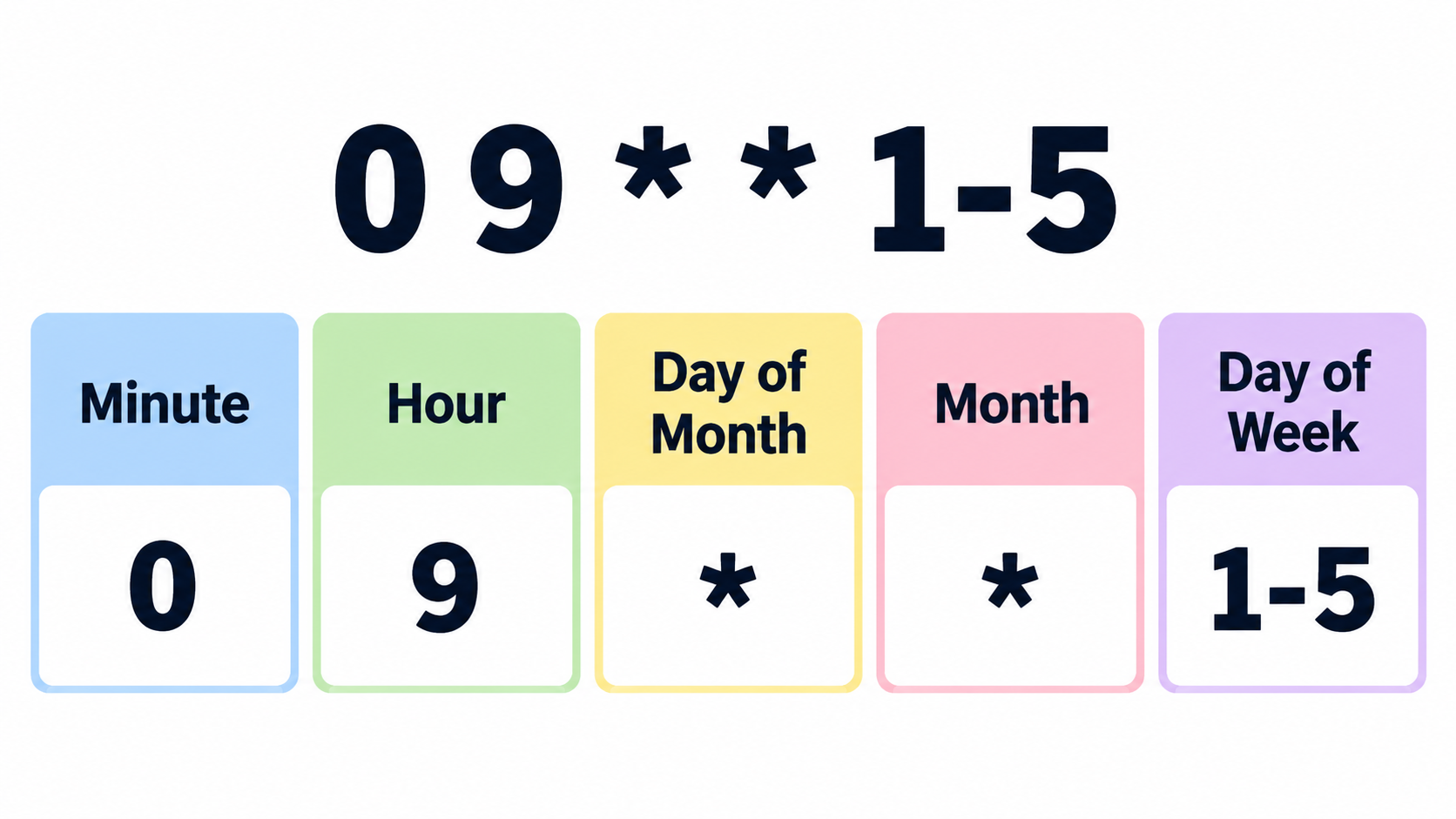
The Five Fields: Minute, Hour, Day of Month, Month, Day of Week
The five fields are the core reference for cron expression syntax. Each field accepts a limited set of values, and some also accept three-letter names.
| Position | Field | Allowed values | Name aliases | Notes |
|---|---|---|---|---|
| 1 | Minute | 0–59 | None | Smallest unit in standard cron |
| 2 | Hour | 0–23 | None | 24-hour clock, no AM/PM |
| 3 | Day of month | 1–31 | None | Some dialects add ?, L, W |
| 4 | Month | 1–12 | JAN–DEC |
Names may not be supported everywhere |
| 5 | Day of week | 0–7 or SUN–SAT |
SUN–SAT |
Sunday numbering varies by dialect |
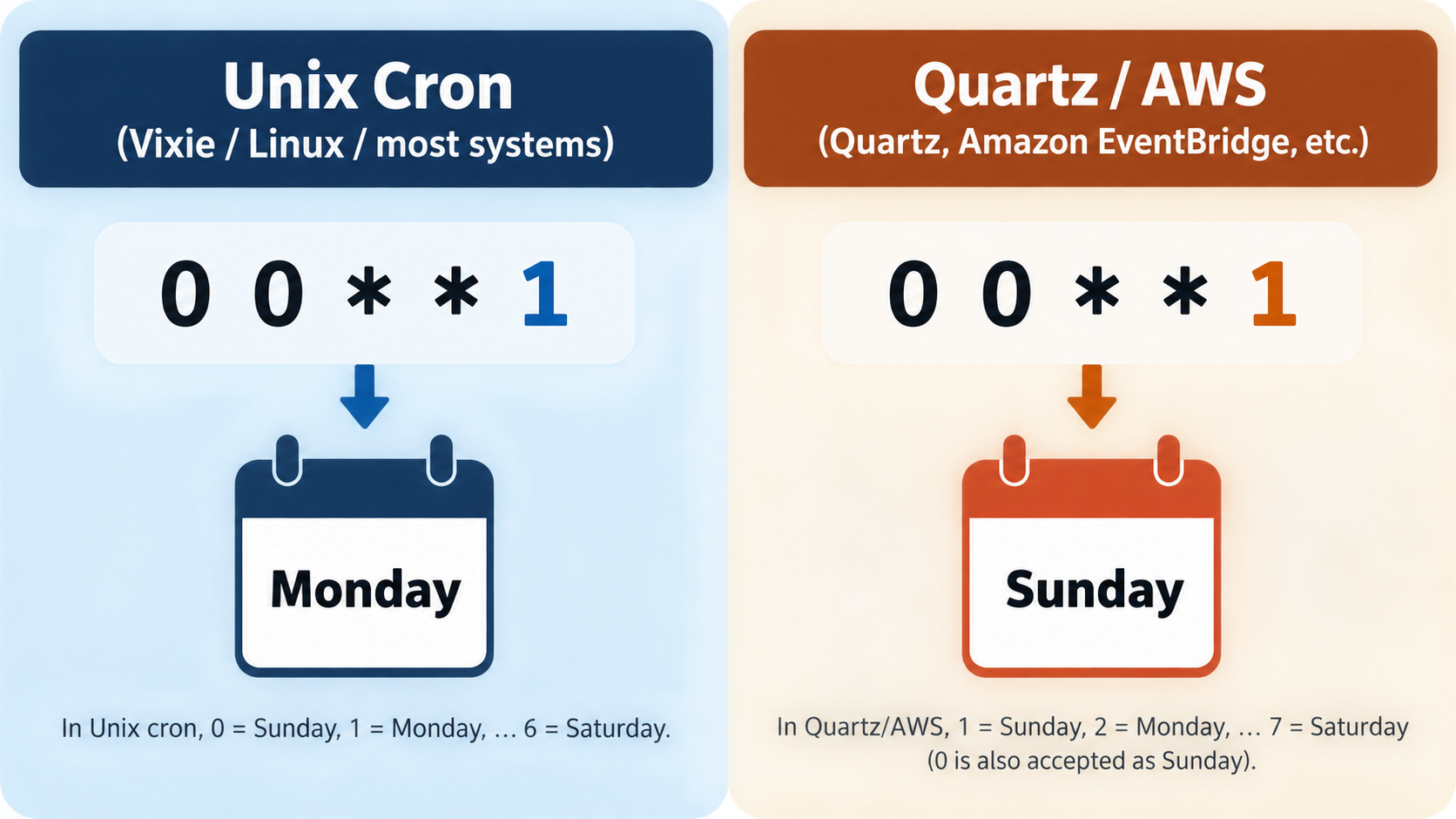
In standard Unix cron, both 0 and 7 mean Sunday, while 1 through 6 mean Monday through Saturday. That convention is not universal. Quartz, AWS EventBridge, Cloudflare, and some other dialects use 1 for Sunday. A copied expression can still parse but run on a different day.
Cron has no concept of a default value. You cannot leave a field blank, and a blank field does not inherit a fallback. The wildcard * is how you say “every value in this field.” Quartz-style schedulers add ? to mean “no specific value,” which helps avoid the day-of-month and day-of-week conflict described later. That difference is often the first sign that a five-field expression is being read by a six-field parser.
Field-order mistakes are costly because they usually produce a valid expression instead of an error. Swap the month and day-of-month fields, and a monthly job can become a daily job on the wrong date. Swap the hour and day-of-month fields, and a 09:00 task can become one that runs on the ninth day of each month. The scheduler does not warn you. It just matches a different pattern.
Value ranges, name aliases, and the values each field rejects
Each field rejects values outside its range, but when that happens varies. Standard cron usually rejects an out-of-range number when the crontab is loaded, while some managed schedulers validate only after deployment. Month names such as JAN and DEC, and weekday names such as MON and SUN, are accepted by many Vixie-derived implementations and are case-insensitive. They are not part of the portable baseline. Vercel’s documentation says Vercel cron jobs do not support alternative expressions like MON, SUN, JAN, or DEC (Vercel, last updated September 16, 2026).
Day-of-week aliases are also where Sunday numbering becomes visible. Cloudflare Workers documentation lists weekdays as 1-7 with case-insensitive three-letter abbreviations such as MON and fri (Cloudflare, last updated September 4, 2026). Quartz and AWS EventBridge also start the week at 1 for Sunday. Unix crontab, Kubernetes CronJob, Jenkins, GitHub Actions, and Spring accept 0 for Sunday and usually also accept 7. A name alias is safer than a bare number when the dialect supports it, but not when the platform rejects aliases entirely.
Field-order mistakes that silently shift your schedule
A field-order mistake rarely causes a syntax error. It causes a different schedule. 0 0 1 * * means midnight on the first day of every month. Reorder it to 0 0 * 1 *, and it means midnight every day in January. The scheduler has no way to know which one you intended.
Two habits prevent most of these errors. First, read the expression aloud with the word “of” between fields, in this order: minute, hour, day of month, month, day of week. Second, check the plain-English translation in a cron expression parser before deploying. A parser that shows the next run times catches a shifted field immediately, because the next-run list no longer matches the cadence you wanted.
The Four Operators: * , – / and How They Combine
Four characters do nearly all the work in standard cron expression syntax: *, ,, -, and /. The asterisk means every allowed value. The comma builds a list. The hyphen defines an inclusive range. The slash defines a step.
Combinations are where the compact syntax becomes powerful. 1-30/5 applies a step of five to the range 1 through 30, producing 1, 6, 11, 16, 21, 26. 0,15,30,45 in the minute field equals */15 in that same field, because both select minutes 0, 15, 30, and 45. 5/15 starts at 5 and steps by 15 through the rest of the field, producing 5, 20, 35, 50. The slash does not create a timer. It selects points from the allowed values.
The highest-frequency standard schedule, * * * * *, runs every minute. According to JasperBernaers.com, that is 1,440 runs per day and 10,080 runs per week. Those numbers are a useful sanity check before deploying anything that runs every minute. A job that sometimes takes longer than sixty seconds can overlap with itself, which is why high-frequency schedules often need a lock or a concurrency policy.
Steps are not intervals: why */7 is not “every 7 minutes”
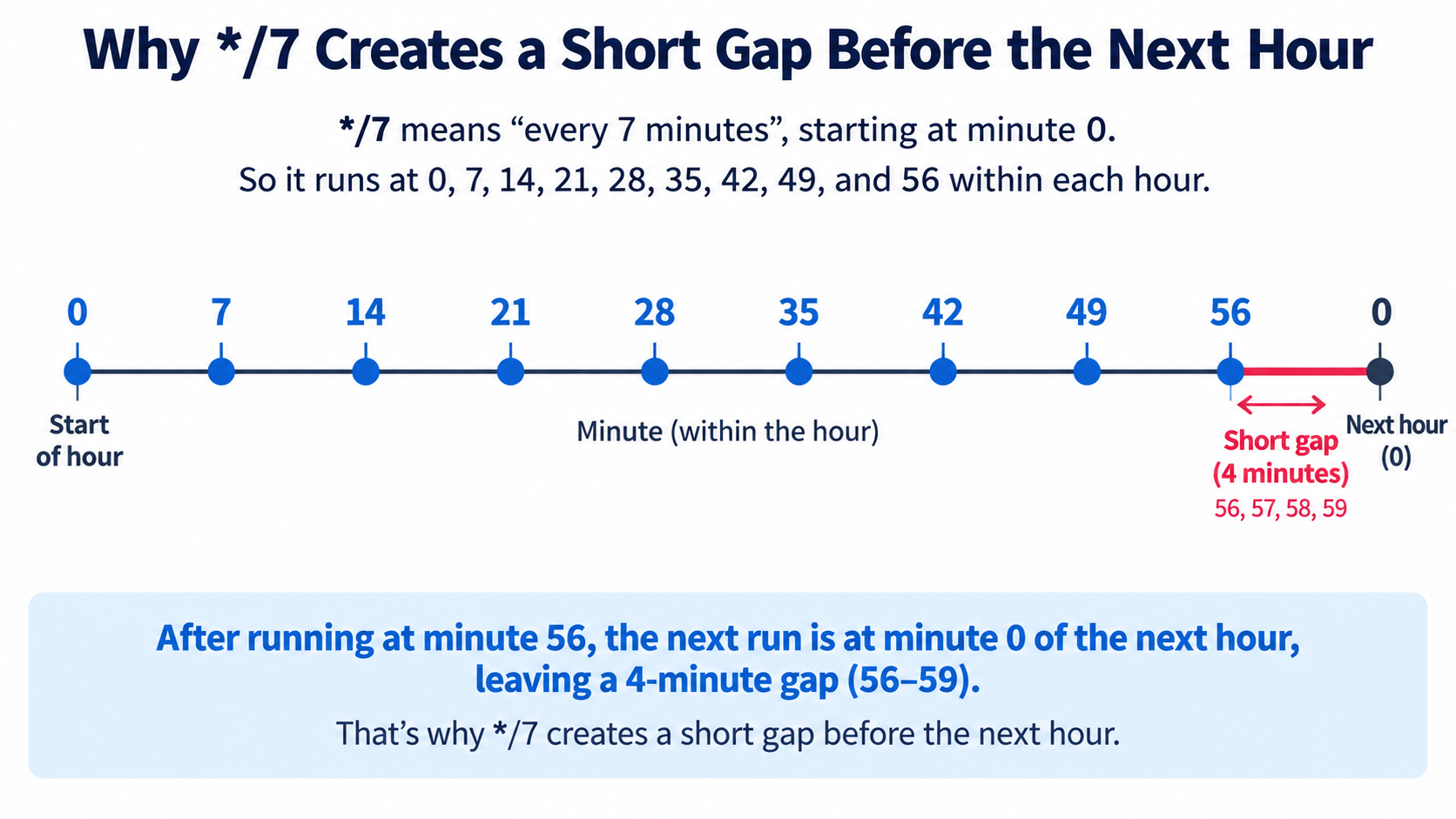
The step operator is the most common source of false expectations. */7 in the minute field selects minutes 0, 7, 14, 21, 28, 35, 42, 49, and 56. The next run after minute 56 is minute 0 of the following hour, only four minutes later. JasperBernaers.com documents this short-gap behavior: any step that does not evenly divide the field range produces an inconsistent final interval. Minutes divide evenly by 2, 3, 4, 5, 6, 10, 12, 15, 20, and 30. A step of 7 does not divide 60 evenly, so every hour has a short gap. If you need a true seven-minute cadence, standard cron cannot express it; you need a scheduler with second-level precision or an application-level loop.
Which Cron Syntax Are You Actually Writing? A Dialect Matrix
“Cron” is not one language. Before writing an expression, identify the scheduler. The same string can be valid, invalid, or valid with a different meaning depending on the platform.
| Platform | Fields | Seconds | Sunday | ? |
L / W / # |
Time zone default |
|---|---|---|---|---|---|---|
| Unix / Vixie crontab | 5 | No | 0 or 7 | No | No | Host local or TZ= |
| Kubernetes CronJob | 5 | No | 0 or 7 | No | No | UTC unless spec.timeZone set |
| Quartz | 6 or 7 | First | 1 | Required in one day field | Yes | JVM default unless set |
Spring @Scheduled |
6 | First | 0 or 7 | Allowed | No | JVM default unless set |
| AWS EventBridge | 6 | No; year last | 1 | Required | Yes | UTC |
| Azure NCRONTAB | 6 | First | 0 | No | No | Service configuration |
| Cloudflare Workers | 5 | No | 1–7 | No | Yes | UTC |
| Jenkins | 5 | No | 0 or 7 | No | No; has H |
Controller time zone |
| GitHub Actions | 5 | No | 0 or 7 | No | No | UTC |
| Vercel | 5 | No | 0–6 | No | No | UTC |
The practical rule is to treat Linux/Vixie five-field cron as the baseline, then check how the target platform deviates. The biggest deviation is Sunday numbering. In Quartz and AWS EventBridge, Sunday is 1 and Saturday is 7. Copying 0 0 * * 1 from a Linux crontab into Quartz does not fail; it changes the run from Monday to Sunday. On a managed platform, that mistake can run for months before anyone notices.
Is Sunday 0, 1, or 7 in your dialect?
Unix crontab, Kubernetes CronJob, Jenkins, GitHub Actions, and Spring treat Sunday as 0, and most also accept 7. Quartz, AWS EventBridge, and Cloudflare treat Sunday as 1. Azure NCRONTAB uses 0 for Sunday and rejects 7. So the safe answer is not a number at all: if the dialect supports names, use SUN, MON, and so on. If it does not, confirm the numbering from the platform documentation before deploying. Vercel is a notable case where names are not supported, so a numeric day-of-week value must be checked against Vercel’s own 0–6 range (Vercel).
The six-field, seconds-first family: Quartz, Spring, Azure NCRONTAB
Quartz is the clearest example of a different dialect. It is a Java scheduler that uses six or seven fields, with seconds first and an optional year last. Broadcom’s Scheduler documentation, which uses Quartz cron, describes special characters *, ?, #, and #-#, and states that the day of week starts at 1 for Sunday (Broadcom TechDocs, last updated September 17, 2026). Spring @Scheduled uses six fields with seconds first. Azure Functions NCRONTAB also uses six fields with seconds first. Pasting a five-field expression into any of these is not a harmless mistake: the parser either rejects it or shifts every value one position to the right, which can make a daily job run sixty times more often.
What changed recently: OCPS 1.0 (2025) and 2026 vendor documentation
In 2025, the Open Cron Pattern Specification published OCPS 1.0, a formal specification of the Vixie cron dialect that codifies the five-field pattern and rules for previously ambiguous edge cases (Wikipedia). The specification is designed as a backward-compatible superset, with future versions planned to add predefined schedules, second-level precision, and advanced calendar modifiers. Its current role is clarification, not replacement. OCPS is a specification effort, not a runtime that a scheduler automatically follows. Platform behavior still comes from each vendor’s documentation.
That is why vendor documentation dates matter. Vercel’s cron jobs page was last updated September 16, 2026, and Cloudflare’s Cron Triggers page was last updated September 4, 2026. Broadcom’s Quartz-based Scheduler cron syntax page was last updated September 17, 2026. When a platform says Sunday is 1, or that names are unsupported, or that only one day field may be set, the current documentation is the authority for that platform.
Common Cron Schedules You Can Copy — and What They Actually Run
These are standard five-field schedules that work in Vixie-style cron and most managed schedulers that accept five fields. The “runs per cycle” column is the check that catches a misread.
| Expression | Meaning | Runs per cycle |
|---|---|---|
*/5 * * * * |
Every 5 minutes | 12 per hour |
0 0 * * * |
Every day at midnight | 1 per day |
0 9 * * 1-5 |
Weekdays at 09:00 | 5 per week |
0 0 1 * * |
First day of every month at midnight | 1 per month |
0 4 * * 0 |
Every Sunday at 04:00 | 1 per week |
0 0 1 1 * |
Once a year on January 1 | 1 per year |
A real operational schedule shows why spacing matters more than guessing. RE:NODE describes four ordered tasks for a game server: announce a restart at 04:40, save and back up at 04:50, restart at 05:00, and take a weekly locked backup on Sunday at 04:00. The ten-minute gap between the backup start and the restart is intentional. A panel “delay” is a wait time, not a completion check. A backup of a large world can take minutes to finish, so a restart scheduled sixty seconds after the backup begins can interrupt the archive. Two schedules ten minutes apart are easier to reason about than one schedule with a guessed delay.
Copying any of these schedules still requires a dialect check. A line containing 0 for Sunday is safe on Unix and Kubernetes but means something else in Quartz or AWS. A line containing a name alias is readable on Linux and unsupported on Vercel. The expression is portable only after the dialect is known.
Shorthand macros: @daily, @hourly, @weekly, @reboot — and where they don’t work
Some cron implementations support macros in place of the five fields. @yearly or @annually equals 0 0 1 1 *; @monthly equals 0 0 1 * *; @weekly equals 0 0 * * 0; @daily or @midnight equals 0 0 * * *; @hourly equals 0 * * * *. @reboot runs once when the daemon starts, which usually corresponds to a machine boot, and it has no five-field equivalent (Wikipedia).
Macros are convenient in a Linux crontab and unreliable in hosted schedulers. Kubernetes CronJobs work with five-field Vixie syntax and the @daily-style macros, but they do not support @reboot because a cluster has no single boot moment (JasperBernaers.com). GitHub Actions and AWS EventBridge do not support the macros in the same way. If portability matters, write the five fields out. They are longer by a few characters and they work in more places.
The Day-of-Month OR Day-of-Week Rule (The Most Expensive Misreading)
In standard Vixie cron, if both the day-of-month field and the day-of-week field are restricted — that is, neither contains * — the job runs when either field matches. The rule is OR, not AND. This is the most expensive misreading in cron expression syntax because it silently multiplies the number of runs.
The classic example is 0 0 13 * 5. Many people read it as “midnight on Friday the 13th.” In Vixie cron it means “midnight on every 13th, and also midnight on every Friday.” JasperBernaers.com estimates that produces about 60 runs a year rather than one or two. A monthly report written this way can start arriving weekly. A maintenance job written this way can run four or five times a month.
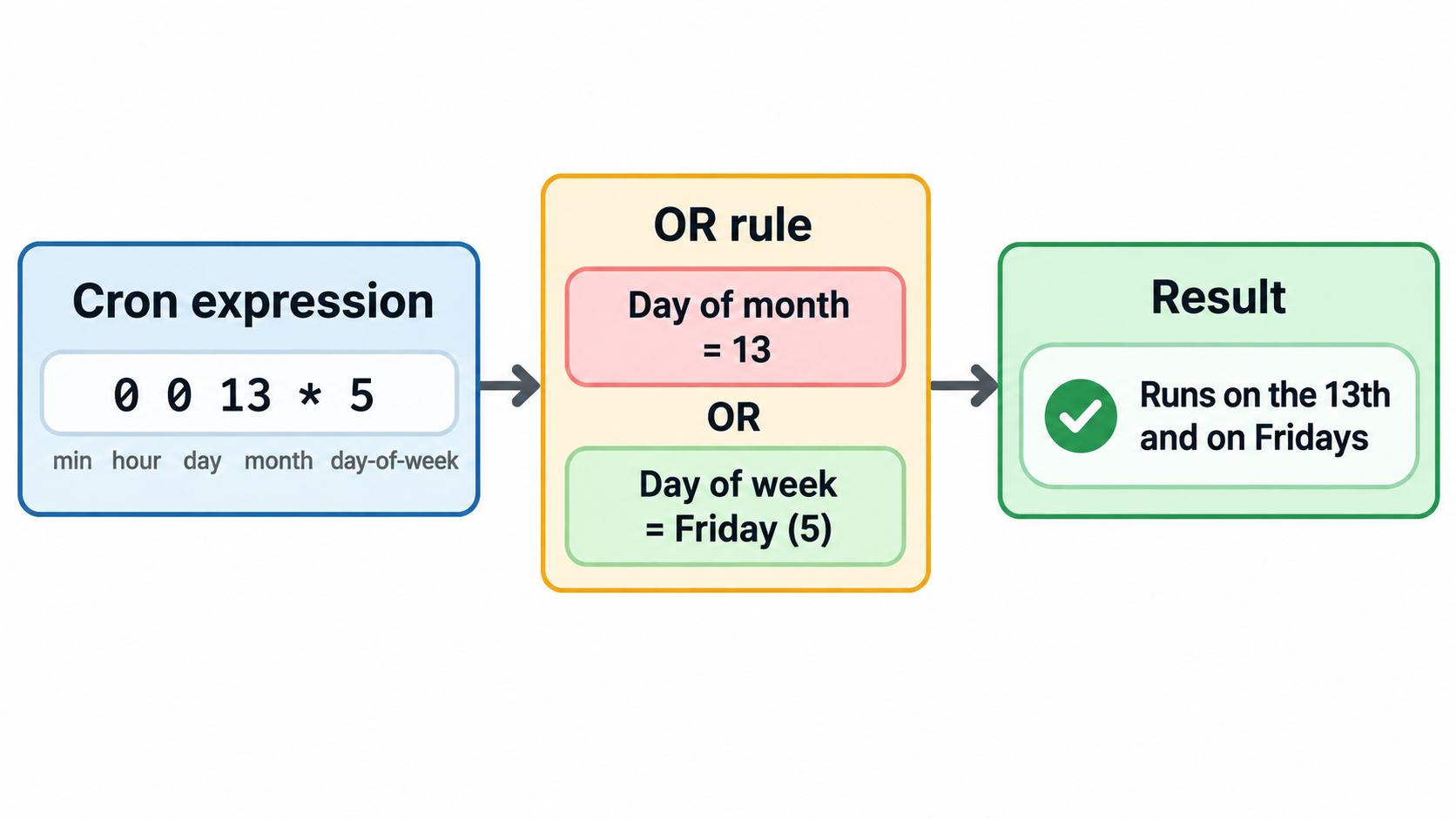
There is no way to express a true AND in standard five-field cron. The workaround is to leave one of the two day fields as * and test the exact condition inside the command. For example, schedule 0 0 13 * * and have the script check whether the day is Friday before proceeding. Some managed schedulers avoid the problem by disallowing both fields at once. Vercel’s documentation states that you cannot configure both day of the month and day of the week at the same time; when one has a value, the other must be * (Vercel). Quartz and AWS EventBridge require a ? in whichever day field is not being used, so only one day condition is ever active.
The self-check is simple: if both date fields are set to something other than *, stop and confirm that OR semantics are actually intended.
Schedules Five Fields Cannot Express: First Monday, Last Day, Friday the 13th
Some schedules look like cron problems but cannot be expressed in five fields. “The first Monday of the month,” “the last day of the month,” and “Friday the 13th” all require a cross-field condition. The first Monday needs a weekday plus a day-of-month range. The last day needs to know the length of the current month. Friday the 13th needs both day-of-month and day-of-week to be true at the same time, which standard cron cannot express because of the OR rule.
Quartz-style extensions add characters for some of these cases. L means last: in the day-of-month field it is the last day of the month, and after a weekday it is the last of that weekday. W means the nearest weekday to a given day, without crossing the month boundary. # followed by a number selects the nth weekday of the month. ? means “no specific value” and is used in one of the two day fields to keep the other active.
Availability is not universal. Quartz, AWS EventBridge, AWS Systems Manager, and Cloudflare support L, W, and # to varying degrees. Standard Linux cron does not. On Linux, the correct approach is to keep the five-field expression as a coarse filter and perform the exact date check inside the command. That also avoids the OR trap, because the expression no longer tries to encode a cross-field rule.
A common mistake on Linux is 0 9 1-7 * 1. It looks like “the first Monday of the month,” but because both day fields are restricted, Vixie cron reads it as “days 1 through 7, OR every Monday.” The job runs far more often than intended. The safer form is a daily or weekly coarse schedule plus a date test in the shell.
L, W, # and ? on Quartz, AWS and Cloudflare
Cloudflare Workers documentation supports five fields with Quartz-like extensions, including L and W in the day-of-month field and L and # in the weekday field (Cloudflare). Its examples include 0 18 * * 6L for 18:00 UTC on the last Friday of the month, and 59 23 LW * * for 23:59 UTC on the last weekday of the month. In Cloudflare’s weekday numbering, 1 is Sunday and 7 is Saturday.
AWS Systems Manager supports L, W, and # in its cron expressions, and its documentation gives cron(15 10 ? * 6L *) as 10:15 AM on the last Friday of every month and cron(0 2 L * ? *) as 02:00 AM on the last day of every month (AWS Systems Manager). The same documentation states that you cannot specify values in both the day-of-month and day-of-week fields; one of them must be ?. Quartz itself requires a ? in one of the two day fields, so only one day condition is active.
The Linux workaround: escaped % and a date test inside the command
On a standard Linux crontab, the workaround for “first Monday” or “last day” is to schedule a superset and filter inside the command. For a first Monday check, schedule the job every Monday at the desired hour and test whether the day of the month is 7 or earlier. For a last-day check, schedule it late in the month and test whether tomorrow is the first day of the next month. The shell expression must be written carefully because % has a special meaning in crontab files.
In a crontab command, an unescaped % turns into a newline, and everything after the first % is sent to the command as standard input. That is why date +%Y-%m-%d inside a crontab can behave incorrectly unless every percent sign is escaped as \%. The cleaner alternative is to put the logic in a script file and call the script from cron. The script runs under a normal shell, where % has no special meaning, and the crontab line stays short. If the command must stay inline, escape each % and test the expression with a parser or a manual run before trusting it.
Does Cron Use UTC or Local Time? Time Zones and DST
Cron schedules wall-clock time in the time zone of the host or service that runs it. The expression itself has no time-zone field. That means two servers with identical cron expressions can run the same job at different real-world moments if their system time zones differ. It also means a hosted scheduler that forces UTC will interpret 0 0 * * * as midnight UTC, which may be 19:00 or 20:00 in the user’s local time.
Several platforms force UTC. Vercel’s cron jobs always use UTC (Vercel). AWS EventBridge cron() rules are always UTC and offer no time-zone option. GitHub Actions scheduled workflows are always UTC. Kubernetes CronJobs default to UTC unless spec.timeZone is set, and that field only exists from Kubernetes 1.27 (JasperBernaers.com). Cloudflare Cron Triggers execute on UTC time (Cloudflare).
Daylight saving time adds two predictable failures. When clocks move forward, an hour disappears. A job scheduled inside that skipped hour does not run at all that day. When clocks move back, an hour repeats. A job scheduled inside that repeated hour runs twice, roughly an hour apart. In the United States, the affected local window is usually 01:00–03:00. A midnight reconciliation job may be safe from the skipped hour, but a job scheduled at 01:30 local can be skipped or duplicated depending on the direction of the clock change.
The skipped hour and the repeated hour
The spring-forward skip is silent. A job at 30 2 * * * simply has no matching wall-clock time on the transition day, so it does not run. No error is raised and no log line is guaranteed. The fall-back repeat is louder in its consequences. A billing run, an email send, or a counter increment that runs twice can produce duplicate charges or duplicate messages. The expression did not change; the clock did.
Mitigations: shift to 03:00, guard with a lock, or pin to UTC
Three practical mitigations reduce DST risk. The first is to move critical jobs outside the 01:00–03:00 local window, with 03:00 or later as a common target. The second is to make the job idempotent and guard it with a lock file so a repeated run does nothing harmful. The third is to schedule in UTC semantics and accept that a “9 AM” job drifts by an hour relative to local office hours twice a year. For machine-facing batch work, UTC is often the more predictable choice. For user-facing notifications, local time may still be worth the complexity, but the schedule should be reviewed against the DST calendar.
crontab -e: Where the Expression Actually Lives
The expression itself is only half of a working cron job. On Linux and Unix-like systems, the expression lives in a crontab file. User crontabs are edited with crontab -e and listed with crontab -l. System crontabs live in /etc/crontab or /etc/cron.d and are managed by system administrators. The behavioral history behind these files is long: cron dates to May 1975, Vixie cron was written in 1987, Vixie cron 4.1 was renamed ISC Cron in January 2004, Red Hat forked it to cronie in 2007, and anacron 2.3 was merged into cronie in 2009 (Wikipedia). Those names matter because “cron” behavior on a modern Linux distribution often comes from a Vixie-derived implementation plus later patches.
Cron’s environment is not the same as an interactive shell. The PATH is usually minimal, often /usr/bin:/bin, and shell profile files are not read. A command that works when typed into a terminal may fail with “command not found” under cron. Use absolute paths for binaries and scripts, or set a PATH= line at the top of the crontab. Output is another common silent failure point. Cron may try to mail stdout and stderr to the crontab owner, and if no mail system is configured, that output disappears. Redirect output explicitly with >> /var/log/job.log 2>&1.
To test the environment cron will use, run the command through env -i /bin/sh -c '...'. That reproduces the stripped environment and catches missing variables, relative paths, and profile-dependent assumptions. Plain cron also does not catch up on runs missed while the machine was off. If the machine was asleep or powered down when the scheduled minute passed, that run never happens. Anacron and systemd timers with Persistent=true exist to cover that gap, but they are not the same as standard cron.
System crontab’s extra user column
System crontabs add a user field before the command. A line in /etc/crontab or /etc/cron.d has six columns: five time-and-date fields, the user to run as, and the command. User crontabs do not have that column. Copying a five-field user crontab line into a system crontab shifts the command into the user field and can make the line fail or run as the wrong user. The reverse mistake is just as common: copying a six-column system line into crontab -e makes cron treat the username as the start of the command.
Before You Deploy: A Sanity-Check Checklist
A cron expression that parses is not necessarily a cron expression that does what you meant. Deployment checks should verify the next run time, the time zone, the overlap behavior, and the missed-run policy.
First, confirm the dialect and the forced time zone. A five-field expression in a six-field scheduler is either rejected or shifted. A UTC platform changes what “9 AM” means. Second, parse the expression and inspect the next several run times rather than only checking that the parser accepts it. Tools such as crontab guru and an online cron parser can show the next fire times, which is where field-order errors and */7 short gaps become visible. Third, check both day fields. If day-of-month and day-of-week are both restricted, confirm that OR behavior is intended. Fourth, decide whether the job can overlap and protect it if it can.
Verify per platform: runnable commands
Different platforms have different verification paths.
- Linux crontab: test the command environment with
env -i /bin/sh -c '/path/to/job.sh'. This catches missingPATHentries and profile dependencies. - systemd timer: run
systemd-analyze calendar 'OnCalendar=...'to print the next elapse time before enabling the timer. - Kubernetes CronJob: run
kubectl create job --from=cronjob/<name> manual-run-1to start the job immediately without waiting for the schedule. - Cloudflare Workers: use
wrangler devand call the local scheduled route at/cdn-cgi/local/scheduledto test the handler. The documentation showscurl "http://localhost:8787/cdn-cgi/local/scheduled"and supports a?cron=parameter to simulate a pattern (Cloudflare). - Parser check: crontab guru or cron-parser can translate the expression and list upcoming runs. Verify the next run time, not just whether the expression parses.
Stop overlapping runs and spread load: flock, Jenkins H, RandomizedDelaySec
If a job can take longer than its interval, prevent overlapping runs. On Linux, wrap the command in flock -n /tmp/job.lock, which exits immediately if the lock is already held. On Kubernetes, set concurrencyPolicy: Forbid on the CronJob so a new run does not start while the previous one is still active. In application code, an advisory lock or a lock file can do the same job.
High-frequency schedules also create load spikes when many jobs fire at the same minute. Jenkins uses H to substitute a hashed value, so each job runs at an unspecified but invariant time within the hour instead of all jobs starting at minute 0 (Wikipedia). systemd timers use RandomizedDelaySec to jitter starts across a fleet. Both approaches spread load without changing the underlying cadence. For missed runs, remember that cron does not catch up. Anacron and systemd timers with Persistent=true do, but their catch-up timing differs, so the behavior should be documented alongside the schedule.
Two final checklist items belong at the top: confirm whether the platform is local time or UTC, and confirm whether both date fields are restricted. Those two checks prevent a large share of “the job ran at the wrong time” and “the job ran too often” incidents.
Kubernetes CronJobs and GitHub Actions: Same Syntax, Different Rules?
Kubernetes CronJobs and GitHub Actions scheduled workflows both accept five-field Vixie-style cron expressions, but the syntax is where the similarity ends. The differences are operational guarantees, not field definitions.
Kubernetes CronJob syntax matches crontab for the five fields and supports the @daily-style macros, but it does not support @reboot because a cluster has no single boot moment. The default time zone is UTC unless spec.timeZone is set. concurrencyPolicy controls whether a new run can start while the previous one is still active; Forbid prevents overlap. startingDeadlineSeconds controls how late a missed run may still start. If a CronJob misses too many schedules, the controller can give up on it, and the reason is recorded as an event. Those are runtime behaviors layered on top of the expression.
GitHub Actions scheduled workflows are best effort. They can be delayed by 5 to 30 minutes, especially at busy times such as the top of the hour. They run in UTC only. Intervals shorter than five minutes are not honored. A scheduled workflow is also disabled automatically after 60 days without repository activity (JasperBernaers.com). A correct expression therefore does not guarantee an on-time run. For jobs that must happen on time, trigger them from a system that guarantees delivery and use Actions as the runner rather than the scheduler.
Kubernetes CronJob: UTC default, concurrencyPolicy, startingDeadlineSeconds
The Kubernetes CronJob spec accepts the standard five fields. The default schedule interpretation is UTC, and spec.timeZone is only available from Kubernetes 1.27. concurrencyPolicy: Forbid is the built-in way to stop overlapping runs, which is often preferable to a lock file inside the container. startingDeadlineSeconds defines the window after the scheduled time in which a missed run may still start. If the controller misses too many schedules in a row, it stops creating jobs and records an event. The expression can be perfectly correct while the runtime still skips or delays a run.
GitHub Actions: best-effort timing, UTC only, disabled after 60 days
GitHub Actions scheduled workflows use five-field cron syntax, but they are explicitly best effort. Delays of 5 to 30 minutes are normal, and runs can be dropped at peak times. Schedules shorter than five minutes are not honored. The time zone is always UTC. Scheduled workflows are disabled after 60 days without repository activity, so a dormant repository can silently stop running its schedule. These are platform policies, not syntax errors.
Managed Schedulers Beyond Linux: Vercel, AWS, and systemd Timers
When moving from a Linux crontab to a managed scheduler, check three things before copying the expression: whether name aliases are supported, whether both day fields can be set, and whether the time zone is forced. Those three checks catch most migration failures.
Vercel uses five fields but does not support MON, SUN, JAN, or DEC. It does not allow both day-of-month and day-of-week to be configured; one must be *. It always uses UTC. Each invocation includes an x-vercel-cron-schedule header containing the cron expression that triggered it, which helps distinguish schedules when multiple cron jobs share the same path (Vercel).
AWS EventBridge uses six fields with a year field last, requires ? in one of the two day fields, treats Sunday as 1, and always uses UTC. AWS Systems Manager has two different cron modes. Maintenance windows require six fields and support the fastest rate of five minutes. Associations require five fields and must use an interval of at least 30 minutes; AWS states that associations cannot use cron or rate expressions shorter than that. Maintenance windows support L, W, and #, while associations also support # and L in their documentation examples (AWS Systems Manager).
systemd timers are the server-side alternative to cron. They use OnCalendar, support Persistent=true for catch-up, and support RandomizedDelaySec for jitter. systemd-analyze calendar verifies the schedule before the timer is enabled. The trade-off is real: a managed platform may give stronger delivery guarantees but removes some syntax freedom, while a server crontab keeps more syntax freedom but leaves overlap protection and catch-up behavior to the operator.
Vercel Cron Jobs: no name aliases, one day field, always UTC
Vercel supports five fields with minute, hour, day of month, month, and day of week. It does not support name aliases. It does not allow both day-of-month and day-of-week to be restricted. It always uses UTC. The invocation header x-vercel-cron-schedule tells the function which expression triggered it. Those constraints make Vercel simpler in one way — the OR trap cannot occur — and stricter in another: an expression copied from a Linux crontab that uses MON or JAN will not work.
AWS EventBridge and Systems Manager: six fields, ?, Sunday = 1
AWS EventBridge cron() expressions use six fields with a year at the end, require ? in exactly one of the day fields, and use Sunday as 1. They are always UTC. AWS Systems Manager maintenance windows require six fields and support a minimum rate of five minutes. Systems Manager associations require five fields and support a minimum interval of 30 minutes, and they do not currently support specifying months. Both AWS paths support advanced day syntax to different degrees, so the correct reference is the specific AWS service documentation, not a general cron guide.
systemd timers: OnCalendar, Persistent, RandomizedDelaySec
systemd timers use a different calendar syntax, not cron syntax. OnCalendar defines the schedule, Persistent=true runs a missed job after the machine comes back, and RandomizedDelaySec adds jitter so a fleet does not start every job at the same second. systemd-analyze calendar prints the next elapse time and is the verification step before enabling the timer. One semantic difference matters when migrating: cron treats day-of-month and day-of-week as an OR when both are restricted, while systemd treats them as an AND. A schedule that uses both fields can fire on fewer days as a timer than it did as a crontab line.
Conclusion
Cron expression syntax comes down to five fields and four operators, but the errors that cost real time usually come from outside the grammar. Sunday numbering changes between dialects, the day-of-month and day-of-week fields combine with OR semantics in Vixie cron, and time zones and daylight saving can skip or repeat a run without any syntax mistake. Before writing the first expression, identify the scheduler and the forced time zone. Before deploying, use a cron parser or a platform-specific command to verify the next run time, then protect the job with a lock or concurrency policy if it can overlap. The expression is only one part of a reliable schedule.
FAQ
Is Sunday 0 or 7 in a cron expression?
Unix, Kubernetes, Jenkins, GitHub Actions, and Spring accept 0 for Sunday, and most also accept 7. Quartz, AWS EventBridge, and Cloudflare use 1 for Sunday, where 0 is either invalid or means something different. The safe approach is to confirm the dialect before using a number, or use a name alias such as SUN when the platform supports it. Vercel does not support name aliases, so its numeric range must be checked directly.
Does cron use UTC or the local time zone?
The expression itself carries no time zone. Cron matches the wall-clock time of the host or service running it. Vercel, AWS EventBridge, GitHub Actions, and Kubernetes CronJobs default to UTC. A Linux crontab uses the server’s local time unless a TZ= line overrides it. If the job matters, confirm the time zone before converting local intentions into an expression, or deliberately schedule in UTC and accept the seasonal drift.
Why does my cron job run more often than I expected?
The most common cause is the day-of-month and day-of-week OR rule. When both fields are restricted, Vixie cron runs the job when either matches, so 0 0 13 * 5 fires on every 13th and every Friday. The second common cause is a step that does not divide its range, such as */7 in the minute field, which creates a short gap at the end of each hour. Also check for duplicate crontab entries or repeated deployments.
Can cron run a job every 30 seconds?
Standard five-field cron cannot. Its smallest unit is one minute, and there is no seconds field. Schedulers that support seconds use a six-field format with seconds first, including Quartz, Spring, and Azure NCRONTAB. On a plain Linux server, the usual workaround is a one-minute job that loops internally with sleep, or a systemd timer with OnUnitActiveSec. GitHub Actions does not honor intervals shorter than five minutes.
What does */5 * * * * mean, and what does 5 mean instead?
*/5 in the minute field selects minutes 0, 5, 10, 15, 20, 25, 30, 35, 40, 45, 50, and 55 — twelve runs per hour. A plain 5 selects only minute 5 of each hour — one run per hour. The difference is that */n steps through the allowed values rather than measuring an interval, so a step that does not divide 60 evenly produces an inconsistent final gap.
How do I schedule “the first Monday of the month” or “the last day of the month”?
Five-field cron cannot express those cross-field conditions directly. Quartz, AWS, and Cloudflare support # for the nth weekday and L for the last day. On Linux, schedule a coarse run and test the date inside the command, escaping % as \% if the crontab line uses date formatting. Avoid 0 9 1-7 * 1 on Vixie cron, because the OR rule makes it run on days 1–7 and every Monday, not only the first Monday.